
CI/CD SCA, SBOM & Secrets with GitHub Actions
Generate a CycloneDX SBOM and scan for hard-coded secrets in your GitHub Actions pipeline with the WASViking Sentinel. Enriches with OSV and CISA KEV, submits over HTTPS, fails the build on known-vulnerable dependencies or leaked credentials, and publishes to the GitHub Security tab.
This integration runs Software Composition Analysis (SCA) and a secrets scan inside your GitHub Actions runner. The WASViking® Sentinel reads your dependency manifests, builds a CycloneDX SBOM, enriches it with OSV and CISA KEV, scans the tree for hard-coded credentials, and fails the pipeline on known-vulnerable dependencies or leaked secrets before merge.
Unlike the DAST flow, there is no mTLS tunnel: the SBOM and secret matches are submitted over plain HTTPS REST with a bearer API Key. No source code leaves the runner, only the dependency graph (package names and versions) and redacted secret matches.
The setup has two halves, and the order matters: configure the
WASViking portal first (one API Key scoped to ci:scan,
sca:submit, and secrets:submit), then wire it into
GitHub Actions.
What this integration does
- Generates a CycloneDX 1.5 SBOM from your manifests (npm, pip, go, composer, Maven, gem, pub) on every push and pull request.
- Enriches components with OSV and CISA KEV (known exploited vulnerabilities).
- Scans the working tree for hard-coded secrets and submits redacted matches.
- Fails the build by severity with
--fail-on, blocking vulnerable releases before merge. - Emits SARIF 2.1.0 for GitHub Code Scanning, plus the raw CycloneDX JSON.
- Builds a consolidated software inventory per organization and detects drift between consecutive submissions.
- Provisions and tears down the agent per run, with no persistent credentials on the runner.
- Supports air-gapped mode for networks with no external egress.
How it works
- The runner downloads and installs the Sentinel agent using the API Key.
- The agent scans the project manifests and builds a CycloneDX SBOM.
- It enriches components against OSV and applies CISA KEV validation.
- It submits the SBOM (and any redacted secret matches) to the WASViking API over HTTPS REST.
- The API validates quota, registers the SBOM snapshot, detects component drift, and promotes findings.
- The agent writes the SARIF and JSON outputs, and the workflow uploads the SARIF to GitHub Code Scanning.
Access posture
- Only manifests and the dependency graph are read. No source code,
runner environment variables (beyond the keys you pass), or files
outside
.wasviking/are collected. - Raw secret values never leave the runner; only redacted matches are submitted.
- Submission is HTTPS REST with a bearer API Key (no mTLS tunnel).
--air-gappedguarantees zero external network egress (no OSV lookup, no submission).- Revoke access at any time by revoking the API Key in the portal.
Pre-requisites
| Requirement | Detail |
|---|---|
| WASViking plan | SBOM submissions enabled (Pro or higher). |
| Portal role | Admin or Manager, to issue API Keys. |
| GitHub repository | Permission to create Actions secrets and files under .github/. |
| Workflow permissions | contents: read and security-events: write (for the SARIF upload). |
| Project manifests | At least one supported lockfile: package-lock.json, yarn.lock, pnpm-lock.yaml, requirements.txt, Pipfile.lock, go.sum, composer.lock, pom.xml, Gemfile.lock, pubspec.lock. The lockfile must be committed to the repository. |
| Runner | GitHub-hosted (ubuntu-latest recommended) or self-hosted Linux x86_64. |
| Network egress | HTTPS to api.wasviking.com, api.osv.dev, and github.com on 443. No inbound is needed. |
Not on GitHub Actions? These gates run on any CI system where the
wasviking-sentinelbinary can execute. There is a worked example for Bitbucket Pipelines, and the vendor-neutral reference is wasviking-sentinel in CI/CD.
Step 1: Create an API Key for the pipeline (portal)
One API Key covers the whole flow: it downloads the agent installer and authenticates the SBOM and secrets submissions. No Sentinel agent token is involved in this integration.
Go to Settings → System Settings → API Keys and click + New Key.
| Field | Value |
|---|---|
| Label | Something identifiable, for example GitHub Actions SCA pipeline. Use one key per repository so you can revoke it without affecting other pipelines. |
| Scopes | Select ci:scan (Trigger scans from a CI/CD pipeline, also what authorizes the agent installer download), sca:submit (Send SBOMs from the Sentinel agent. OWASP A06), and secrets:submit (Send hard-coded credential matches from the Sentinel agent. OWASP A07). Add only what this pipeline needs. |
| Expiration | 90 days is a sensible default; rotate on that cadence. |
Save and copy the key once. You will paste it into GitHub in Step 2
as WASV_SCA_API_KEY. The same key carries all three scopes, so it
covers the agent install, the SBOM, and the secrets scan.
WASViking authenticates with the
Authorization: ApiKey <key>header, notBearer. You can review or adjust a key's scopes later with Edit; that keeps the same key value, so the pipeline keeps working without re-issuing the secret.
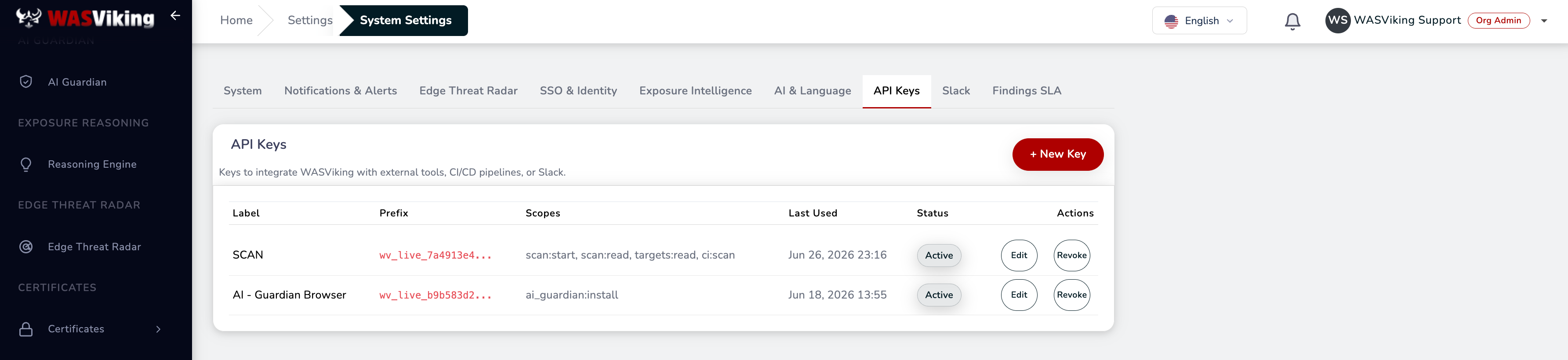 Settings → System Settings → API Keys.
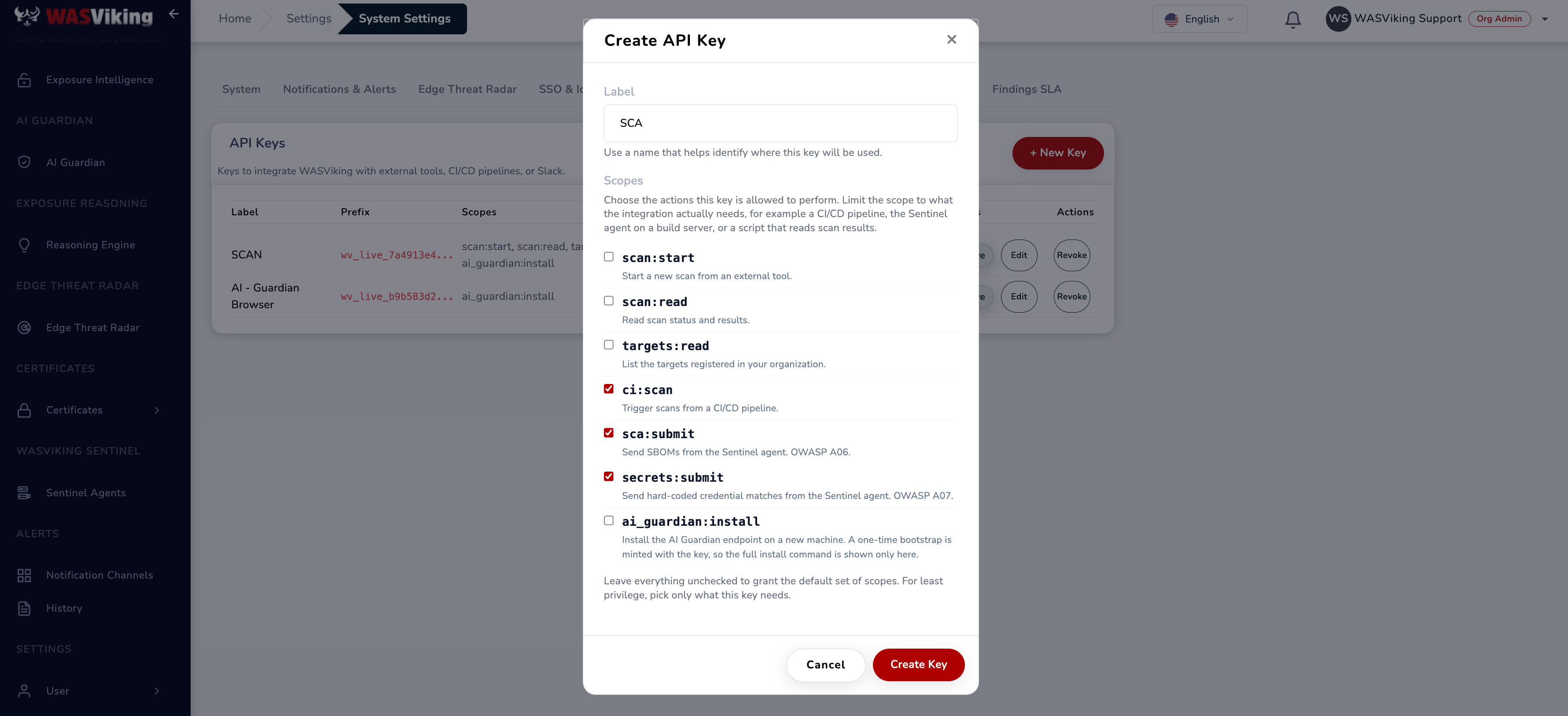 Select the pipeline scopes when creating the key.
Step 2: Add the GitHub secret
Never commit a key to the repository. Store it as an encrypted Actions secret.
In GitHub, go to the repository's Settings → Secrets and variables → Actions → Secrets and add:
| Name | Value |
|---|---|
WASV_SCA_API_KEY |
The API Key from Step 1 (carries ci:scan, sca:submit, and secrets:submit). |
Use Secrets (encrypted), never Variables, for the key. For multiple environments (staging, production), prefer Environment secrets with required reviewers and deployment protection rules.
Step 3: Add the workflow
Create .github/workflows/wasviking-sca.yml:
name: WASViking SCA

on:
  push:
    branches: [main]
  pull_request:
    branches: [main]

permissions:
  contents: read
  security-events: write
  actions: read

jobs:
  sca:
    runs-on: ubuntu-latest
    timeout-minutes: 25
    steps:
      - name: Checkout
        uses: actions/checkout@v4

      - name: Install WASViking Sentinel
        env:
          WASV_SCA_API_KEY: ${{ secrets.WASV_SCA_API_KEY }}
        run: |
          curl -fsSL -H "Authorization: ApiKey $WASV_SCA_API_KEY" \
            https://api.wasviking.com/api/v1/sentinel/install.sh | sh

      - name: Run WASViking SBOM (SCA)
        env:
          WASV_SCA_API_KEY: ${{ secrets.WASV_SCA_API_KEY }}
        run: |
          mkdir -p wasviking-reports
          ./.wasviking/wasviking-sentinel sbom \
            --api-key "$WASV_SCA_API_KEY" \
            --path . \
            --app-name "${{ github.repository }}" \
            --app-version "${{ github.sha }}" \
            --fail-on critical \
            --submit \
            --out ./wasviking-reports

      - name: Run WASViking secrets scan
        env:
          WASV_SCA_API_KEY: ${{ secrets.WASV_SCA_API_KEY }}
        run: |
          ./.wasviking/wasviking-sentinel secrets \
            --api-key "$WASV_SCA_API_KEY" \
            --path . \
            --fail-on high \
            --submit \
            --out ./wasviking-reports

      - name: Upload SARIF to GitHub code scanning
        if: always() && hashFiles('wasviking-reports/*.sarif') != ''
        uses: github/codeql-action/upload-sarif@v4
        with:
          sarif_file: wasviking-reports
          category: wasviking-sca

      - name: Upload SBOM artifacts
        if: always()
        uses: actions/upload-artifact@v4
        with:
          name: wasviking-sbom
          path: wasviking-reports/
Code Scanning upload (the SARIF step) requires GitHub Advanced Security on private repositories. If you do not have it, drop that step and rely on the uploaded artifact and the portal instead.
Step 4: Command flags
sbom (SCA / SBOM)
wasviking-sentinel sbom [flags]
| Flag | Required | Description |
|---|---|---|
--api-key |
Yes | API Key with the sca:submit scope. |
--path |
No | Directory scanned recursively for manifests. Default: current directory. |
--app-name |
No | Project name embedded in the CycloneDX metadata. Default: directory name. |
--app-version |
No | Project version in the metadata. Use ${{ github.sha }}. |
--fail-on |
No | Single threshold: critical, high, medium, low, or none. "Or above" logic. Default: high. |
--submit |
No | Submit the SBOM to WASViking. Omit for a local-only run. |
--out |
No | Output directory for the CycloneDX JSON and SARIF. Default: current directory. |
--air-gapped |
No | Fully offline. No OSV lookup and no submission. |
Outputs: wasviking-sbom.cdx.json (CycloneDX 1.5) and
wasviking-sbom.sarif (SARIF 2.1.0).
Without
--app-namethe project is named after the checkout directory. When that directory carries a build-location name (build,dist,target,vendorand similar), the agent uses the CI repository name instead, so the inventory does not fill up with entries called "build". An explicit--app-namealways wins, which is why the workflow above passes one.
secrets
wasviking-sentinel secrets [flags]
Scans the tree for hard-coded credentials and submits redacted
matches (raw secrets never leave the runner). Takes the same
--api-key (with secrets:submit), --path, --fail-on, --submit,
and --out flags. Results land in the portal under
Application Security → Hard-coded Secrets.
Exit codes
| Code | Meaning |
|---|---|
0 |
Success. Nothing at or above the --fail-on threshold. |
70 |
SCA gate: a KEV-flagged dependency at or above the threshold. Known exploited, treat as urgent. |
71 |
SCA gate: findings at or above the threshold, none of them in KEV. |
73 |
Secrets gate: a credential confirmed live by --verify. |
74 |
Secrets gate: matches at or above the threshold that were not verified. |
79 |
Coverage failure: the scan root could not be traversed, so nothing was scanned. Not returned for an empty project or one with no supported manifest. See Coverage failures. |
1 / 2 |
Operational error (unreadable manifest, rejected key, invalid argument). |
A failed OSV enrichment or a failed submission does not fail the build. Both warn, keep the artifacts on disk, and let the gate decide on what the run could see.
Fail-on policy
--fail-on sets the lowest severity that fails the build; everything
above it also fails.
| Setting | Behavior |
|---|---|
--fail-on none |
Never fails. Report only. |
--fail-on critical |
Fails on critical only. |
--fail-on high |
Fails on high and critical. A good default for PRs. |
--fail-on medium |
Fails on medium and above. Stricter, more friction. |
--fail-on low |
Maximum posture. Use on new projects with no accumulated debt. |
A practical rollout: start at high, then tighten to medium once your
dependency baseline is stable (typically a couple of sprints).
Air-gapped mode
Regulated environments (defense, government, classified healthcare) often forbid external egress. Run the SBOM fully offline:
wasviking-sentinel sbom \
  --path . \
  --air-gapped \
  --out ./wasviking-reports
--air-gapped skips the OSV lookup and the submission, using only the
bundled KEV data. Use it for classified networks with no egress, for
local validation before manually shipping an artifact, or for isolated
build farms.
What is and isn't collected
WASViking does not collect your repository source code, runner
environment variables beyond the keys you pass, runner filesystem
contents outside .wasviking/, or any production data. The SBOM holds
only the dependency graph (package names, versions, licenses, manifest
hashes); the secrets scan submits only redacted matches. Data is
processed in the US region, encrypted in transit (TLS 1.2+) and at rest
(AES-256), with retention set by your plan. A DPA and EU data residency
are available on request; see the
Trust Center for the full
compliance mapping (ISO 27001, SOC 2, LGPD, GDPR, NIST SSDF,
OWASP Top 10 A06/A07, OWASP DSOMM, CISA SBOM minimum elements).
Common problems
| Problem | Likely cause |
|---|---|
HTTP 401 Unauthorized |
API Key revoked, expired, or missing ci:scan / sca:submit / secrets:submit. WASViking uses Authorization: ApiKey <key>, not Bearer. |
HTTP 402 quota exceeded |
Monthly SBOM submission quota reached. Wait for the cycle, upgrade, or buy an add-on pack. |
HTTP 413 payload too large |
SBOM over 100 MiB (rare). Reduce with --no-osv or split the monorepo. |
manifest not detected |
None of the supported lockfiles found under --path. |
| OSV timeout | api.osv.dev slow or unreachable. Use --no-osv for a bare SBOM, or --air-gapped. |
| Findings differ between runs | Non-deterministic lockfile (for example, package-lock.json regenerated without npm ci). Always commit lockfiles. |
install.sh download error |
Network policy blocking api.wasviking.com or the release bucket. |
| Unexpected exit 70 on a small PR | A new transitive dependency arrived via the lockfile and matches CISA KEV. Inspect with npm ls <package> or the equivalent. |
Drift detected: yes every run |
Your dependency set really is changing on every run, usually a lockfile regenerated during the build. Install with npm ci or the equivalent and commit the lockfile. Drift compares components against the previous submission with the same --app-name and ignores --app-version. |
| Drift never reported | --app-name is not stable between runs, so each submission starts its own lineage with nothing to compare against. Derive it from the repository, not from the checkout path. |
Where this fits in the platform
- The software inventory lives under Inventory → SBOM; secret matches under Application Security → Hard-coded Secrets.
- The DAST counterpart is CI/CD DAST with GitHub Actions.
- The same two gates on Atlassian are CI/CD SCA, SBOM & Secrets with Bitbucket Pipelines.
- Prefer no pipeline change at all? Code Security runs the same SBOM and secrets engines server-side on the repositories you connect through the GitHub App or Bitbucket OAuth, on your plan cadence and on push; the pipeline gate stays the way to block a build.
- Alert routing is documented under Slack and Teams and Webhooks.