
Set up Code Security (SAST, SCA, secrets and SBOM)
Connect GitHub or Bitbucket once and let WASViking clone and assess the repositories you choose on its own, with SAST, dependency analysis, secret detection and SBOM generation, on your plan's cadence and on every push. No CI change and no agent to install.
Code Security is the pipeline-free way to assess your source code continuously. You connect your GitHub account (through the WASViking GitHub App) or your Bitbucket Cloud workspace (through OAuth), pick which repositories WASViking may read, and WASViking® takes it from there: it clones the default branch into a private, short-lived workspace, runs static application security testing (SAST), dependency analysis, secret detection and SBOM generation, and files the results in Findings, on the Code Security page and in your software inventory under the repository name.
Nothing changes in your CI. Nothing is installed on your side. The repository becomes an asset in your inventory, like a target. The capability itself is described in Code Security.
When to use which
| You want | Use |
|---|---|
| Block a merge or a release on a vulnerable dependency or a leaked secret | The pipeline gates (GitHub Actions, Bitbucket Pipelines) |
| Continuous coverage of every repository, including the ones without a pipeline, with SAST on the application source | Code Security (this page) |
| Both | Both. Results merge under the same repository name in Code Security, the inventory and Findings, so a repository covered by a gate and by a connection shows one lineage, one drift history and one set of findings. |
What WASViking does with a connected repository
- Clones the default branch (shallow by default; full history only when git-history secret scanning is on) into an isolated scratch area on a dedicated worker. Nothing from the repository is ever executed.
- Runs SAST on the application source: automated code discovery ranks the files that matter for security, the analysis reviews them and reports each weakness with the file and line, the route and parameter, why it is exploitable, an attack scenario and the fix. Every file with an open finding is reviewed again on each scan, and the remaining review budget rotates across the rest of the repository.
- Runs the SBOM engine: dependency manifests (npm, pip, go, composer, Maven, gem, pub) become a CycloneDX SBOM, enriched with OSV and CISA KEV, with drift detection against the previous scan of the same repository.
- Runs the secrets engine on the working tree, and on the git history when your plan includes it and you switch it on for that repository.
- Records the results under Application Security → Code Security (coverage, last run, components, open findings by severity, SAST findings, risk), Inventory → Software Bill of Materials, Application Security → Hard-coded Secrets and Findings (filter by repository), with the branch, commit and provider attached to every submission.
- Deletes the clone and every intermediate file at the end of the run, also when the run fails or times out. Only derived data stays: the findings with their evidence, the component list, vulnerability matches, redacted secret evidence and the run record.
Before you start
- A plan that includes Code Security (Pro and above; a partner or our team can enable it on other plans). Your Repositories tab under Account → Subscription shows the allowance and what is in use.
- An account role with the Connected Repositories capability (Admins and Managers edit, Analysts view).
- On GitHub: you must own the account or organization that owns the repositories. WASViking confirms that during the connect flow, so a member who is allowed to install the App but does not own the organization cannot complete the connection; ask an owner to finish it. On Bitbucket: access to the workspace and permission to add repository webhooks.
Step 1: connect the provider
- Open Settings → System Settings → Connected Repositories.
- Click Connect GitHub. You are sent to GitHub, choose the account, choose Only select repositories (recommended) and pick the ones WASViking may read. GitHub returns you to WASViking and the connection appears with the granted repositories. The App asks for Contents: read, Metadata: read and Members: read only. The last one is how WASViking confirms that whoever connects an organization owns it; it is never used to read a repository.
- Or click Connect Bitbucket. You are sent to Bitbucket, approve the WASViking consumer, and (if you belong to several workspaces) choose the workspace on return. The consumer asks for Account: read, Repositories: read and Webhooks: read and write.
Adding repositories later: edit the installation on GitHub (the list syncs on its own) or click Sync on the connection. Bitbucket lists every repository of the workspace you can read.
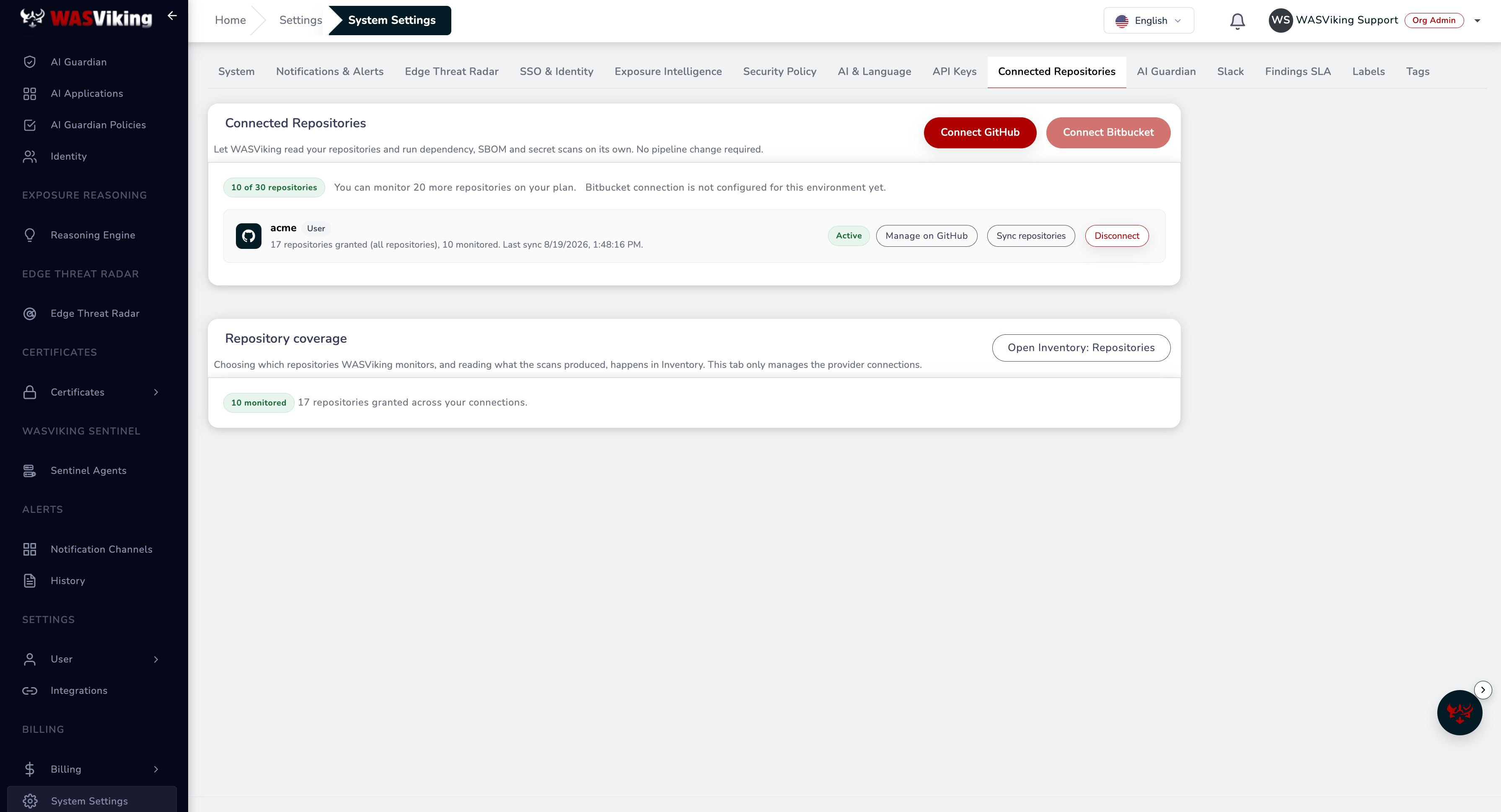 Settings → System Settings → Connected Repositories: the connection, what it granted, and where to sync or disconnect.
The connection card is the record of what you handed over: which account it belongs to, how many repositories the grant covers, how many of those you are monitoring, and when the list was last synced. Manage on GitHub takes you back to the installation to add or remove repositories, and Disconnect ends the access from our side and revokes the runner key.
Step 2: choose what to monitor
Open Application Security → Code Security. Every granted repository is listed; switch Monitored on for the ones WASViking should assess. Each monitored repository counts one unit against your plan allowance, whatever its size and however often it is scanned.
Git history: on plans that include it, switch it on per repository to run the secrets engine on the full history of the default branch as well. It is heavier (a full clone) so keep it for the repositories where leaked credentials in past commits matter.
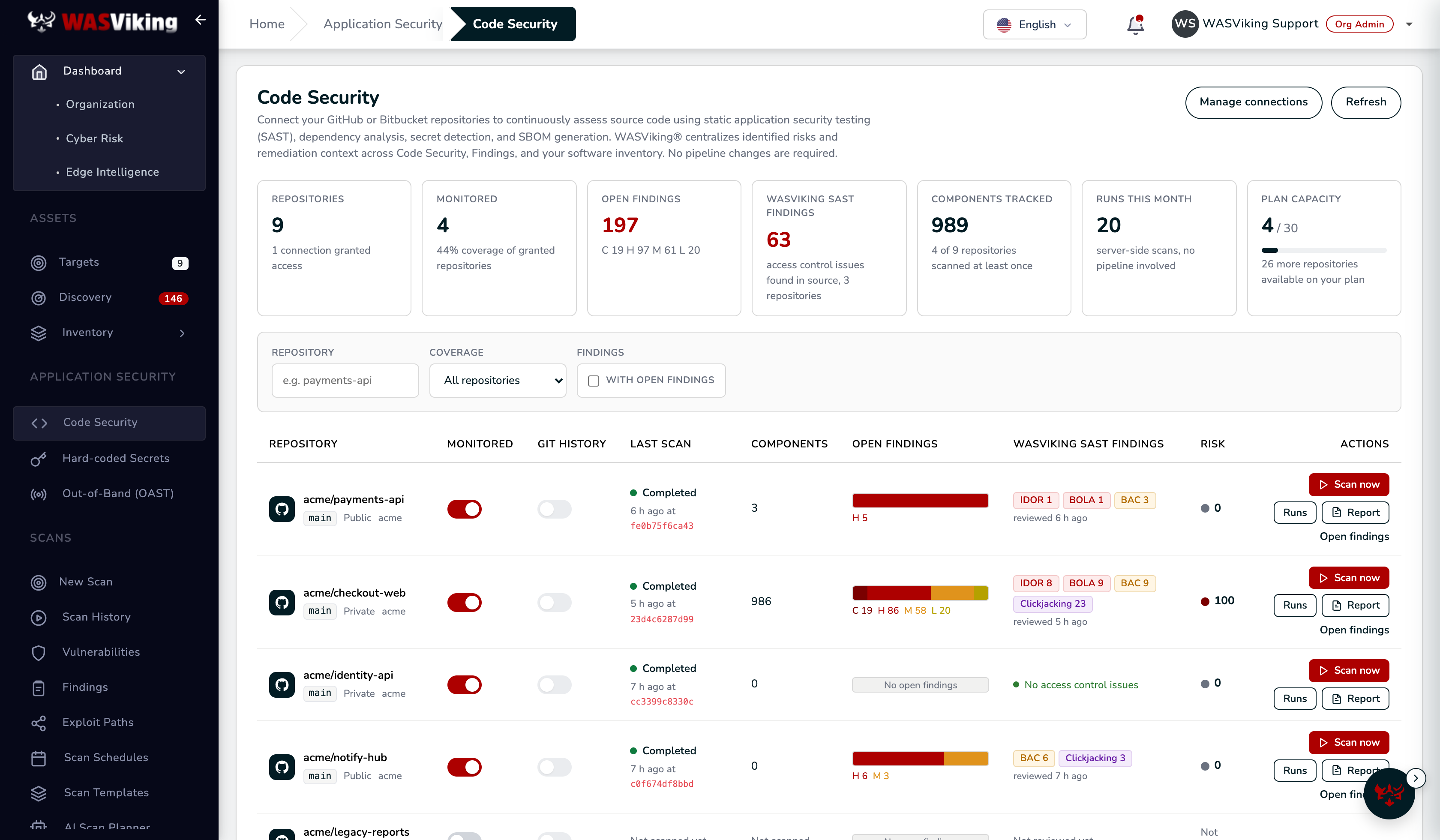 Application Security → Code Security: one row per repository, with the switches, the last scan and what it found.
The row is where you read the result without leaving the page: the commit that was scanned, how many components were catalogued, the open findings split by severity, the WASViking SAST Findings by weakness class with when the code was last reviewed, and the risk score. A Drift marker means the dependency set changed since the previous scan, and KEV means at least one finding is on the CISA catalogue of exploited vulnerabilities, which is the one to look at first. Open findings jumps to the Findings list already filtered by that repository.
The tiles at the top summarise the fleet: how many repositories the connections granted, how many you monitor, open findings across all of them, components tracked, SAST findings, runs this month, and how much of your plan allowance is in use.
Step 3: scan now, then let it run
- Scan now on a monitored repository queues a run immediately (one manual run per repository every 10 minutes). The row shows the run moving through Queued, Cloning, Scanning and Recording results, and the Runs panel keeps the history: trigger, branch, commit, duration, components, secret matches, SAST findings, findings promoted, and a plain reason when a run does not complete.
- On the plan cadence: every monitored repository is scanned at least once per interval (Pro every 24 hours, Business every 4 hours, custom on Enterprise), with your plan's number of runs at a time.
- On push: a push to the default branch triggers a scan right away when the interval since the last scan has elapsed; otherwise the push is remembered and the next scheduled slot picks it up, so a busy repository is never scanned more often than the plan cadence.
Server-side runs consume the same monthly SBOM and secrets submission allowances as the pipeline gates. When an allowance is used up the run records that reason and the next run retries after the reset.
What happens when access changes
- Uninstalling the GitHub App, or suspending it, is picked up automatically: the connection shows the state, monitored repositories are released and no further clone is attempted.
- Repositories removed from the installation (or deleted, archived, transferred) are marked No longer granted and stop counting.
- Disconnect in Settings uninstalls the App (GitHub) or drops the tokens and removes the push webhooks (Bitbucket), releases the repositories and deactivates the runner credential. Your inventory, SBOMs, secrets history and findings stay.
- Closing your WASViking account revokes every provider grant as one of the immediate closure effects.
Security notes
- Provider credentials never reach your browser and are stored encrypted. WASViking mints a short-lived, repository-scoped token for each run; it is passed to git through the process environment, never on a command line, and dropped when the clone finishes.
- Clones use https to
github.com/bitbucket.orgonly, with prompts, LFS and submodules disabled and a size ceiling per repository. - Each run has its own credential for submitting results (a system key scoped to the connection, hidden from the API Keys page and revoked on disconnect), so a run can never write outside your organization.
- Live credential verification (calling third-party providers to confirm a leaked secret still works) is off for server-side runs.
- On an organization, the connection is accepted only from an owner, and that check is the sole use of the App's Members: read permission. Seeing an installation is not the same as owning it: GitHub shows an organization installation to every member who can reach one covered repository, so without the ownership proof any employee could bind your organization to a WASViking tenant of their own and read everything the installation grants.
Where this fits in the platform
- Coverage, SAST findings and runs: Application Security → Code Security; components under Inventory → Software Bill of Materials; secret matches under Application Security → Hard-coded Secrets; triage under Findings with the repository filter.
- Usage and plan capacity: Account → Subscription → Repositories.
- Reading and closing the first SAST result, step by step: Triage your first SAST finding.
- The pipeline gates remain the way to block a build: GitHub Actions and Bitbucket Pipelines.
- Alert routing is documented under Slack and Teams and Webhooks.