
Roll back a change that misbehaved
Undo a completed security update job from WASViking Resolve. Each package returns to the version it had before, the change goes through the same approval and window as the update did, the reassess measures the risk that came back, and the returned updates stay out of the recommendations until you decide otherwise.
Sometimes an update breaks something the vulnerability never did: a TLS library that no longer handshakes with a partner, a cumulative update that makes a database service stall. Resolve lets you undo the change with the same discipline it applied to install it. The rollback is a job of its own, tied to the job it undoes, so the record shows what went in, what came back out, who decided each step and why. By the end of this guide you will have rolled back a completed job on a Linux or Windows host, read the verdict of the reassess, and seen how the returned updates are held out of the recommendations for a while.
Before you start
- A completed Apply security updates job on a Linux or Windows host. Only completed security update jobs can be rolled back; a restart job or a third-party application upgrade has nothing to roll back.
- The Sentinel Host agent 0.1.38 or later on that host. The Resolve screen does not offer the action on an older agent; update it from Infrastructure Defense → Sentinel Hosts first.
- The Manage permission on Infrastructure Defense to create the rollback job, and the Approve permission to sign it off, exactly as for any other change. The approval governance of the host's environment applies to a rollback as it applies to an update.
What a rollback does on each platform
| Platform | What the agent does | What it never does |
|---|---|---|
| Linux (apt and dnf) | Downgrades each package to the exact version it had before the job, one transaction per package, with a fresh index so the previous version can be found. | Touch the kernel. The previous kernel normally stays installed; boot it from the boot menu if the new one is the problem. |
| Windows | Removes each update by its KB number through the Windows Update Agent, the same engine that installed it. An update the platform does not allow removing (a servicing stack update, a definition update) is reported as such. A KB the agent no longer lists is tried through the standalone installer. | Install or remove anything the original job did not name. |
| macOS | Nothing. Apple offers no way to remove an installed macOS update; the Resolve screen says so instead of offering the action. Recover the host from a backup or reinstall it. |
A rollback is a change like any other. The host keeps its "one change at a time" rule, the maintenance window still applies, and a host with a restart still pending from an earlier change holds the rollback the same way it holds an update.
Step 1: find the change and open the rollback
Open Infrastructure Defense → Resolve and scroll to Jobs. A completed security update job that can be rolled back shows Roll back this change in its Actions column. Open it.
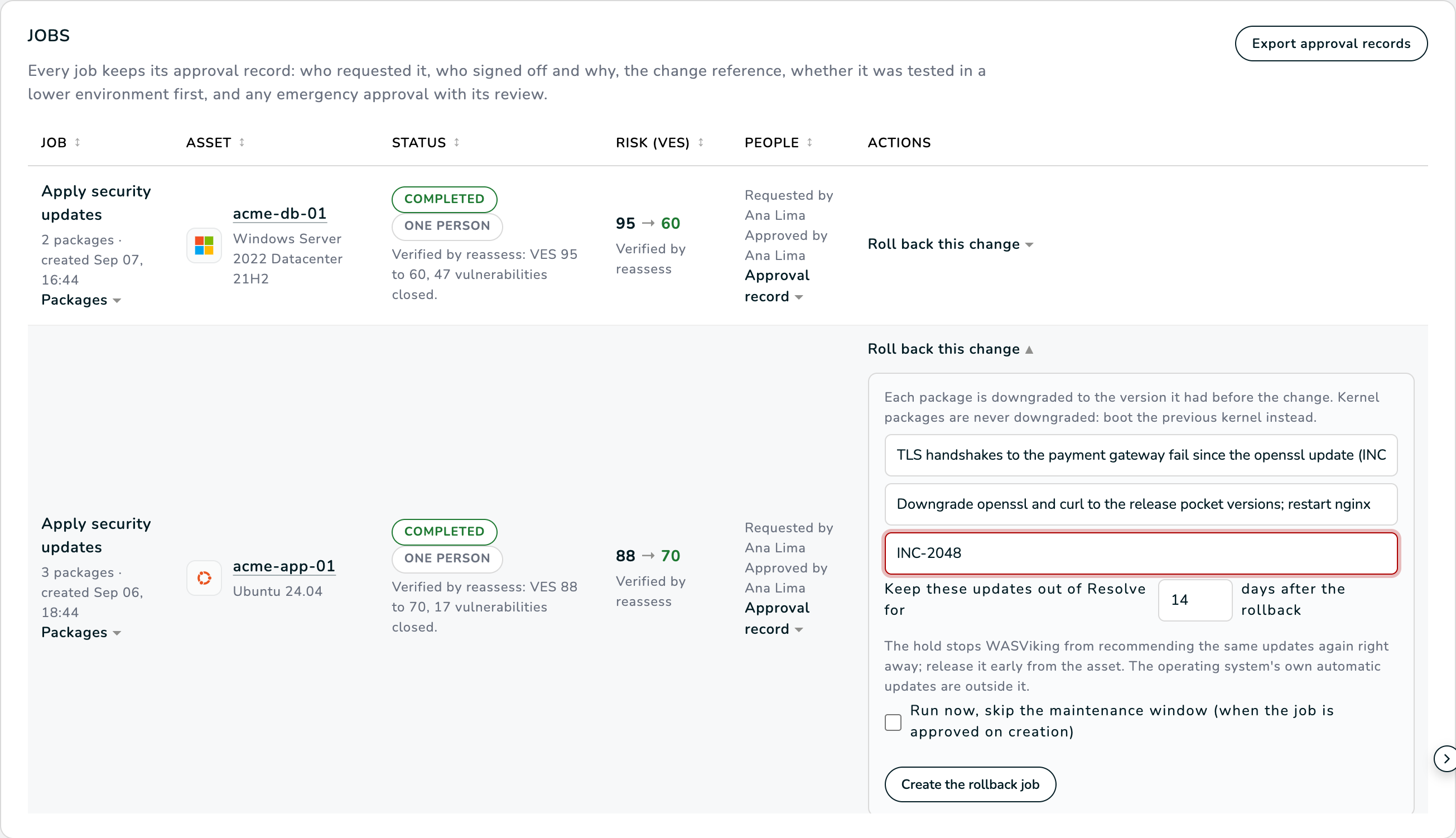
The form asks for:
- Why this change has to go. Required. This is the evidence that the update misbehaved; it goes into the approval record, the e-mail to the approvers and the CSV export.
- Back-out plan. Pre-filled with the plan the requester stated when the original job was scheduled, if any. Adjust it for the record.
- Change or incident reference. Optional, for the ticket in your own tool.
- Keep these updates out of Resolve for N days. Fourteen by default, up to ninety, zero for none. After the rollback the same updates come straight back as pending on the next inventory; this hold stops WASViking® from recommending them again the same afternoon (see Step 5).
- Run now skips the maintenance window when the governance approves the job on creation. When a person has to approve it, that person makes the scheduling choice.
- Allow a reboot appears only when the host policy allows automatic reboot; a Windows removal may ask for one.
On a Windows host the same form explains the KB-based removal and which updates cannot be removed.
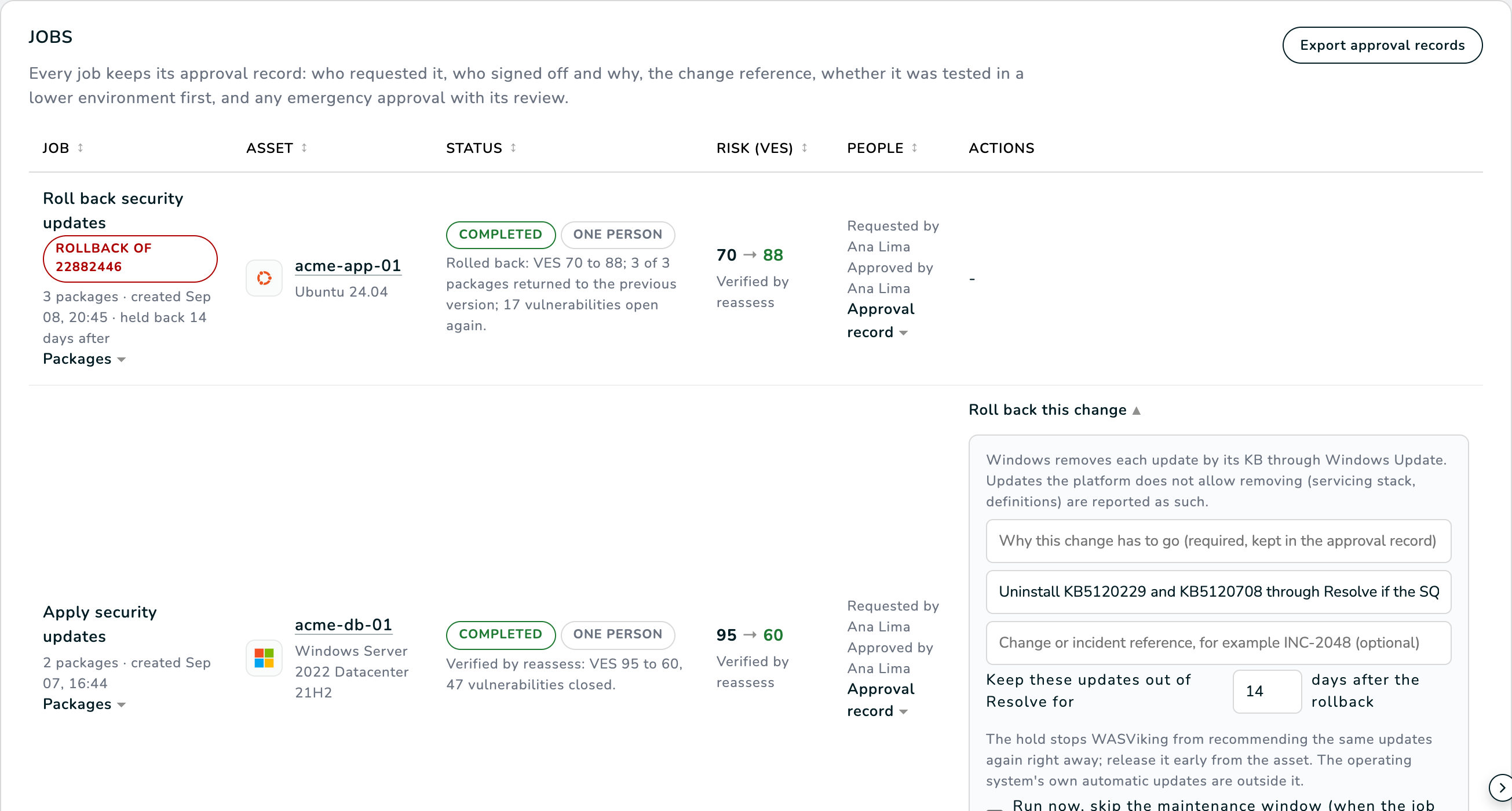
Confirm with Create the rollback job. Nothing runs yet: a rollback job is created for the same packages, frozen with the version each one returns to.
Step 2: approve the rollback
The new job appears at the top of the Jobs table with a Rollback of badge naming the job it undoes, the expected score movement (from the current score back to the score the host had before the update), and the approval the governance of its environment requires: automatic, one person, or a formal quorum by people other than the requester.
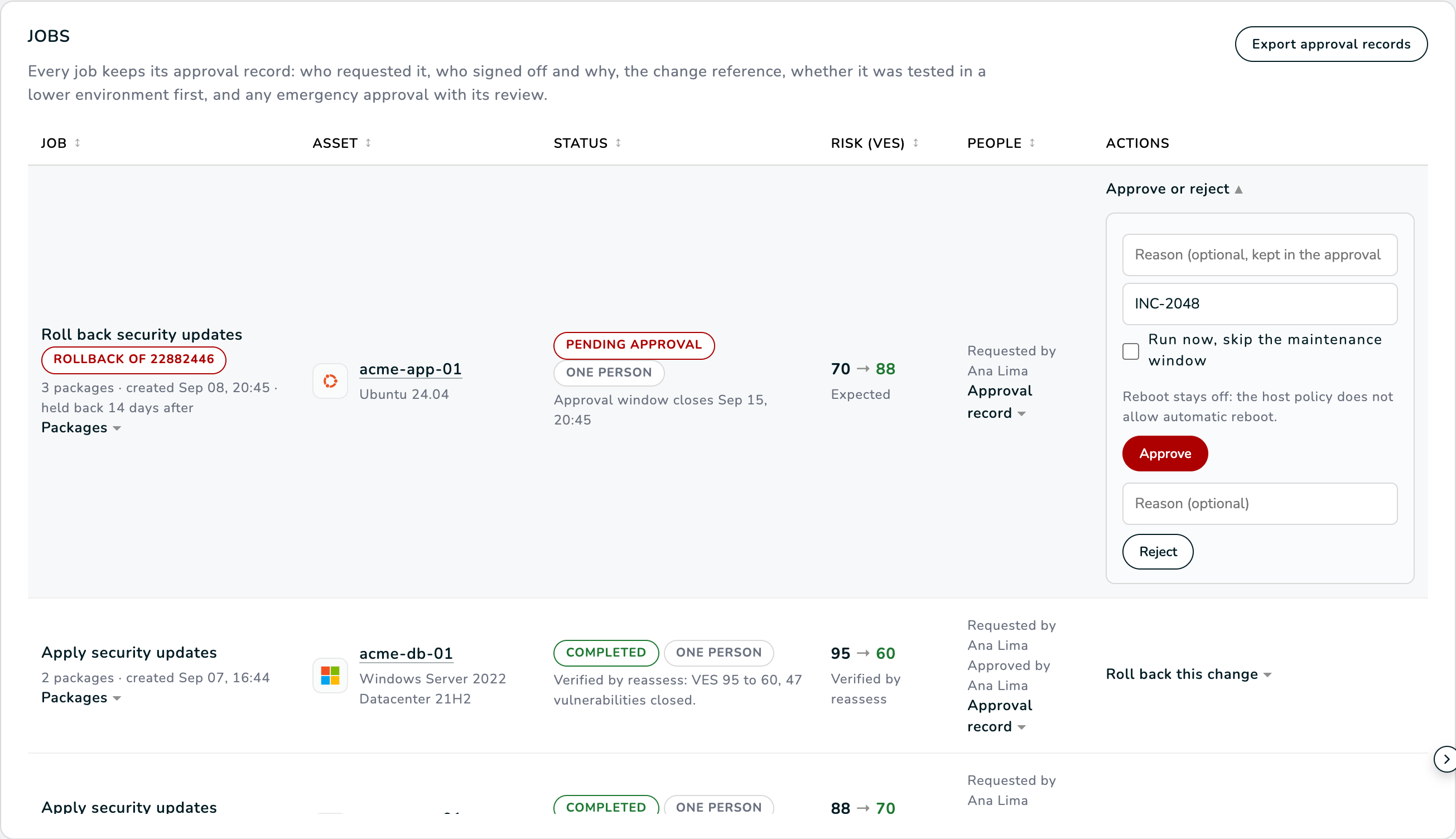
Approve it as you would approve an update. Choose Run now to skip the maintenance window, or leave it and the host picks the job up when the window opens. An emergency approval is available under the same rules as for any formal job.
Step 3: what happens on the host
The agent runs its pre-checks (privileges, free space, memory on Linux) and then returns each package, reporting the outcome per item:
- downgraded to the previous version, or removed for a Windows KB, when the package really went back;
- not installed on the host when the update was not there any more;
- not uninstallable when Windows does not allow removing that update;
- skipped for a kernel package, for a package with no previous version recorded, or for a version the agent refused to pass to the package manager;
- failed with the reason, for example a previous version that no configured repository carries any more.
The job fails only when nothing at all went back. A partial rollback is reported as such, item by item, never as a full success.
Step 4: read the verdict
The rollback completes when the next inventory has been reassessed. The Status column then reads Rolled back: VES 70 to 88; 3 of 3 packages returned to the previous version; 17 vulnerabilities open again. The numbers are measured by the reassess, never estimated: the score goes back up because the vulnerabilities the update closed are open again, and the line says so plainly.
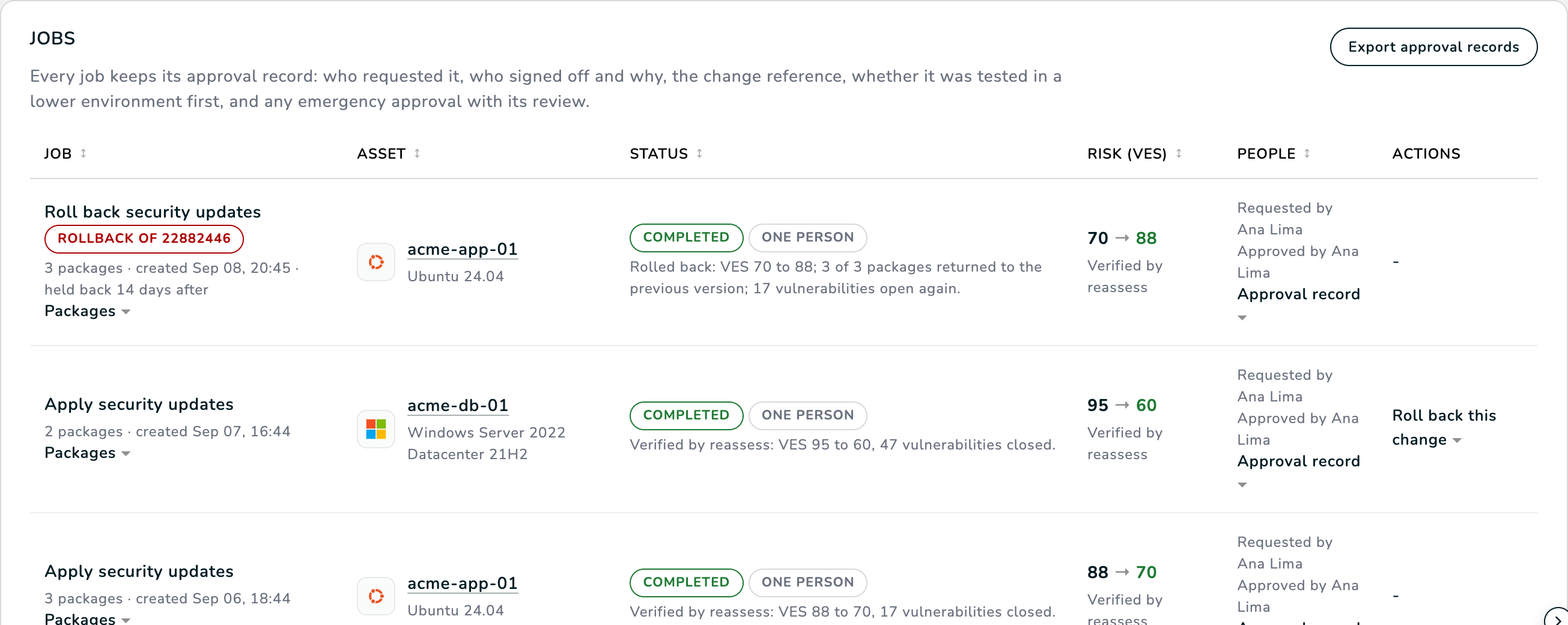
A Windows removal that needs a restart says restart pending to finish the removal; the host shows the pending restart and the usual restart actions apply.
Step 5: the hold on the returned updates
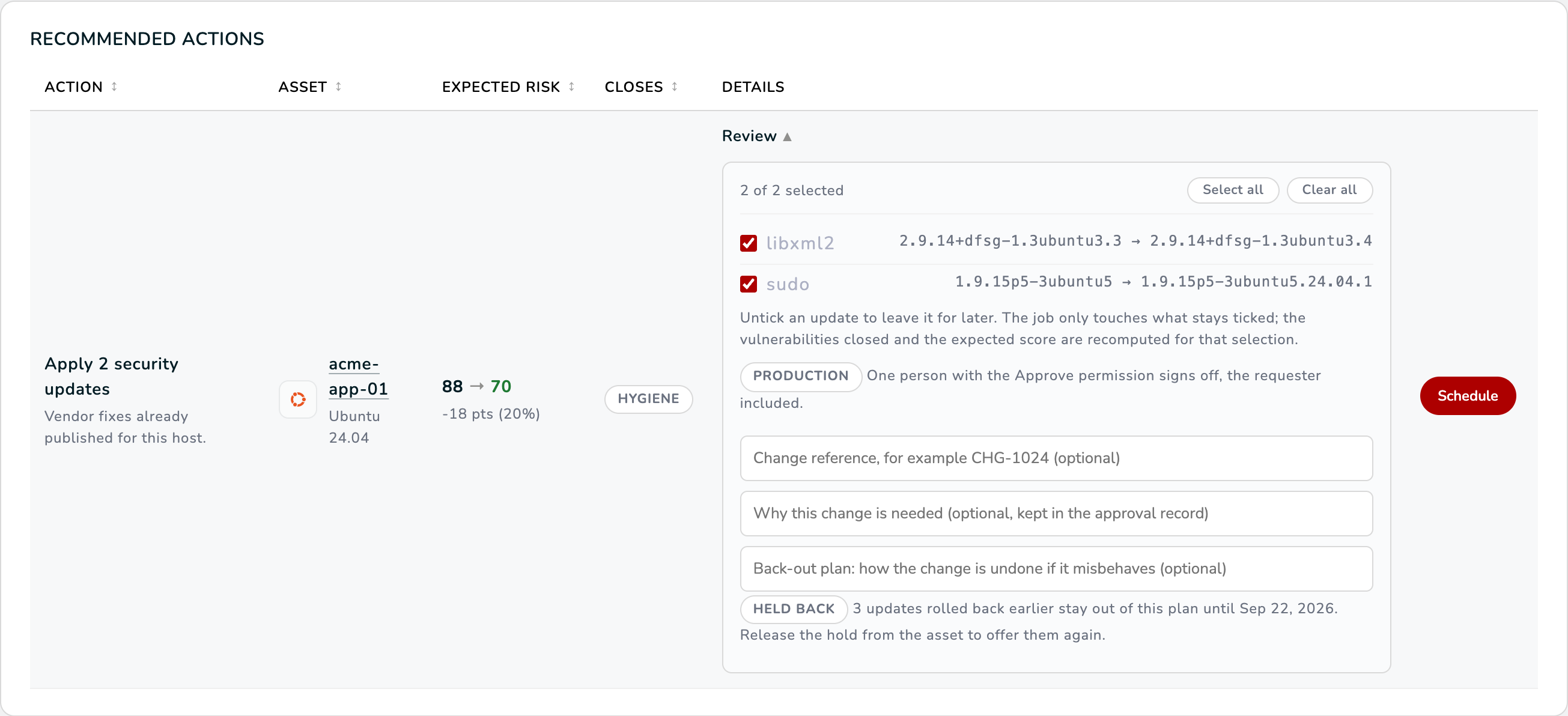
The updates a rollback returned come straight back as pending on the next inventory. To keep Resolve from recommending them again right away, the packages that really went back are held on that host for the days the rollback job asked. While the hold lasts:
- the Recommended actions row of the host leaves those packages out of the plan and says so;
- the host's asset page shows a Held Back After Rollback card with each package, the version that was rolled back, the date the hold ends and the rollback job that created it.
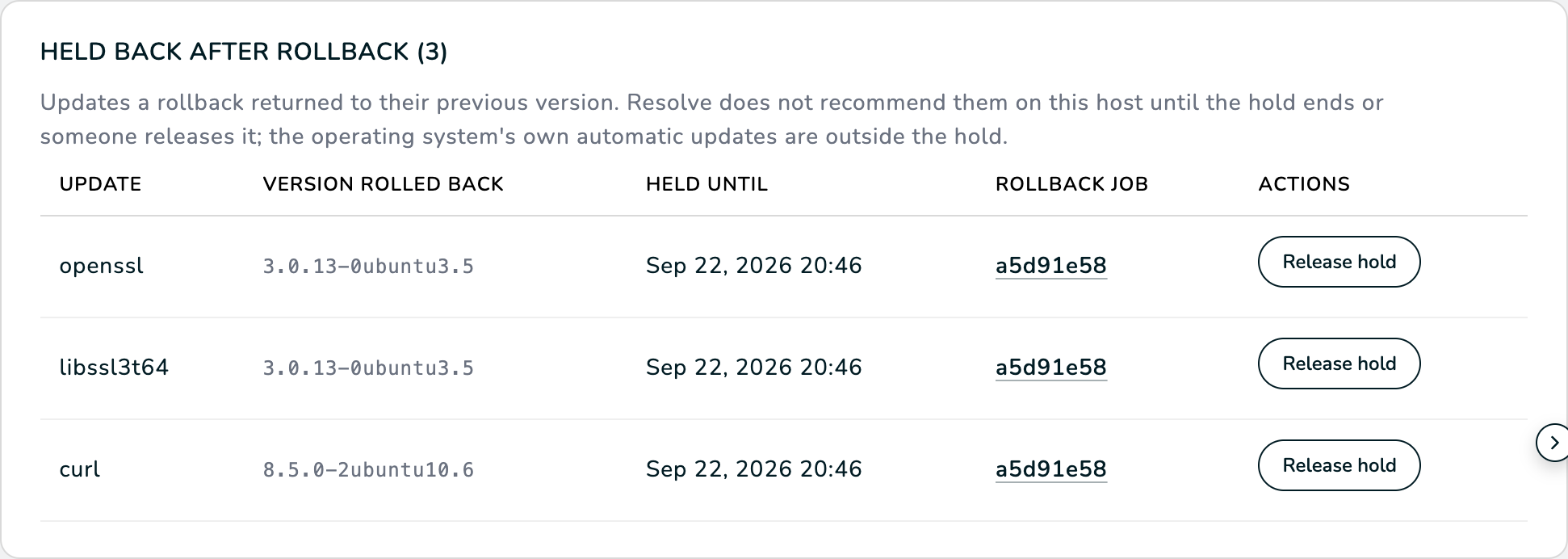
A hold expires on its own. To offer an update again earlier, for example after the vendor published a fixed build, press Release hold on that row. The release is recorded under your name and the update is back in the recommendations from the host's next assessment.

The hold governs what WASViking® recommends. It does not stop the operating system's own automatic updates: a Windows host with automatic installation turned on may reinstall a removed update on its own schedule. Pause automatic updates on that host through your usual policy if the hold has to be strict.
Day two
- Alerts. A verified rollback raises a Rollback Verified alert on your channels with the packages returned, the vulnerabilities open again and the hold; a failed one raises Patch Job Failed with the reason.
- Evidence. The rollback job carries the reason, the back-out plan, the
reference, the job it undid and the hold, and every approval decision on
it. Export approval records on the Resolve screen writes all of it
to CSV, one row per decision, with the original job id in the
rollback_ofcolumn. - Audit trail. Creating the rollback, approving it and releasing a hold are audit entries like every other Resolve action.
Troubleshooting
The job has no Roll back this change action. Either it is not a completed security update job, the host runs macOS, the agent is older than 0.1.38, the host has another job active, or the job was already rolled back (a job is rolled back once). The notice after the click names the reason when the button was there a moment ago.
Nothing in this job can be rolled back. The job only contained kernel packages, or entries with no previous version or KB identifier. The kernel is never downgraded on purpose; boot the previous kernel instead.
A package came back as "failed: still at" the new version. The previous version is not available in any configured repository any more (some distributions keep only the current build of a security update). Restore the package from your own mirror or snapshot; the other packages of the job went back on their own lines.
A Windows update came back as "not uninstallable". Windows does not allow removing servicing stack updates and definition updates, and some combined packages can only be removed by the platform's own tooling. The per-item outcome names them; the rest of the job went back.
The update was recommended again the next day. The rollback job was created with a hold of zero days, or the hold was released. Roll back with a longer hold next time, or leave the update unticked in the Review of the next job.
What to look at next
- Set up Infrastructure Defense walks through scheduling and approving an update, the change a rollback undoes.
- Infrastructure Defense in Capabilities explains Resolve, the approval governance and how the Viking Exposure Score is measured before and after every change.