
CI/CD SCA, SBOM & Secrets with Bitbucket Pipelines
Run the WASViking Sentinel inside Bitbucket Pipelines to build a CycloneDX SBOM, check dependencies against OSV and CISA KEV, scan the working tree and git history for hard-coded credentials, and stop a vulnerable release before it reaches your main branch.
This guide runs Software Composition Analysis (SCA) and a secrets scan inside a Bitbucket Pipelines build. The WASViking® Sentinel reads your dependency manifests, builds a CycloneDX SBOM, enriches it with OSV and CISA KEV, walks the working tree and the git history for hard-coded credentials, and fails the build before a vulnerable dependency or a leaked key reaches your main branch.
Both gates are the same binary and the same API used in the GitHub Actions guide. Neither one is tied to a CI vendor: the agent runs as a one-shot command, authenticates with an organization API Key, and submits over HTTPS REST. What changes between vendors is the YAML around it, plus two Bitbucket details that are easy to miss and that this page calls out explicitly (the clone depth and secured variables).
There is no mTLS tunnel in this flow. No source code leaves the runner, only the dependency graph (package names and versions) and redacted secret matches.
The setup has two halves, and the order matters: configure the
WASViking portal first (one API Key scoped to ci:scan,
sca:submit, and secrets:submit), then wire it into Bitbucket.
What this integration does
- Generates a CycloneDX 1.5 SBOM from your manifests (npm, pip, go,
composer, Maven, gem, pub) on pull requests and on pushes to
main. - Enriches components with OSV and CISA KEV (known exploited vulnerabilities).
- Scans the working tree and, with
--git, the repository history for hard-coded secrets, submitting only redacted matches. - Optionally verifies a match against the provider's identity endpoint
with
--verify, so a rotated key does not read like a live incident. - Fails the build by severity with
--fail-on, which blocks the merge. - Writes SARIF 2.1.0 and the raw CycloneDX JSON as build artifacts.
- Builds a consolidated software inventory per organization and detects drift between consecutive submissions.
- Leaves nothing behind on the runner. The agent is installed per build and dies with the container.
How it works
- The build container downloads and installs the Sentinel agent using the API Key.
- The agent runs a license preflight against the WASViking API. An
approval is cached for 30 minutes under
~/.wasviking/, which in a Bitbucket build means it is fetched fresh on every run. - It walks the project manifests and builds a CycloneDX SBOM.
- It enriches components against OSV and applies CISA KEV validation.
- It scans the tree, and the git history when
--gitis set, for hard-coded credentials. - It submits the SBOM and the redacted matches over HTTPS REST. The API validates quota, registers the snapshot, detects component drift, and promotes findings.
- The agent writes the JSON and SARIF outputs into
--out, and Bitbucket collects that directory as a build artifact.
Access posture
- Only manifests and the dependency graph are read. No source code,
no repository variables beyond the key you pass, and nothing outside
.wasviking/is collected. - Raw secret values never leave the runner. Submissions carry a hash and a masked preview.
- Submission is HTTPS REST with an API Key header. There is no mTLS tunnel and no inbound connection to the runner.
--verifyadds read-only calls to the provider identity endpoints of the matched credentials (for example the GitHub or AWS identity API). Drop the flag if outbound calls to third parties are not acceptable in your build network.--air-gappedon thesbomgate guarantees zero external egress: no OSV lookup and no submission.- Revoke access at any time by revoking the API Key in the portal.
Pre-requisites
| Requirement | Detail |
|---|---|
| WASViking plan | SBOM and secrets submissions enabled (Pro or higher). |
| Portal role | Admin or Manager, to issue API Keys. |
| Bitbucket | Pipelines enabled on the repository, under Repository settings → Pipelines → Settings. |
| Bitbucket permission | Admin on the repository, to create secured repository variables and commit bitbucket-pipelines.yml. |
| Build image | Any Linux x86_64 image with curl, sha256sum, and dpkg-deb (or ar, from binutils). atlassian/default-image:5 has all of them. |
| Clone depth | clone: depth: full when you scan git history with --git. Bitbucket clones shallow by default. |
| Project manifests | At least one supported lockfile: package-lock.json, yarn.lock, pnpm-lock.yaml, requirements.txt, Pipfile.lock, go.sum, composer.lock, pom.xml, Gemfile.lock, pubspec.lock. The lockfile must be committed to the repository. |
| Network egress | HTTPS to api.wasviking.com and api.osv.dev on 443. No inbound is needed. |
On GitLab CI, Jenkins, CircleCI, or anything else that can execute a Linux binary? The commands below are identical. Only the YAML dialect changes. Start from wasviking-sentinel in CI/CD.
Step 1: Create an API Key for the pipeline (portal)
One API Key covers the whole build: it authorizes the agent installer download and both submissions. No Sentinel agent token is involved here, that belongs to the tunnel flow.
Go to Settings → System Settings → API Keys and click + New Key.
| Field | Value |
|---|---|
| Label | Something you will recognise in six months, for example Bitbucket SCA, checkout-api. Use one key per repository so revoking it does not take down other pipelines. |
| Scopes | ci:scan (Trigger scans from a CI/CD pipeline, which is also what authorizes the installer download), sca:submit (Send SBOMs from the Sentinel agent. OWASP A06), and secrets:submit (Send hard-coded credential matches from the Sentinel agent. OWASP A07). |
| Expiration | 90 days is a sensible default. Rotate on that cadence. |
Save and copy the key once. You will paste it into Bitbucket in
Step 2 as WASV_SCA_API_KEY.
WASViking authenticates with the
Authorization: ApiKey <key>header, notBearer. Scopes can be adjusted later with Edit without changing the key value, so the pipeline keeps working.
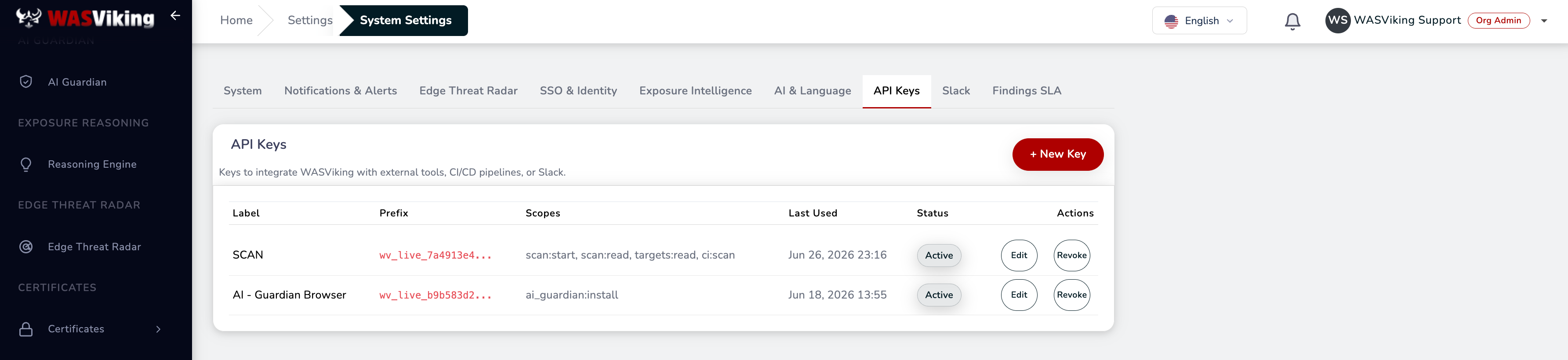 Settings → System Settings → API Keys.
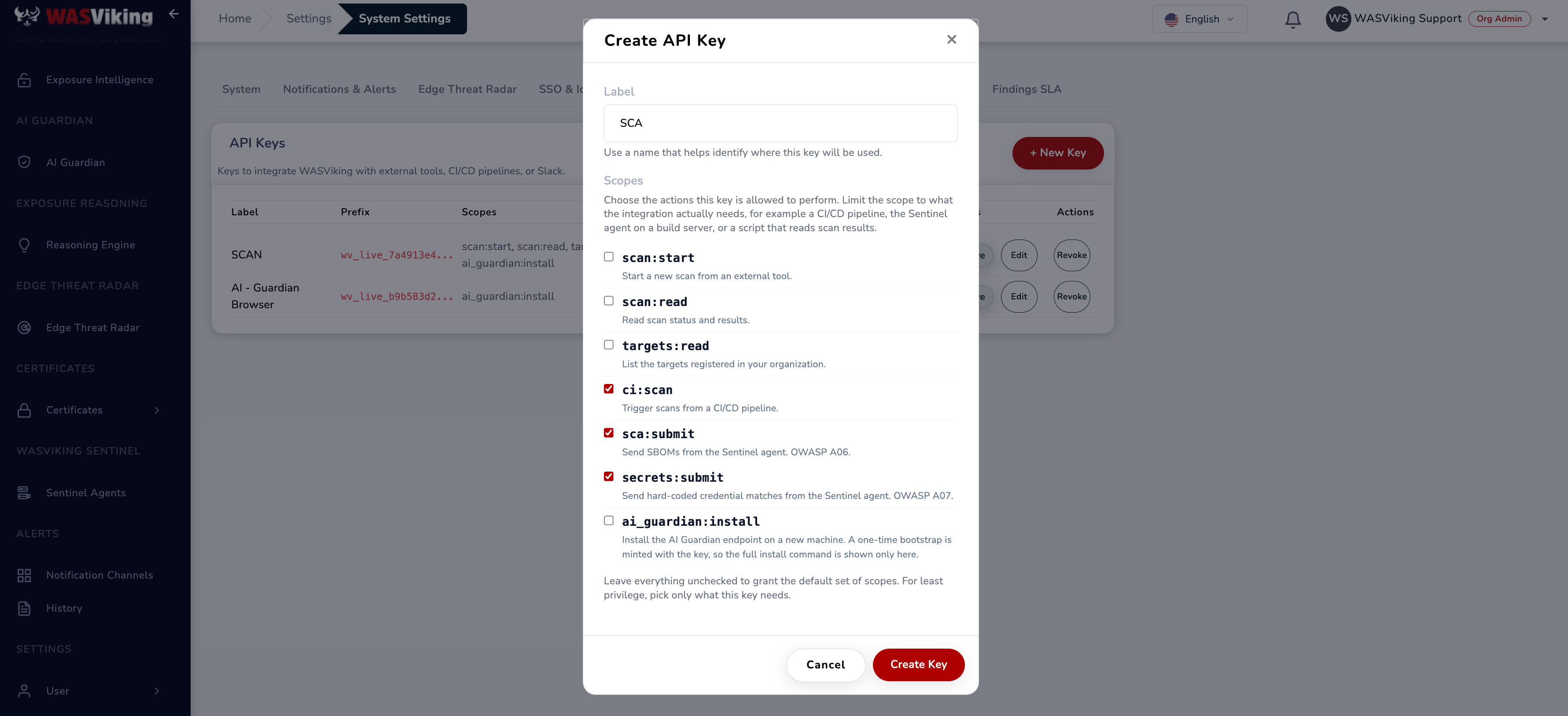 Select the three pipeline scopes when creating the key.
Step 2: Store the key as a secured repository variable
Never commit a key to the repository. In Bitbucket, go to Repository settings → Pipelines → Repository variables and add:
| Name | Value | Secured |
|---|---|---|
WASV_SCA_API_KEY |
The API Key from Step 1. | Yes |
Tick Secured so the value is masked in the build log and cannot be read back from the UI. If several repositories share one key, a workspace variable works the same way, though a key per repository gives you a cleaner revocation story.
One Bitbucket behaviour to plan for: pull request builds triggered from a forked repository do not receive secured variables. The first line of the step below is a guard that fails the build immediately in that case, instead of letting the scan run unauthenticated and report a false all-clear.
Step 3: Add the pipeline
Create bitbucket-pipelines.yml at the repository root:
image: atlassian/default-image:5

# Full Git history is required when using the secrets --git option.
clone:
  depth: full

definitions:
  steps:
    - step: &wasviking-security-scan
        name: WASViking SCA + SBOM + Secrets
        max-time: 20

        script:
          - test -n "$WASV_SCA_API_KEY"

          # Run from the repository root.
          - cd "$BITBUCKET_CLONE_DIR"

          # WASViking API endpoint.
          - export WASV_API_BASE="https://api.wasviking.com"

          # Install WASViking Sentinel.
          - |
            curl -fsSL \
              -H "Authorization: ApiKey $WASV_SCA_API_KEY" \
              "$WASV_API_BASE/api/v1/sentinel/install.sh" | sh

          - mkdir -p wasviking-reports

          # Generate CycloneDX SBOM, run SCA, and submit results.
          - |
            ./.wasviking/wasviking-sentinel sbom \
              --api "$WASV_API_BASE" \
              --api-key "$WASV_SCA_API_KEY" \
              --path . \
              --app-name "$BITBUCKET_REPO_FULL_NAME" \
              --app-version "$BITBUCKET_COMMIT" \
              --fail-on high \
              --submit \
              --out ./wasviking-reports

          # Scan the working tree and Git history for hard-coded secrets.
          - |
            ./.wasviking/wasviking-sentinel secrets \
              --api "$WASV_API_BASE" \
              --api-key "$WASV_SCA_API_KEY" \
              --path . \
              --git \
              --verify \
              --fail-on high \
              --submit \
              --out ./wasviking-reports

        artifacts:
          - wasviking-reports/**

pipelines:
  pull-requests:
    '**':
      - step: *wasviking-security-scan

  branches:
    main:
      - step: *wasviking-security-scan

  custom:
    wasviking-security-scan:
      - step: *wasviking-security-scan
Four choices in that file are worth understanding before you adapt it:
clone: depth: full. The--gitflag walks commit history. With Bitbucket's default shallow clone the agent only sees the last commits, so a credential committed months ago and later removed from the working tree stays invisible. Drop bothdepth: fulland--gittogether if you only want the current tree scanned, which makes builds faster.- The YAML anchor (
&wasviking-security-scan). The step is declared once underdefinitionsand referenced three times. Pull requests andmainget the gate automatically, and thecustomentry lets anyone run it on demand from Pipelines → Run pipeline, which is handy for the first rollout. max-time: 20. A ceiling in minutes for the step. Repositories with deep history or many manifests should raise it. The agent has its own timeouts, 5 minutes for the SBOM pipeline and 10 for secrets, both adjustable with--timeout.artifacts. Bitbucket keepswasviking-reports/**attached to the build, so the SARIF and JSON outputs are downloadable from the Artifacts tab after the run.
Commit the file and the pipeline starts on the next push or pull request.
Step 4: Command flags
sbom (SCA and SBOM)
wasviking-sentinel sbom [flags]
| Flag | Required | Description |
|---|---|---|
--api-key |
Yes | API Key with the sca:submit scope. Also reads WASV_API_KEY. |
--api |
No | WASViking API base URL. Default: https://api.wasviking.com. |
--path |
No | Directory scanned recursively for manifests. Default: current directory. |
--app-name |
No | Project name in the CycloneDX metadata. $BITBUCKET_REPO_FULL_NAME gives you workspace/repo. Pass it: without it the agent falls back to the CI repository name, since the checkout directory on Bitbucket is always called build and would make a poor inventory label. |
--app-version |
No | Project version in the metadata. $BITBUCKET_COMMIT ties the SBOM to the exact commit. |
--fail-on |
No | Lowest severity that fails the build: critical, high, medium, low, none. Default: high. |
--submit |
No | Send the SBOM to WASViking. Omit for a local-only run. |
--out |
No | Output directory for the CycloneDX JSON and SARIF. Default: current directory. |
--no-osv |
No | Skip OSV enrichment and ship a bare SBOM. |
--from-cyclonedx |
No | Ingest an SBOM produced by another tool instead of generating one. |
--air-gapped |
No | Fully offline. No OSV lookup and no submission. |
--timeout |
No | Wall-clock ceiling for the SBOM pipeline. Default: 5 minutes. |
Outputs: wasviking-sbom.cdx.json (CycloneDX 1.5) and
wasviking-sbom.sarif (SARIF 2.1.0).
secrets
wasviking-sentinel secrets [flags]
| Flag | Required | Description |
|---|---|---|
--api-key |
Yes | API Key with the secrets:submit scope. |
--api |
No | WASViking API base URL. |
--path |
No | Directory scanned recursively. Default: current directory. |
--git |
No | Also walk the git history. Requires clone: depth: full. |
--verify |
No | Confirm matches against the provider identity endpoints, read-only. |
--fail-on |
No | Same scale and default (high) as the SBOM gate. |
--submit |
No | Send redacted matches to WASViking. |
--out |
No | Output directory. |
--timeout |
No | Wall-clock ceiling. Default: 10 minutes. |
Outputs: wasviking-secrets.json and wasviking-secrets.sarif.
Exit codes
Bitbucket fails the step on any non-zero exit, so these codes are what turn a finding into a blocked merge.
| Code | Meaning |
|---|---|
0 |
Nothing at or above the --fail-on threshold. |
70 |
SCA gate: a KEV-flagged dependency at or above the threshold. Treat as urgent, it is a known exploited vulnerability. |
71 |
SCA gate: findings at or above the threshold, none of them in KEV. |
73 |
Secrets gate: a credential confirmed live by --verify. |
74 |
Secrets gate: matches at or above the threshold that were not verified. |
79 |
Coverage failure: the scan root could not be traversed, so nothing was scanned. See below. |
1 / 2 |
Operational error: unreadable manifest, rejected API key, network failure on --submit. |
Coverage failure (exit 79)
A gate that scans nothing finds nothing, and without a check that reads exactly like a clean run. Exit 79 keeps those apart: the agent measures what it covered against what the scan root actually contained, and stops rather than reporting a pass over an empty traversal.
It is not a finding, and it does not fire on an empty repository or on one with no supported manifest. Those walk correctly and pass, and the log reports how many entries were walked so you can see the difference.
Bitbucket is worth one note here. $BITBUCKET_CLONE_DIR is always
/opt/atlassian/pipelines/agent/build, so on this platform the scan
root is called build, which is also a name the agent excludes inside
projects. Exclusions apply to sub-directories only, so the checkout is
scanned in full and the log states that the root name was recognised. A
build/ directory inside your repository is still excluded, as it should
be. The full reference is
Coverage failures.
Fail-on policy
--fail-on sets the lowest severity that fails the build, and
everything above it also fails.
| Setting | Behavior |
|---|---|
--fail-on none |
Never fails. Report only, useful for the first week. |
--fail-on critical |
Fails on critical only. |
--fail-on high |
Fails on high and critical. The default, and a good one for pull requests. |
--fail-on medium |
Fails on medium and above. Stricter, more friction. |
--fail-on low |
Maximum posture. Realistic on new projects with no accumulated debt. |
A rollout that tends to survive contact with a real team: start at
none on pull requests to see the volume, move to high once the
backlog is triaged, and keep main stricter than feature branches.
Reading the results
The portal is the system of record. Dependency data lands under Inventory → SBOM and credential matches under Inventory → Secrets, both with the promoted findings attached to your organization's posture.
The SARIF files are written for tools that consume the format. Bitbucket does not ingest SARIF natively, so on this platform they are build artifacts you can download or hand to another tool, not an annotation layer on the pull request. The build log carries the summary line, and the portal carries the history.
Drift compares the component set of this submission against the previous
one carrying the same --app-name, and it ignores --app-version
entirely. A commit that changes no dependency reports no drift even
though the version string moved.
That makes --app-name the value to keep stable. If it varies between
runs, every submission starts its own lineage with nothing to compare
against, and drift silently never fires. Deriving it from
$BITBUCKET_REPO_FULL_NAME, as the pipeline above does, keeps it
constant for the life of the repository.
Air-gapped mode
Build networks with no external egress can still produce an SBOM:
./.wasviking/wasviking-sentinel sbom \
  --path . \
  --air-gapped \
  --out ./wasviking-reports
--air-gapped skips the OSV lookup and the submission, working from the
bundled KEV data. Use it on isolated build farms, or to validate locally
before shipping an artifact by hand.
What is and isn't collected
WASViking does not collect your repository source code, repository
variables beyond the key you pass, files outside .wasviking/, or any
production data. The SBOM holds the dependency graph (package names,
versions, licenses, manifest hashes). The secrets gate submits a hash
and a masked preview, never the credential itself. Data is processed in
the US region, encrypted in transit (TLS 1.2+) and at rest (AES-256),
with retention set by your plan. A DPA and EU data residency are
available on request. See the
Trust Center for the full
compliance mapping (ISO 27001, SOC 2, LGPD, GDPR, NIST SSDF,
OWASP Top 10 A06/A07, OWASP DSOMM, CISA SBOM minimum elements).
Common problems
| Problem | Likely cause |
|---|---|
| Step fails on the first line, before any output | WASV_SCA_API_KEY is not set. On a pull request from a fork, secured variables are not delivered to the build. |
HTTP 401 Unauthorized |
Key revoked, expired, or missing ci:scan, sca:submit, or secrets:submit. The header is Authorization: ApiKey <key>, not Bearer. |
HTTP 402 quota exceeded |
Monthly submission quota reached. Wait for the cycle, upgrade, or add a pack. |
| Secrets scan finds nothing in history | clone: depth: full is missing, so the shallow clone has no history to walk. |
neither dpkg-deb nor ar is available |
A minimal build image (Alpine and similar). Install binutils, or switch the step to atlassian/default-image:5. |
install.sh download error |
Network policy blocking api.wasviking.com or the release bucket. |
| Step killed at 20 minutes | Deep history plus --verify on a large repository. Raise max-time and the agent --timeout, or drop --verify on pull requests and keep it on main. |
| Exit 79 | The scan root could not be traversed. Check the Root: line against your repository layout, then check that the step can read the checkout. |
manifest not detected |
No supported lockfile under --path. Commit your lockfiles. |
| OSV timeout | api.osv.dev slow or unreachable. Use --no-osv for a bare SBOM, or --air-gapped. |
| Findings differ between runs | A lockfile regenerated during the build. Install with npm ci or the equivalent, and commit the lockfile. |
| Unexpected exit 70 on a small change | A new transitive dependency arrived through the lockfile and matches CISA KEV. Inspect with npm ls <package> or the equivalent. |
Where this fits in the platform
- The software inventory lives under Inventory → SBOM, credential matches under Application Security → Hard-coded Secrets.
- The GitHub Actions version of this same pipeline is CI/CD SCA, SBOM & Secrets with GitHub Actions.
- The cloud DAST gate is a third subcommand of the same binary, with the same API Key model. See CI/CD DAST with Bitbucket Pipelines for the Bitbucket worked example, wasviking-sentinel in CI/CD for the reference, and CI/CD DAST with GitHub Actions for the GitHub version.
- Prefer no pipeline change at all? Code Security runs the same SBOM and secrets engines server-side on the repositories you connect through the GitHub App or Bitbucket OAuth, on your plan cadence and on push; the pipeline gate stays the way to block a build.
- Alert routing is documented under Slack and Teams and Webhooks.