
Cloud Security
Agentless security posture for your AWS accounts through a read-only role. Inventory, control evaluation mapped to the frameworks you report against, contextual risks that combine exposure, identity, data and vulnerabilities, attack paths with the move that breaks them, change and drift with its judged risk effect, guided remediation and evidence-grade reports.
WASViking® Cloud Security is the security posture of the cloud accounts running your business, read through a role you create in your own account and keep under your own control. Nothing is installed, no access key is ever shared, and the role can only list and describe configuration: it cannot change a resource and it cannot read the data inside one. From that read-only view the module builds an inventory, evaluates every resource against a catalog of controls, joins the result with what the rest of the platform already knows about your exposure, your hosts and your identities, and tells you what to fix first and why.
It never ends at "N findings". A finding carries the score with every point named, the confidence the evidence supports, the fix in four forms and a verification that closes it only when the next evaluation proves the change. AWS is the first provider; the model and the screens are provider neutral.
How it works
You connect an account in four steps: register it, deploy the assessment role with the template the wizard generates, paste the role identifier and validate, and optionally turn on real-time change evaluation. The walkthrough is Set up Cloud Security.
Every connected account is then read on a schedule (every 24 hours by default) and on demand:
- Inventory. Identity (users, roles, groups, policies, access keys), network (VPCs, subnets, gateways, route tables, security groups, load balancers, API gateways, CloudFront), compute (instances, launch templates, containers, Lambda functions, EKS clusters), storage and data (S3, RDS, DynamoDB, EFS, snapshots, KMS keys, secrets), logging and detection (CloudTrail, Config, GuardDuty, Security Hub) and the AI services (Bedrock, SageMaker). Each resource keeps its configuration with a version history, its tags, its owner, environment and criticality, and the relationships that join it to the others.
- Controls. A built-in catalog evaluates each resource type against the practices the frameworks you report against expect, with every control mapped to AWS Foundational Security Best Practices, CIS AWS Foundations, PCI DSS 4.0.1 and NIST SP 800-53. A control passes, fails, does not apply, or reads Not evaluated with the reason when the role could not read an input. Not evaluated is never counted as passed.
- Posture findings and contextual risks. A failing control becomes a finding scored by its severity and its context: the exposure of the resource, the data it holds, the identity it runs as, the vulnerabilities of the host behind it, how many crown jewels it reaches. A contextual risk is a combination the platform resolves on its own, such as a store with personal data reachable from the internet, a workload reachable from the internet running software with exploitable vulnerabilities, or an administrative port open on a critical workload that hostile sources are already probing.
- Exposure, confirmed from the outside. The network path from the internet to each resource is resolved from the stored configuration (gateway, route table, subnet, security group, network ACL, address). A path that resolves is cloud confirmed; the platform's external probe and the edge telemetry of Edge Threat Radar then confirm it from the outside or report hostile traffic already hitting it. Behind a network load balancer, the security group of the workload decides who gets through. A port your security group admits only from named sources (an office address, a VPN range) is listed with those sources and the description of each rule, is never counted as open to the internet and is never probed; an administrative port allow-listed this way is a low hygiene risk, or a medium one when a source is a wide public range. A resource with a Sentinel Host agent shows the host's vulnerabilities next to its cloud facts.
- Identity and data. Every principal gets a profile: the effective privilege, the escalation paths it holds (passing a role to a compute service, rewriting a policy, assuming any role), the trust it extends outside your organization, dormant credentials and missing MFA. Every data store gets its classification (declared by tag, inferred from the service, the name or a log relationship, or set by hand), whether it answers publicly, its encryption at rest and in transit, its backups and the identities that can read it.
- Attack paths. Deterministic chains over the stored graph from an entry point to a sensitive target: internet to data through a vulnerable workload, internet to a public database or bucket, a CI identity to account administration, an external account to data, a public function to a privileged role, an exposed secret path, a public snapshot, lateral movement through a shared security group. Each path shows every step with the evidence behind it, a confidence, a score, and the break options ranked by impact with one recommended.
- Changes and drift. With real-time on, a change in your account is evaluated within seconds of happening: the resource is re-read, the controls that depend on the changed configuration run again and the change is judged as risk introduced, risk removed or no risk change, naming the findings and the attack paths it created or closed and the actor and tool that made it (console, API, CloudFormation, an IaC tool, a pipeline). Without real-time, every scheduled sync records the same changes from the inventory difference.
- Remediation. A work item is built from a finding (the fix from the catalog in console, CLI, Terraform and CloudFormation form, the host patch when a vulnerability takes part, and the verification) or from the break option of an attack path. The item moves through To do, In progress and In review; Resolved is written only by the next evaluation that proves the fix. A finding can be sent to Jira or ServiceNow through the platform's ticketing integration.
- Assisted remediation (optional). With a second, separate role in your account and a governance policy you set, WASViking applies a short list of reversible fixes for you: Block Public Access on a bucket, a world-open administration or database port, IMDSv2, a public database instance or snapshot, a stale access key, log file validation, key rotation, point-in-time recovery, scan on push. Each one is requested on a work item with what changes and how it rolls back, decided by an approver (or by the policy for a low impact action), executed through that role, verified by the next evaluation and kept as a record of who asked, who decided, what was read and what was written; a rollback writes the previous state back.
- Exceptions. Accepting a risk, recording an exception, a false positive or a compensating control is always time bound, needs an approver, and reopens the finding when it expires.
What you see
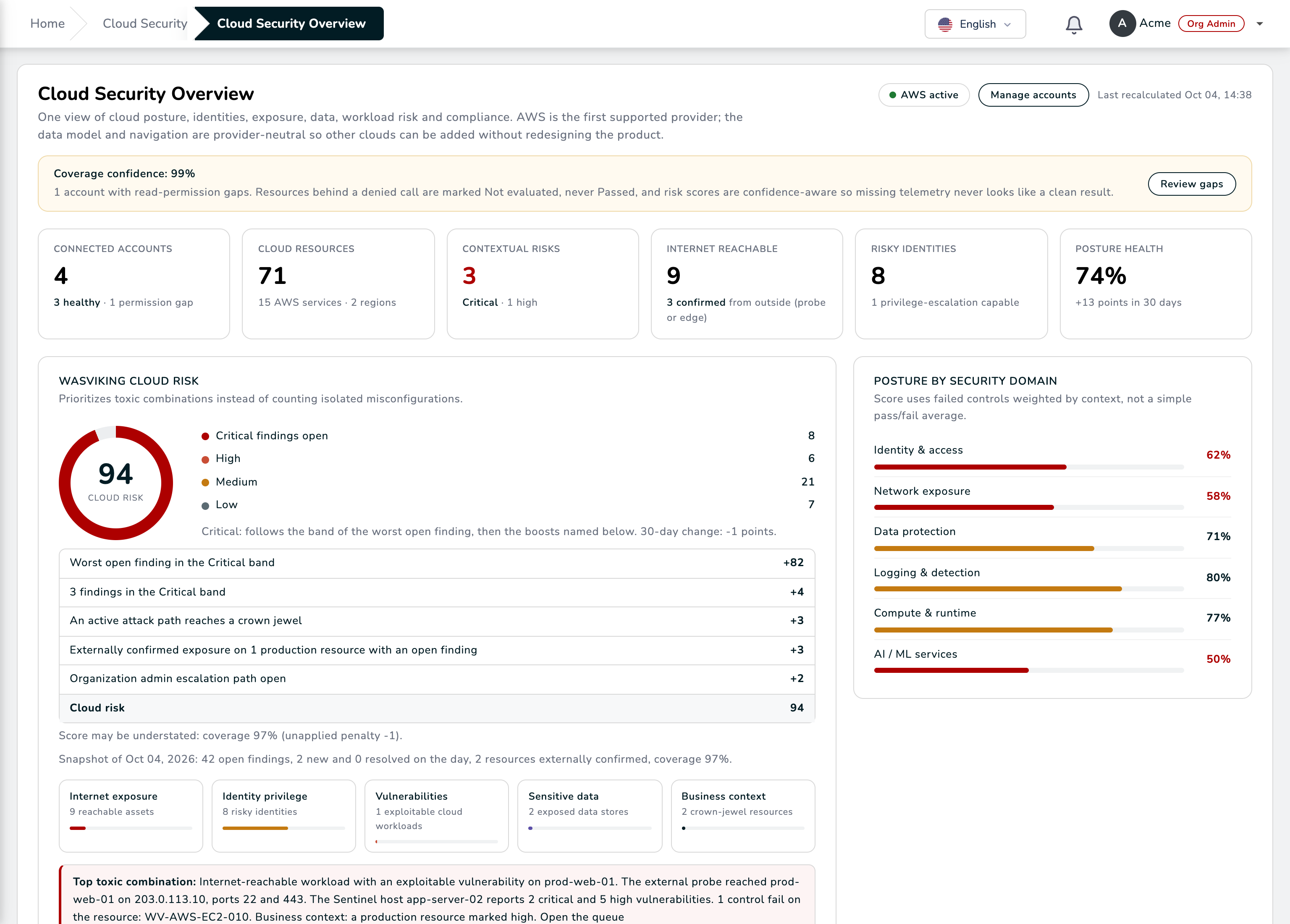
- Overview: coverage confidence, the Cloud Risk ring with every point named, posture by security domain, the 30-day trend with the remediation velocity, the live change feed, the highest priority risks and the framework cards.
- Accounts & Connectors: every account with its status, coverage, regions, last sync and real-time state; the connect wizard.
- Cloud Inventory: every resource with filters by account, service, region, exposure and data; the resource page with the configuration, its versions, the graph around it, the host and attack surface context, its findings, its exposure path, its data profile, the attack paths it sits on and its change timeline.
- Architecture Map: the topology of your accounts drawn from the inventory, with exposure, identity, data and findings on top. See below.
- Posture Findings: the control failures and the contextual risks, with the workflow (owner, status, SLA), the evidence and the fix.
- Identity & Entitlements, Network Exposure, Data Security: the profiles above, each with its own filters and KPIs.
- Compliance: the statement per framework from the live evaluations, with the export.
- Attack Paths: the paths, the featured chain, the break options.
- Changes & Drift: the judged timeline, the drift by change source, the saved watch rules and the export.
- Policies & Controls: the control library, the policy packs you enable, and the exception governance.
- Remediation: the work items and their verification.
- Reports & Evidence: the executive PDF, the posture and inventory CSV exports, the evidence pack and the scheduled reports.
- Settings: the reconciliation cadence, retention, the tag keys that name owner, environment, criticality and data classification, the native signals to ingest and the crown jewel rules.
The Architecture Map
The Architecture Map draws your estate the way you would draw it on a whiteboard: each account, its regions, the VPCs inside them and the public and private subnets of each VPC, with every service placed where it runs and the identities and global services in their own lanes. The lines say how things connect, in plain words: a record resolves to a distribution, a distribution routes to its origin, a load balancer sends traffic to its targets, a role is attached to an instance, a role can read a bucket, a key encrypts a store, a web ACL or a security group protects a resource. The internet is a node of its own in front of every entry point found reachable, and a line turns red when the exposure is confirmed from outside or the link belongs to a risky path.
Each resource carries a badge with its open findings: red for critical, orange for high, amber for medium, green when the controls that apply to it passed, grey when no control evaluates it yet. A box carries the worst risk of what it holds, so a finding on a route table still shows on its VPC. Findings never become nodes: they stay on the resource they concern.
The mode changes what the map emphasizes. Topology shows how the services connect. Security adds the security groups and puts the risk band on every border. Exposure keeps only the way in from the internet, laid out from left to right, so you see where traffic enters and which workloads receive it. The Critical paths switch draws the active attack paths over the map, and each path links to the Attack Paths page that explains it and the smallest fix that breaks it.
Large accounts stay readable. Regions that hold nothing but default networking fold into one node, and many resources of one type become a single group such as "S3 buckets (112)" that keeps the riskiest ones outside. Double click a group or a closed box to open it and an open box to close it; double click the public or private subnets to see one box per subnet, grouped by availability zone. The search finds a resource by name, identifier, ARN, IP address or tag and opens whatever holds it.
Click a resource to read its details without leaving the map: where it runs, whether it is public and reachable, its encryption, its role, its security groups, its data class, its findings and compliance failures, what reaches it and what it reaches, the attack paths through it, the exposure evidence and its recent changes, each with a link to the page that has the full story. The same panel highlights its relations, its blast radius or the path from the internet to it.
The presets light up what answers one question: internet exposure, identity trust and privilege, sensitive data paths, the critical attack surface, public resources, cross-account trust, the resources changed in the last 24 hours and critical findings only.
Drag nodes to arrange the map and save the view with its scope, its mode, the boxes you opened and the positions you chose; a saved view is shared with your organization. Export PNG / SVG downloads the drawing on screen. Reading the map needs the Cloud Security view permission; exporting needs the export permission.
Safe by design
- Read-only, in your account. The assessment role carries the AWS managed read-only audit policy plus a small supplement of list and describe actions; it can never write, and it can never read object contents, secret values, parameter values, function code or database rows. You can review the exact policy before creating it.
- No shared credential. The role trusts the WASViking account with a unique External ID generated for your account, as the AWS guidance on the confused deputy problem describes; sessions are temporary. You can rotate the External ID at any time with a grace window.
- Missing permission is never silence. A denied read marks the resource and its controls Not evaluated, lowers the account's coverage and shows on the Overview as coverage confidence; the validation page lists the exact actions to add.
- Nothing is called "compliant". The product reports technical controls passed and failed against each framework and leaves the judgement to your assessor.
- Removing an account stops the reads at once; you delete the role on your side and nothing on ours can keep it.
- Writes are opt-in, separate and approved. The assessment role never writes. Assisted remediation uses a second role you create from its own template, with its own External ID and an allow-list of only the actions you tick, each one reversible; nothing runs without a request and an approval under your governance policy, and every run is a record you can roll back.
Plans and roles
Cloud Security is enabled per organization by your WASViking contact or partner, with an allowance of connected accounts. Reading the screens needs the view permission on the module; registering and validating accounts, enabling policy packs and saving settings need manage; the remediation workflow needs remediate; approving exceptions needs approve; the exports need export. An Admin holds all of them.
Set up
Follow Set up Cloud Security: register the account, deploy the read-only role from the template, paste the role identifier, validate, and let the first sync fill the Overview. The module also has its row in Activate your modules.