
Set up Sentinel Gateways
Bring your remote sites and data centers into Infrastructure Defense without depending on the internet link. A Sentinel Gateway is an appliance that relays the agents to the cloud, caches verified agent releases and patch content ahead of the maintenance window, serves the Linux package managers, shapes bandwidth by schedule and can sit behind another gateway. This guide covers what it is, how to install, assign and nest it, and how to read what it saved.
The Sentinel Host agent gives you the inside of every server, and the Sentinel Probe gives you the network around them. Both report to the WASViking® cloud over the internet, and so does every patch a maintenance window installs. On a site with a thin link, a strict egress policy or hundreds of hosts pulling the same cumulative update, that link is the bottleneck. The Sentinel Gateway is the third component of Infrastructure Defense and it takes that dependency away: one appliance per site, and the site talks to the internet once.
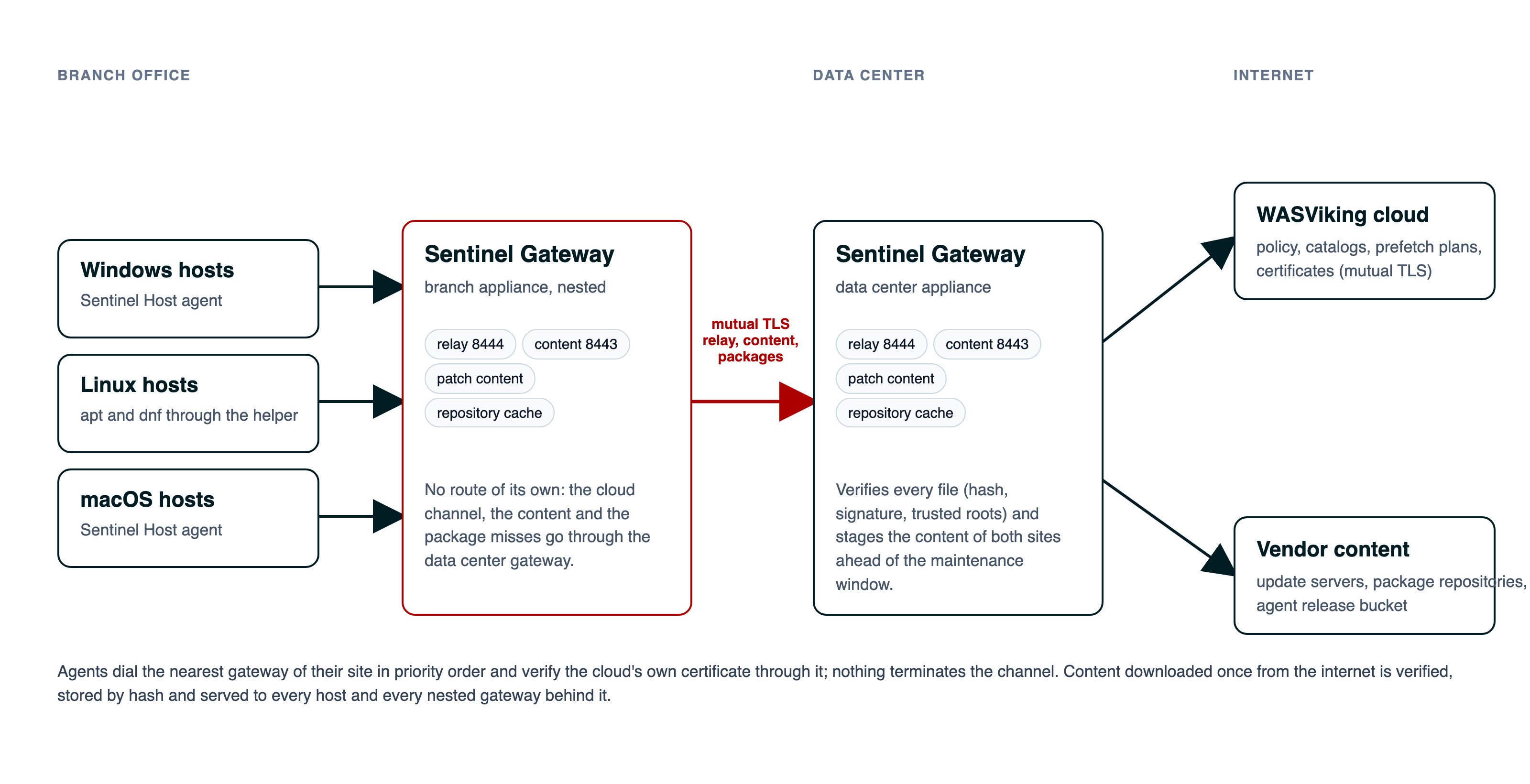 Hosts dial the gateway of their site. A branch gateway can sit behind a data center gateway, and only that one reaches the internet. Nothing terminates the channel to the cloud.
What a Sentinel Gateway is
A Sentinel Gateway is a single program on an Ubuntu Server machine inside your network. It enrolls with an activation key, like a probe, and from then on it serves the Sentinel Hosts of the sites you assign to it in four ways, each one a role you switch on from the portal:
- Relay. Agents with no route to the internet dial the gateway instead of the cloud. The gateway forwards the connection by server name and never opens it: the mutual TLS channel between the agent and the cloud stays end to end, and the agent keeps verifying the cloud's own certificate. A host on an isolated VLAN enrolls, reports and runs jobs through it.
- Cache. Agent releases are downloaded once and served to every host of the site from a content-addressable store, verified by the checksum the cloud fixed and by the release signature.
- Patch distribution. When a Resolve job is approved, the cloud tells the gateway which files the window will need, and the gateway brings them in ahead of time: Windows cumulative updates, third-party installers from the public package manifests, macOS packages and the installers you upload yourself. Every file is verified against its vendor signature and trusted roots before a host may have it, and the host verifies it again before installing.
- Repository cache. The Linux hosts of the site run apt and dnf through the gateway during a job, so the second host that installs the same package finds it on the LAN. Repository indexes are revalidated, package files are kept as long as the quota allows.
Every listener the gateway opens is mutual TLS with the certificate the platform issued at enrollment, and it only serves agents of your own organization: a gateway of one tenant never answers another on a shared network.
What it does not do
The gateway distributes content that can be verified. Operating system updates for macOS still come from the vendor's own channel. HTTPS repositories are relayed for the package managers, not cached. A disk image installer cannot be verified outside the platform it targets, so a macOS application ships as a signed package or stays a manual step. The Patches screen tells you, per update, whether it will arrive through the gateway, through the package channel on the host, or needs you to acquire it.
Before you start
Infrastructure Defense is enabled per organization by your WASViking contact or partner. Configuring a gateway needs the Manage permission on the module. You will need:
- A machine running Ubuntu Server 22.04 LTS or 24.04 LTS, with 4 vCPU and 16 GB of memory for a site of a few hundred hosts.
- A disk for the content store, on its own mount so a full cache never fills the operating system disk. Plan 150 GB for a site that patches Windows servers; the quota is yours to set.
- Outbound HTTPS from the gateway to the WASViking cloud, the release bucket and the vendor domains the policy allows. Nothing else leaves the site through it.
- Inbound from the hosts of the site to the gateway on TCP 8443 (content) and 8444 (relay). Both ports are configurable.
Step 1: create an activation key
Open Infrastructure Defense → Sentinel Gateways in the portal sidebar and switch to the Activation keys tab. Create a key with a title your team will recognize, optionally cap how many gateways it may enroll, and keep the value for the install command. The key's Install page carries the package downloads and the exact command.
Step 2: install the gateway
On the Ubuntu Server machine, install the package and enroll in one command each:
sudo apt install ./wasviking-sentinel-gateway_<version>_amd64.deb
sudo wasviking-sentinel-gateway install --activation-key <your-activation-key> --store /srv/wasviking/store
The installer creates an unprivileged service user, records the store
path, registers the appliance under its own certificate identity and
starts the service. Within a minute the gateway shows Online on the
Gateways tab with its CPU, memory, store disk, IOPS, latency and network
throughput. Run sudo wasviking-sentinel-gateway check on the machine
whenever you want the appliance's own view: the path to the cloud, the
store mount and its headroom, the listener ports, the certificate.
Step 3: switch on the roles
Open the gateway's page and use the form on the Policy tab. Tick Relay to let agents dial the cloud through it, Cache to serve agent releases, Patch distribution to stage the content of approved jobs and Repository cache to serve apt and dnf. The last two need the cache, and the form enables it for you. Set the Address agents dial when the hosts should use a DNS name or an address other than the first one the appliance reported: it goes on the certificate the cloud issues. The appliance adopts a change at its next heartbeat, and the page shows the policy as applied once it reports back.
Step 4: assign the sites it serves
A site is a group of networks: a name, one or more CIDRs, the ordered list of gateways that serve it, whether its hosts may still dial the cloud directly, and whether the package manager proxy stays in place between jobs. Create one from the Sites tab and add the gateway to it. Every host whose address falls inside the site's networks is mapped to it on its next inventory and receives the gateway list at its next heartbeat; a host you want elsewhere can be pinned to a site on its asset page. From then on the agent dials the gateways of its site in priority order, sticks to the one that answered and falls back to the next, and the host page shows which site it belongs to.
A host installed on a network with no route out enrolls through the gateway from the first minute:
sudo wasviking-sentinel-host install --activation-key <host-key> --gateway 10.20.0.6
The cloud replaces that manual entry with the site's list as soon as the host is mapped.
Step 5: shape the bandwidth
The gateway's page has a Bandwidth tab: an ordered list of windows (days, start, end) with the download rate from the internet, the serve rate to the LAN and the number of concurrent downloads inside each, plus a default outside them. A common shape is 50 Mbps of download during business hours and no limit at night. Prefetch respects it: when a job is approved, the gateway downloads its content under the policy in deadline order, and the Resolve screen shows Content staged N of M for the job as the files arrive. A job whose content is not staged in time still runs; the host then downloads what is missing the usual way.
Step 6: hand it what it cannot download itself
Some installers are not published where a gateway can fetch them. The Installer uploads tab takes them from you: choose the platform, name the application the way the inventory lists it, give the version and the architecture, pick the installer type and the silent switches, and upload the file from your browser. For a macOS package you can pin the developer's Team ID. The platform pins the file's hash, a gateway downloads and verifies the signature, and the row shows Verified by with the signer or Rejected with the reason. From then on the Patches screen classifies that update as Automatic, via gateway with the source From your upload, and the next job installs it from the gateway's content.
Step 7: nest a branch behind the data center
A branch office often has no internet path of its own, only a link to the data center. Install a gateway at the branch and, on its page, choose the data center gateway as its Upstream gateway. The branch appliance then reaches the cloud through the data center's relay, asks the data center for every object before the internet, and sends the package manager misses through the data center's own repository cache. The data center gateway also stages the content of the branch's sites, so the branch window starts warm. A branch appliance installed without any route enrolls through the data center gateway with one flag:
sudo wasviking-sentinel-gateway install --activation-key <your-activation-key> --store /srv/wasviking/store --upstream 10.20.0.6
The portal refuses a loop, and every file is verified on the branch as well as on the data center: nesting never trusts bytes the branch did not check itself. The gateway page shows the chain (this gateway, then its upstream, then the cloud), the gateways nested behind it, and how much came through the upstream instead of the internet.
Reading the numbers
The Gateways tab opens with the fleet: gateways, their health, agents connected, cache size and hit rate, and the last thirty days of Bandwidth saved, Served locally and Patch files served. A gateway's page keeps its health, uptime, store disk and hit rate on top and splits the rest in tabs: Performance has the resources with the store disk's IOPS and latency and the twelve hour, twenty four hour and seven day charts, Serving the cache and repository cache requests, Patch content the content it holds with the signer of each file, and Bandwidth the bandwidth policy. The same thirty day totals appear on the Infrastructure Defense tab of your account profile and in the Content delivery section of the Infrastructure Defense PDF report, so the number you show your management is the number the appliances measured.
Day two
The platform raises an alert when a gateway goes offline, when its store disk, CPU or memory run high, when its version falls behind, when its certificate approaches expiry, when a file failed verification or when prefetch is behind a window's deadline; each alert clears itself on the next healthy heartbeat.
You manage those alerts on the Monitoring alerts tab. Every condition has a rule you can switch off and, where it depends on a number, the threshold inside its sentence: the store disk marks, memory, CPU and disk latency with how long they must hold, connection capacity, how long without a heartbeat means offline, and how close to expiry a certificate is worth a message. The thresholds decide when a reading becomes a condition, so the health on the Gateways tab follows them; a rule that is off only stops the message. On the same tab you choose who is told: subscribe the notification channels of your organization (email, Slack, Microsoft Teams, HTTP API) to the Sentinel Gateway Monitoring event, add up to ten extra recipients for the people who only want the appliance mail, and send a test that follows the same route a real alert takes. A gateway under maintenance can be muted for an hour, four hours, a day, a week or until you resume it: its conditions are still recorded and no message is sent.
A gateway shows as offline on the screens the moment its service stops. The offline alert waits for the offline window, whether the gateway vanished or was stopped on purpose, so a restart or an update that comes back within seconds never sends a message, and a gateway that stays down always does. A gateway you deactivate in the portal does not alert.
The Operations tab of the gateway's page
offers the quick actions:
refresh the policy, collect the logs, restart, update to the stable
release, rotate the certificate. On the machine, status prints what the
service reported last and check probes the path to the cloud and, on a
nested appliance, the upstream gateway.
What to look at next
- Set up Infrastructure Defense for the host agent the gateway serves.
- Set up Sentinel Probes for the network view of the same sites.
- Infrastructure Defense for how the score, Resolve and the reports fit together.