
CI/CD DAST with Bitbucket Pipelines
Run an automated WASViking Sentinel DAST scan inside Bitbucket Pipelines against the app you bring up on localhost, over an ephemeral mTLS tunnel. The app is never exposed publicly, the build fails on real findings, and results land in the portal with SARIF and JSON as build artifacts.
This guide runs a WASViking® DAST scan inside a Bitbucket
Pipelines build, against the application you start on localhost in the
runner, and fails the pipeline when it finds real vulnerabilities. The
app is never exposed to the public internet: the Sentinel agent opens an
ephemeral mTLS tunnel and the DAST engine sends its probes back through
it.
It is the same binary, the same API, and the same one-shot scan
subcommand as the
GitHub Actions guide. What
changes between vendors is the YAML around it, plus two Bitbucket details
this page calls out explicitly: you bring the app up as a service so
it answers on localhost, and credentials live in secured repository
variables.
The setup has two halves, and the order matters: configure the
WASViking portal first (one API Key scoped to ci:scan), then wire
it into Bitbucket.
What this integration does
- Runs a DAST scan on demand, on pull requests, or on pushes to
main, against the build you stand up in the runner. - Fails the build by severity with
--fail-on, so a vulnerable release is blocked before merge. - Compares against the base branch with
--baseline, so a pull request only fails on what it introduces, not pre-existing debt. - Runs authenticated scans with a short-lived token your pipeline
mints at runtime (
--auth-bearer/--auth-header), so protected areas behind a login are actually reached, with no static credentials in a config. - Prioritizes the endpoints you list with
--path, scanning your own API routes first, before the auto-discovered surface. Essential for authenticated APIs and SPAs with no crawlable HTML links. - Emits SARIF 2.1.0 plus a full JSON report as build artifacts.
- Provisions and tears down the agent per run, with no persistent credentials left on the runner.
- Meters against your CI/CD scan quota and records every run in the portal.
How it works
- The build container downloads and installs the Sentinel agent using the API Key.
- The agent provisions an ephemeral mTLS bundle (valid 60 minutes, not reusable) from the WASViking API.
- The agent opens a gRPC over mTLS tunnel to the WASViking tunnel server.
- The agent requests a scan against your
localhosttarget. The API validates that the target is a private address, checks quota and concurrency, and starts the DAST engine. - The engine runs its checks (OWASP Top 10, SQLi, XSS, security headers, and more) by sending probes back through the tunnel; the agent executes them locally against your app.
- The agent writes
wasviking-scan.sarifandwasviking-scan.json, and Bitbucket collects that directory as a build artifact.
Access posture
- The agent only scans private targets:
localhost, RFC1918, and link-local. Public addresses are rejected by the API target validator, which is intentionally stricter than the persistent on-premise flow. - The mTLS bundle is ephemeral (60 minutes) and single-use.
- No production traffic is intercepted. Only the test instance you start in the runner is scanned.
- No source code, no repository variables beyond the key you pass, and
nothing outside
.wasviking/is collected. - Revoke access at any time by revoking the API Key in the portal.
Pre-requisites
| Requirement | Detail |
|---|---|
| WASViking plan | CI/CD Pipeline Scans enabled (Pro or higher). |
| Portal role | Admin or Manager, to issue API Keys. |
| Bitbucket | Pipelines enabled on the repository, under Repository settings → Pipelines → Settings. |
| Bitbucket permission | Admin on the repository, to create secured repository variables and commit bitbucket-pipelines.yml. |
| Build image | Any Linux x86_64 image with curl. atlassian/default-image:5 works. |
| Target app | Able to start in the runner and answer on localhost:<port>, whether as a Bitbucket service or a container you launch in the step. |
| Network egress | HTTPS to api.wasviking.com and sentinel.wasviking.com on 443. No inbound is needed. |
On GitLab CI, Jenkins, CircleCI, or anything else that can execute a Linux binary? The commands are identical. Only the YAML dialect changes. Start from wasviking-sentinel in CI/CD.
Step 1: Create an API Key scoped to ci:scan (portal)
One API Key covers the whole build: it authorizes the agent installer download and the scan itself. No Sentinel agent token is involved. The CI flow provisions an ephemeral agent on the fly from this key, so there is no persistent agent to register.
Go to Settings → System Settings → API Keys and click + New Key.
| Field | Value |
|---|---|
| Label | Something you will recognise later, for example Bitbucket DAST, checkout-api. Use one key per repository so revoking it does not take down other pipelines. |
| Scopes | ci:scan (Trigger scans from a CI/CD pipeline, which also authorizes the installer download). Least privilege: a DAST pipeline needs nothing else. |
| Expiration | 90 days is a sensible default. Rotate on that cadence. |
Save and copy the key once. You will paste it into Bitbucket in
Step 2 as WASV_DAST_API_KEY.
WASViking authenticates with the
Authorization: ApiKey <key>header, notBearer. If you already run the SCA / SBOM / Secrets pipeline, its key already includesci:scan, so you can reuse the same variable instead of issuing a second key.
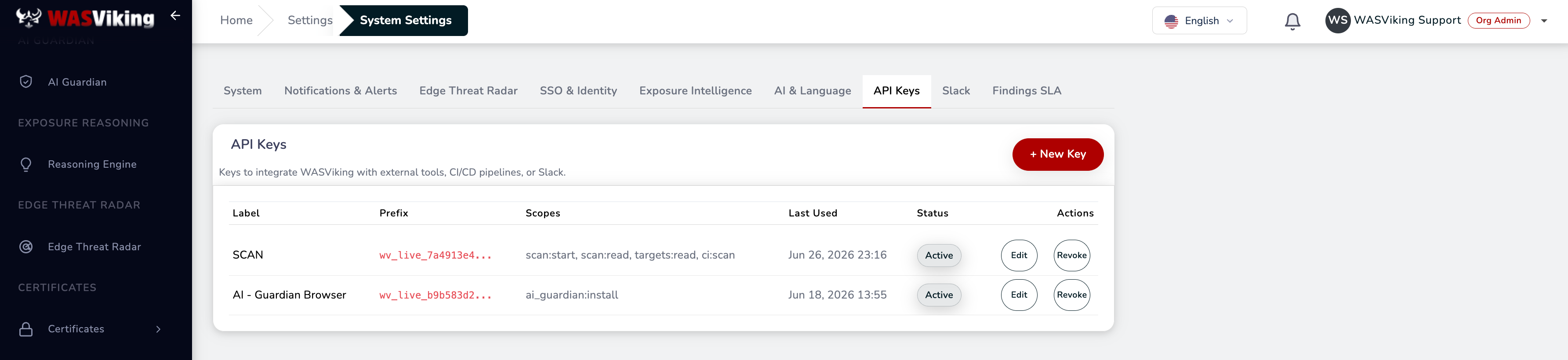 Settings → System Settings → API Keys.
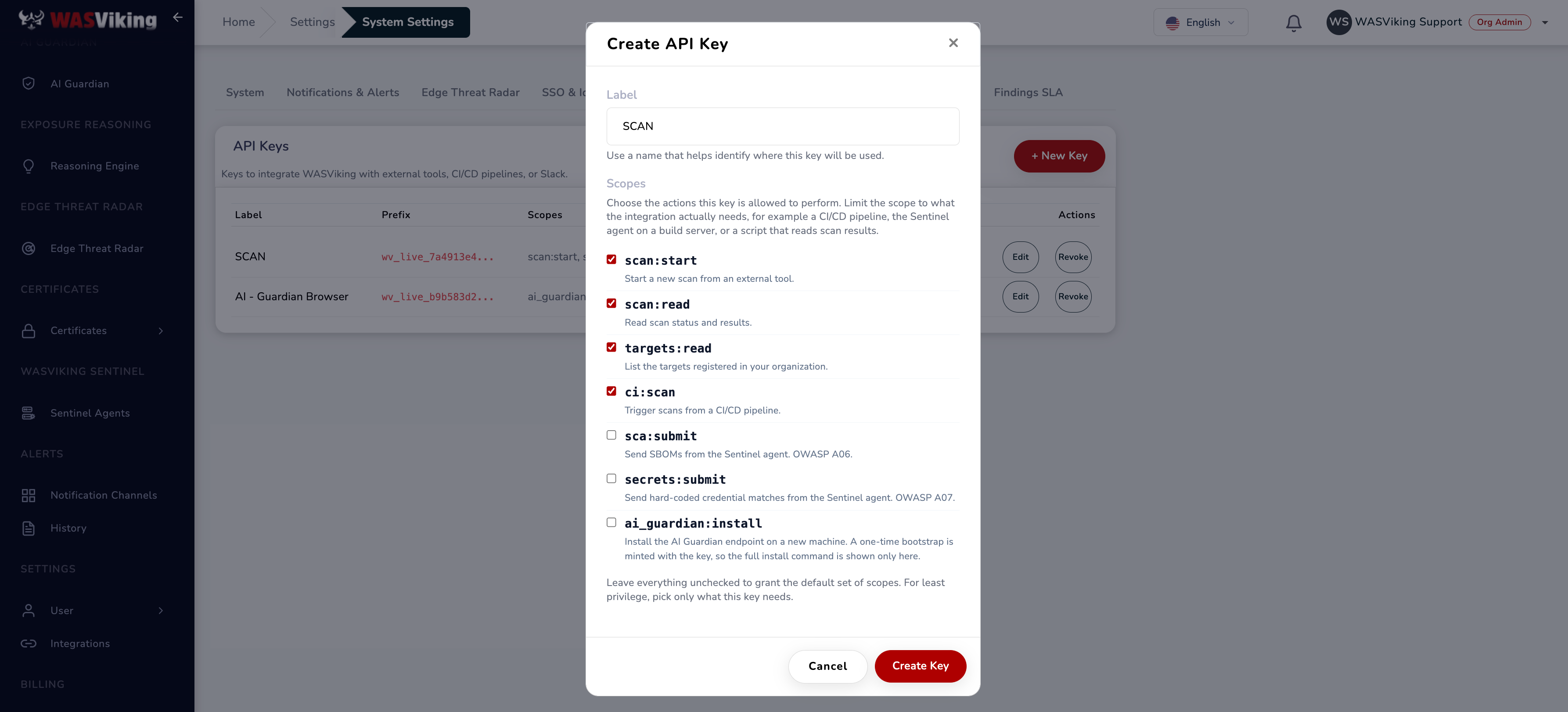 Select ci:scan only for a CI/CD pipeline key.
Step 2: Store the key as a secured repository variable
Never commit a key to the repository. In Bitbucket, go to Repository settings → Pipelines → Repository variables and add:
| Name | Value | Secured |
|---|---|---|
WASV_DAST_API_KEY |
The API Key from Step 1. | Yes |
WASV_TEMPLATE |
Optional. The CI/CD slug of a Scan Template, for example ci-fast. |
No |
Tick Secured on the key so the value is masked in the build log and
cannot be read back from the UI. Leave WASV_TEMPLATE unsecured; it is
not a secret, and seeing it in the log is helpful.
One Bitbucket behaviour to plan for: pull request builds triggered from a forked repository do not receive secured variables. The first line of the step below is a guard that fails the build immediately in that case, instead of running the scan unauthenticated.
Picking a Scan Template
A Scan Template is a reusable, named bundle of scan preferences (crawl,
auth, analyzer selection, AI commentary), so the pipeline does not
reconfigure those each run. Browse them in the portal under
Scans → Scan Templates; the CI/CD Slug column is exactly the
value you put in WASV_TEMPLATE.
For a per-PR or per-commit gate, use ci-fast: crawl, security
headers, exposed ports, and TLS only, skipping the heavy active modules,
so the gate returns in seconds. Pair it with a scheduled full-coverage
run against staging. Leave WASV_TEMPLATE unset to use the built-in CI
defaults.
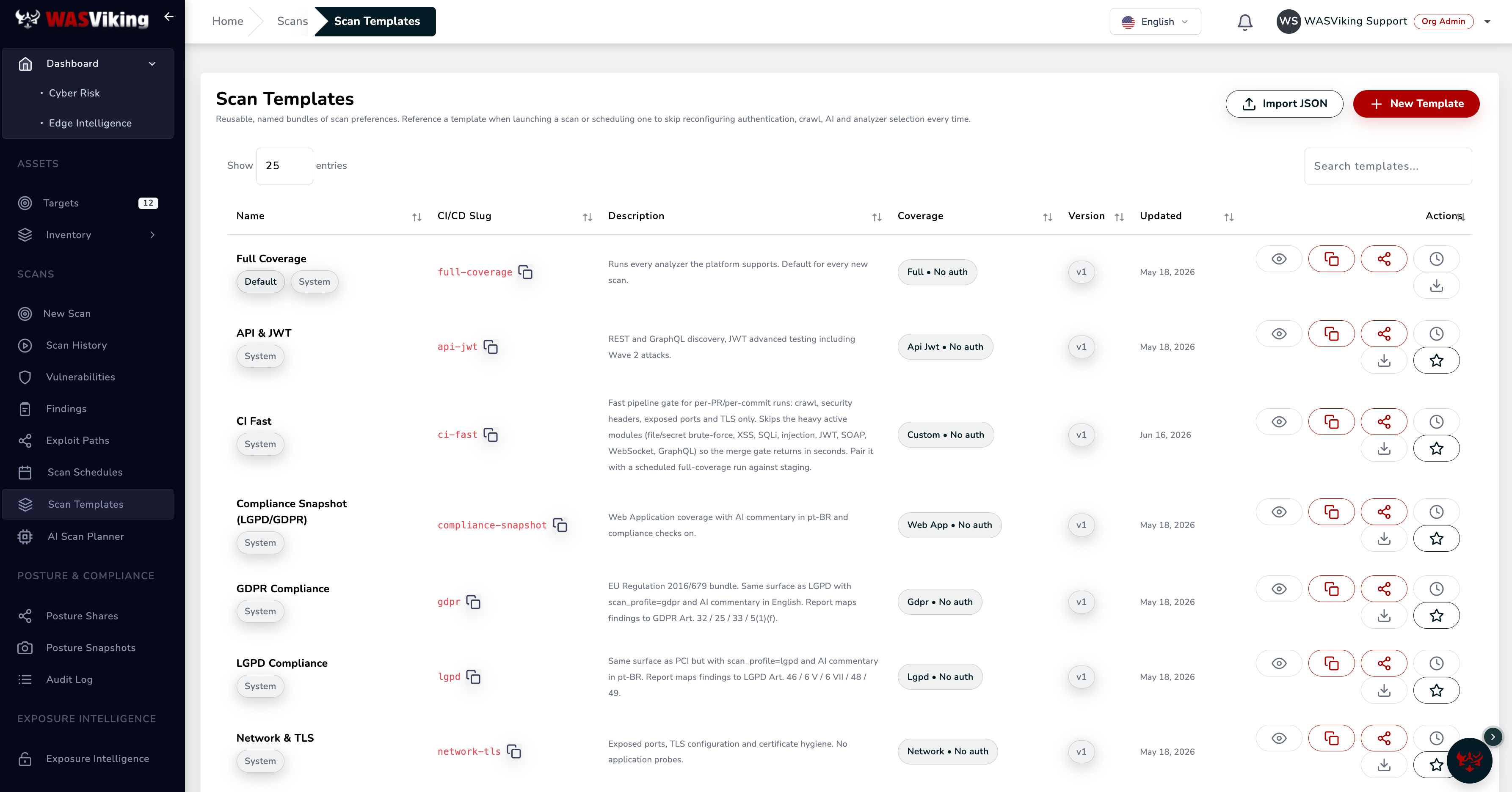 Scans → Scan Templates. The CI/CD Slug column is the WASV_TEMPLATE value.
Step 3: Add the pipeline
Create or extend bitbucket-pipelines.yml at the repository root. The
example brings up OWASP Juice Shop as the app under test so you can
run it end to end today; replace the service with however your own
application boots in CI.
image: atlassian/default-image:5

definitions:
  services:
    # The application under test. Bitbucket makes a service reachable on
    # localhost, so the agent scans it at http://localhost:3000. Replace
    # this image with your own app; keep it intentionally on a private
    # port, never public.
    app-under-test:
      image: bkimminich/juice-shop:latest
      memory: 2048

pipelines:
  custom:
    wasviking-dast:
      - step:
          name: WASViking DAST
          max-time: 25
          services:
            - app-under-test
          script:
            - test -n "$WASV_DAST_API_KEY"
            - export WASV_API_BASE="https://api.wasviking.com"
            - export TARGET_URL="http://localhost:3000"

            # Wait until the app answers before scanning.
            - |
              up=""
              for i in $(seq 1 60); do
                if curl -fsS "$TARGET_URL/" >/dev/null 2>&1; then
                  echo "target is up after ${i} tries"; up=1; break
                fi
                sleep 3
              done
              test -n "$up" || { echo "target never answered on $TARGET_URL"; exit 1; }

            # Install WASViking Sentinel.
            - |
              curl -fsSL \
                -H "Authorization: ApiKey $WASV_DAST_API_KEY" \
                "$WASV_API_BASE/api/v1/sentinel/install.sh" | sh

            - mkdir -p wasviking-reports

            # Run the DAST scan through the ephemeral mTLS tunnel.
            # --fail-on none keeps the first runs green while you review
            # the findings; switch to --fail-on high (or critical) to make
            # it a merge gate. WASV_TEMPLATE is optional.
            - |
              TEMPLATE_ARG=""
              if [ -n "$WASV_TEMPLATE" ]; then TEMPLATE_ARG="--template $WASV_TEMPLATE"; fi
              ./.wasviking/wasviking-sentinel scan \
                --api "$WASV_API_BASE" \
                --api-key "$WASV_DAST_API_KEY" \
                --scan-type singlescan \
                --fail-on none \
                --baseline all \
                --out ./wasviking-reports \
                $TEMPLATE_ARG \
                "$TARGET_URL"

          artifacts:
            - wasviking-reports/**
Four choices in that file are worth understanding before you adapt it:
- The service on
localhost. Bitbucket makes a service container reachable from the build step atlocalhoston the port the service listens on. That is why the agent, which executes the engine's probes locally, can scanhttp://localhost:3000. Some apps need memory;memory: 2048gives Juice Shop room, and for a heavier app you may needsize: 2xon the step to enlarge the pool. If you prefer to launch the app yourself, add- dockertoservicesanddocker compose up -dthe app instead, then scan the same localhost URL. - A
custompipeline. The scan runs on demand from Pipelines → Run pipeline → Custom → wasviking-dast, which is the right shape for the first rollout. Move the step underpull-requestsorbranches: main(with a YAML anchor, as the SCA guide shows) once it is proven. --fail-on noneto start. The first runs stay green so you can read the findings in the portal and in the artifacts without a red build masking the integration. Tighten tohighorcriticalwhen the baseline is understood.artifacts. Bitbucket keepswasviking-reports/**attached to the build, sowasviking-scan.sarifandwasviking-scan.jsonare downloadable from the Artifacts tab after the run.
Commit the file, then run it from Pipelines → Run pipeline → Custom.
Step 4: Scan flags
The scan command takes the target URL as its final argument:
wasviking-sentinel scan [flags] <URL_TARGET>
| Flag | Required | Description |
|---|---|---|
<URL_TARGET> |
Yes | Target URL, passed last. Must resolve to a private address (localhost, RFC1918, link-local). |
--api-key |
Yes | API Key with the ci:scan scope. Also reads WASV_API_KEY. |
--api |
No | WASViking API base URL. Default: https://api.wasviking.com. |
--scan-type |
No | singlescan (default, recommended for CI) or fullscan. |
--template |
No | Slug of a Scan Template, to reuse a standard scan config. Also reads WV_TEMPLATE. Empty = built-in CI defaults. |
--fail-on |
No | Single threshold: critical, high, medium, low, or none. "Or above" logic: high fails on high and critical. Default: critical. |
--baseline |
No | all (every finding counts, default) or new (only findings absent from the latest scan on the base branch). |
--auth-bearer |
No | Bearer token to run authenticated. Prefer the WV_AUTH_BEARER env var so it never lands in argv or the log. Overrides any auth in --template. |
--auth-header |
No | Custom auth header in Name: value form. Prefer WV_AUTH_HEADER. Use either --auth-bearer or --auth-header, not both. |
--path |
No | Extra endpoint to scan first, before the auto-discovered surface. Repeatable, or via WV_SEED_PATHS (comma-separated). Relative paths or same-origin URLs; up to 500. |
--out |
No | Output directory for SARIF and JSON. Default: current directory. |
--timeout |
No | Total wall-clock timeout. Default: 45 minutes. |
Two files are produced: wasviking-scan.sarif (SARIF 2.1.0) and
wasviking-scan.json (full output with WASViking metadata).
Exit codes
Bitbucket fails the step on any non-zero exit, so these codes are what turn a finding into a blocked merge.
| Code | Meaning |
|---|---|
0 |
Nothing at or above the --fail-on threshold. |
1 |
Findings at or above the threshold, or an unmapped runtime failure. |
2 |
Invalid --baseline value. |
70 |
The --template slug was not found for your organization. |
71 |
The --template slug exists but your key may not use it. |
If you also enable the local --sca or --secrets pre-checks on the
same command, they run before provisioning and add their own exit codes
(70/71 for SCA, 73/74 for secrets), documented in the
SCA guide.
Authenticated scans
An unauthenticated scan only sees what an anonymous visitor sees. To reach the area behind a login, mint a short-lived token in the pipeline and pass it to the scan, rather than storing static credentials in a template.
| Mode | Flag | Env var (preferred) | Sent as |
|---|---|---|---|
| Bearer token | --auth-bearer <token> |
WV_AUTH_BEARER |
Authorization: Bearer <token> |
| Custom header | --auth-header 'Name: value' |
WV_AUTH_HEADER |
Name: value (e.g. X-Api-Token: …) |
Always pass the token via the environment variable, not the flag. A value on the command line ends up in the process argv and the build log; an environment variable does not.
How it behaves:
- Overrides the template. A supplied credential replaces the
authenticationblock of your--templateentirely; everything else in the template is preserved. One template can serve both anonymous and authenticated pipelines. - Encrypted at rest, never logged. The secret travels over the same
TLS channel as the API Key and is stamped only as a mode marker
(
bearer/header) in the audit trail, never the value. - No silent downgrade. On success the CLI prints
Authenticated scan confirmed (mode=bearer). If the server does not apply the credential, the CLI fails the step (exit 2) instead of running unauthenticated and reporting a false all-clear.
Mint the token against the instance you started in the runner, then export it before the scan step:
- |
  TOKEN="$(curl -fsS -X POST http://localhost:3000/api/login \
    -H 'Content-Type: application/json' \
    -d "{\"email\":\"$SCAN_TEST_USER\",\"password\":\"$SCAN_TEST_PASSWORD\"}" \
    | python3 -c 'import sys,json;print(json.load(sys.stdin)["authentication"]["token"])')"
  test -n "$TOKEN" || { echo "login failed"; exit 1; }
  export WV_AUTH_BEARER="$TOKEN"
Use a dedicated, low-privilege test account for scanning, never a real
user or an admin credential. Store SCAN_TEST_USER and
SCAN_TEST_PASSWORD as secured repository variables.
Prioritizing specific endpoints (seed paths)
The engine auto-discovers your surface (crawl, robots.txt, sitemap,
OpenAPI/Swagger, GraphQL introspection). But API routes and SPA views
often have no crawlable HTML links, so the crawler never reaches them.
List them explicitly with --path and they are scanned first:
--path /rest/products/search \
--path /api/v1/orders
Or, equivalently, via the environment (comma-separated):
export WV_SEED_PATHS=/rest/products/search,/api/v1/orders
Relative paths or same-origin URLs, up to 500. Pair with authentication:
the token unlocks the protected routes, and --path makes sure the
scanner actually visits them. On success the CLI prints
Priority seed paths confirmed (N applied).
Fail-on policy
--fail-on sets the lowest severity that fails the build, and everything
above it also fails.
| Setting | Behavior |
|---|---|
--fail-on none |
Never fails. Report only, useful for the first runs. |
--fail-on critical |
Fails on critical only. |
--fail-on high |
Fails on high and critical. A good default for pull requests. |
--fail-on medium |
Fails on medium and above. Stricter, more friction. |
A practical rollout: start at none to see the volume, move to
critical, then tighten to high once your baseline is clean (typically
a couple of sprints).
Baseline diff
--baseline controls what counts toward the fail-on policy.
| Mode | Behavior |
|---|---|
all (default) |
Every finding counts. Use for release branches, scheduled scans, and audits. |
new |
Only findings absent from the latest scan on the base branch count. Use for day-to-day pull requests, to avoid friction with pre-existing debt. |
Reading the results
The portal is the system of record. Every run and its findings land under User → CI/CD Pipeline, with the run tagged as Bitbucket Pipelines, and its findings attached to your organization's posture.
The SARIF file is written for tools that consume the format. Bitbucket
does not ingest SARIF natively, so on this platform it is a build
artifact you download from the Artifacts tab or hand to another tool,
not an annotation layer on the pull request. The build log carries the
scan summary (a severity breakdown and Result: PASS/FAIL), and the
portal carries the full history.
What is and isn't collected
WASViking does not collect your repository source code, runner
environment variables beyond the keys you pass, runner filesystem
contents outside the .wasviking/ directory, or any production traffic
or data. Only the test instance you start in the runner is scanned. Data
is processed in the US region, encrypted in transit (TLS 1.2+) and at
rest (AES-256). A DPA and EU data residency are available on request; see
the Trust Center for the
full compliance mapping (ISO 27001, SOC 2, LGPD, GDPR, NIST SSDF,
OWASP DSOMM).
Common problems
| Problem | Likely cause |
|---|---|
| Step fails on the first line, before any output | WASV_DAST_API_KEY is not set. On a pull request from a fork, secured variables are not delivered to the build. |
target never answered on http://localhost:3000 |
The app service did not come up in time. Raise the wait loop, give the service more memory, or check the service image starts cleanly. |
HTTP 401 Unauthorized |
Key revoked, expired, or missing the ci:scan scope. The header is Authorization: ApiKey <key>, not Bearer. |
HTTP 400 target must be private |
The target resolved to a public address. Scan localhost or a private range. |
HTTP 429 quota exceeded |
Monthly CI/CD scan quota reached. Wait for the cycle, upgrade, or buy an add-on pack. |
HTTP 429 concurrency limit |
Too many simultaneous scans for your plan. |
| Exit 70 | The --template slug does not exist for your organization. Fix the WASV_TEMPLATE value or unset it to use CI defaults. |
| Scan stuck in running | The target app did not respond to probes. Confirm the health check passed before the scan step. |
| Empty SARIF | The app was not reachable or returned only 5xx errors. |
install.sh download error |
Network policy blocking api.wasviking.com or the release bucket. |
| Step exits 2, "server did not apply any credential" | You requested an authenticated scan but the token was not applied. Check the token was minted (not empty) and exported to WV_AUTH_BEARER/WV_AUTH_HEADER. |
Where this fits in the platform
- The CI/CD scan quota and run history live under User → CI/CD Pipeline in the portal.
- The GitHub Actions version of this same pipeline is CI/CD DAST with GitHub Actions.
- The dependency and secrets gates run on Bitbucket too, from the same binary and key model. See CI/CD SCA, SBOM & Secrets with Bitbucket Pipelines.
- The reference for the
scansubcommand across CI systems is wasviking-sentinel in CI/CD. - Alert routing is documented under Slack and Teams and Webhooks.