
SBOM Evidence Bundles
Answer a customer audit request with a signed, password-protected SBOM evidence package. Generate the bundle in the portal, deliver the link and the password through separate channels, and track every download.
Sooner or later one of your customers asks what is inside your software. The request usually lands on your compliance inbox as a vendor security questionnaire, a third-party risk review, or an auditor asking for proof that you track the components you ship. Answering by hand means exporting spreadsheets, pasting versions into an email thread, and hoping nobody asks how that list was produced.
An SBOM Evidence Bundle replaces that thread with one artifact: a cryptographically signed package of every CycloneDX SBOM submitted for a target during a period, wrapped with a cover page in your customer's name, tagged with the compliance frameworks they care about, and delivered through a password-protected link that records every download. The customer's auditor gets verifiable evidence. You get an audit trail showing exactly what was shared, with whom, and when.
WASViking® holds none of the unlocking material: the share works on a token plus password split, so the link alone opens nothing. The frameworks referenced on the cover map to the audit requests you are most likely to receive: PCI DSS 6.3.3, ISO 27001 A.8.8, LGPD Art. 46, GDPR Art. 32, and BACEN CMN 4.893 Art. 3.
Where this helps in the day to day
- A customer's compliance team requests third-party analysis of your software. Generate a bundle scoped to that customer, send the link, and answer the request the same day.
- A procurement gate asks for an SBOM before contract renewal. The signed package carries more weight than an exported file because the recipient can verify the signature and the SHA-256 offline.
- An auditor wants evidence for a specific window. The period filter scopes the bundle to exactly the quarter or the release cycle under review.
- You need to prove later what was shared. Delivered, expired, and revoked bundles keep their audit trail, so the history of every disclosure stays on record.
Pre-requisites
| Requirement | Detail |
|---|---|
| SBOM submissions | At least one CycloneDX submission for the target inside the chosen period. Submissions come from wasviking-sentinel sbom or the CI/CD pipeline. |
| Portal access | A role that can manage the SBOM inventory, such as Admin. |
| A second channel to the customer | Phone, SMS, or a separate mailbox to deliver the password. The password must never travel in the same message as the link. |
Step 1: Open the Evidence Bundles page
In the portal, go to Inventory → SBOM → Evidence Bundles
(/portal/inventory/sbom/bundles/).
The page opens with four counters that summarize your sharing posture: Total Bundles, Ready to Share (active customer share links), Delivered (customers who downloaded at least once), and Expired / Revoked (kept for the compliance audit trail). Below them, the table lists every bundle with its status, target, customer, period, language, compliance tags, and download count.
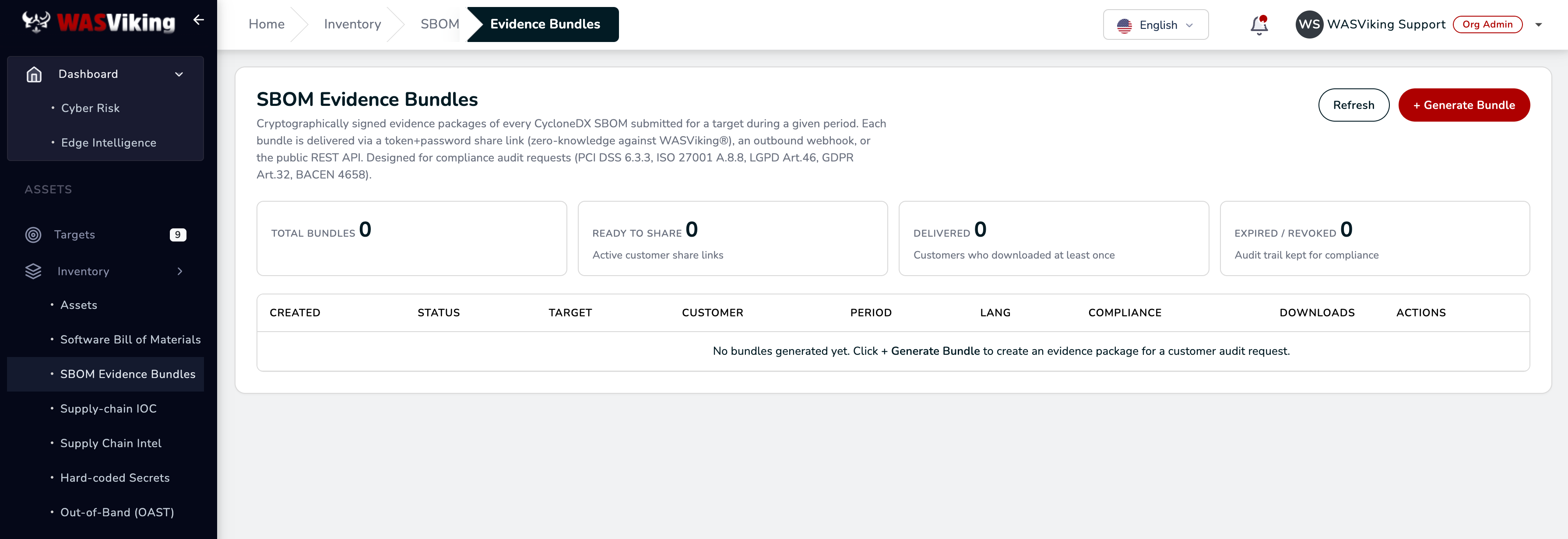 Inventory → SBOM → Evidence Bundles.
On a fresh organization the table is empty and points you to the + Generate Bundle button. That is the whole flow: one button per audit request.
Step 2: Generate the bundle
Click + Generate Bundle and fill the form:
| Field | What to enter |
|---|---|
| Target / Project | One target, or All targets (organization-wide) for a company-level disclosure. |
| Period from / to | The submission window the bundle covers. It defaults to the last 90 days; narrow it to the quarter or release cycle the auditor asked about. |
| Customer name (cover page) | Required. Printed on the bundle cover, so use the name the recipient expects to see, for example Acme Bank Compliance. |
| Language | Language of the cover page and reports. |
| Share lifetime (days) | How long the share link stays live. Default 30. |
| Compliance frameworks | Tick the frameworks the request mentions (BACEN, GDPR, ISO27001, LGPD, PCI). Hover each one to see which controls it covers; the tags appear on the cover and on the recipient page. |
| Share password (min 12 chars) | Accept the generated one or type your own. This is what you will deliver out-of-band. |
| Notes for customer | Optional free text shown to the recipient. |
Click Generate. The bundle is built asynchronously, and the share URL and password are shown on this screen only once. Copy both before closing the dialog.
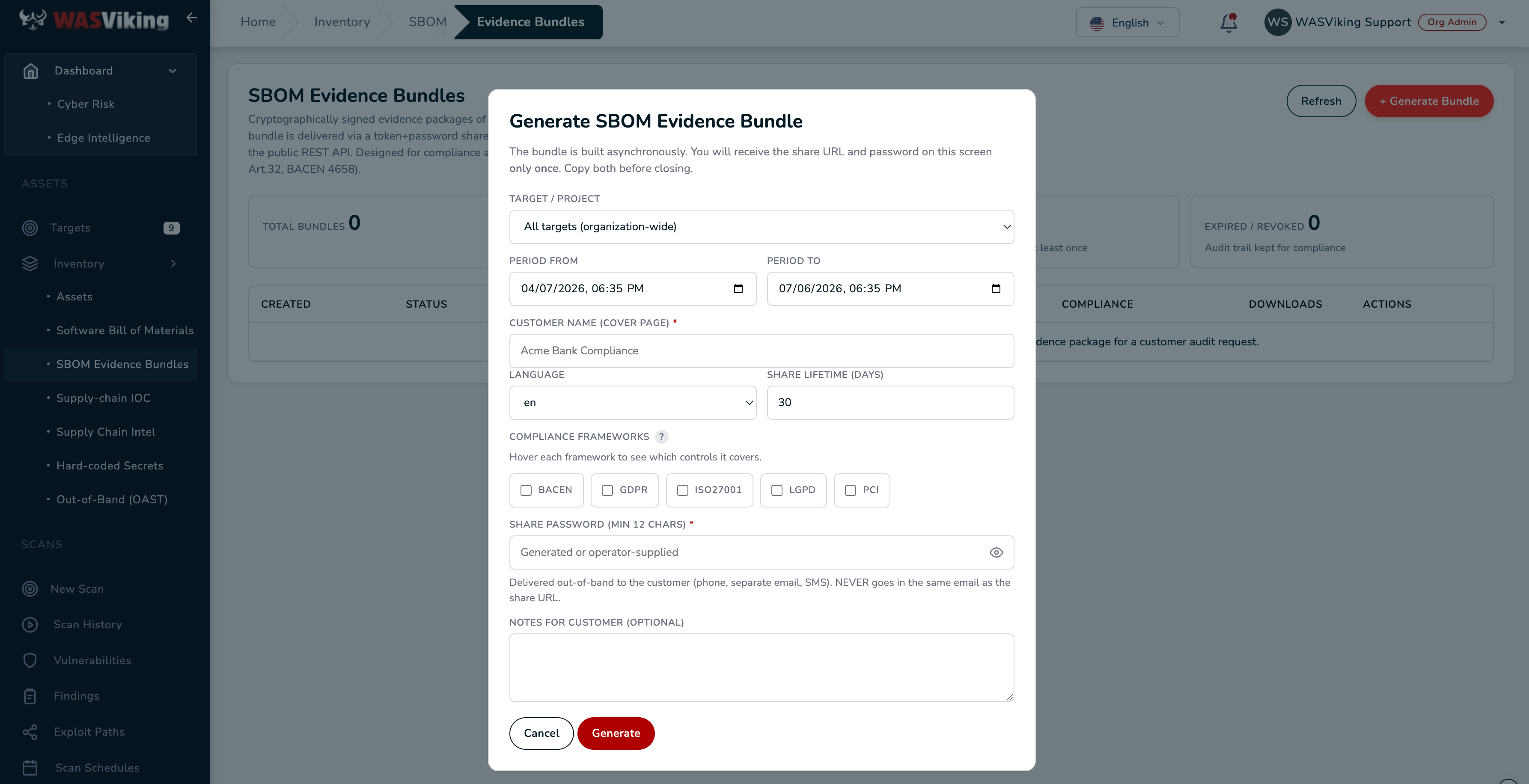 The share URL and password appear once. Copy both before closing.
What goes into the package: every CycloneDX submission in the period,
a consolidated CycloneDX, the branded cover PDF, and the drift,
findings, audit, and compliance CSVs, plus the verification.txt
used to check the signature. The full contents and the cosign
verification procedure are documented in
SBOM Evidence Bundle.
Step 3: Deliver the link and the password separately
Send the share URL through your normal channel, usually email. Deliver the password through a different one: a phone call, SMS, or a separate mailbox. Never put the two in the same message; if that email is ever forwarded or leaked, the link alone must be useless.
Your customer's analyst lands on a page that states what they are about to receive before anything is unlocked: your customer name on the cover, the target, the period in UTC, the compliance tags, and the bundle size. They enter the password and click Unlock and download. The download is single use and nothing is cached on their device.
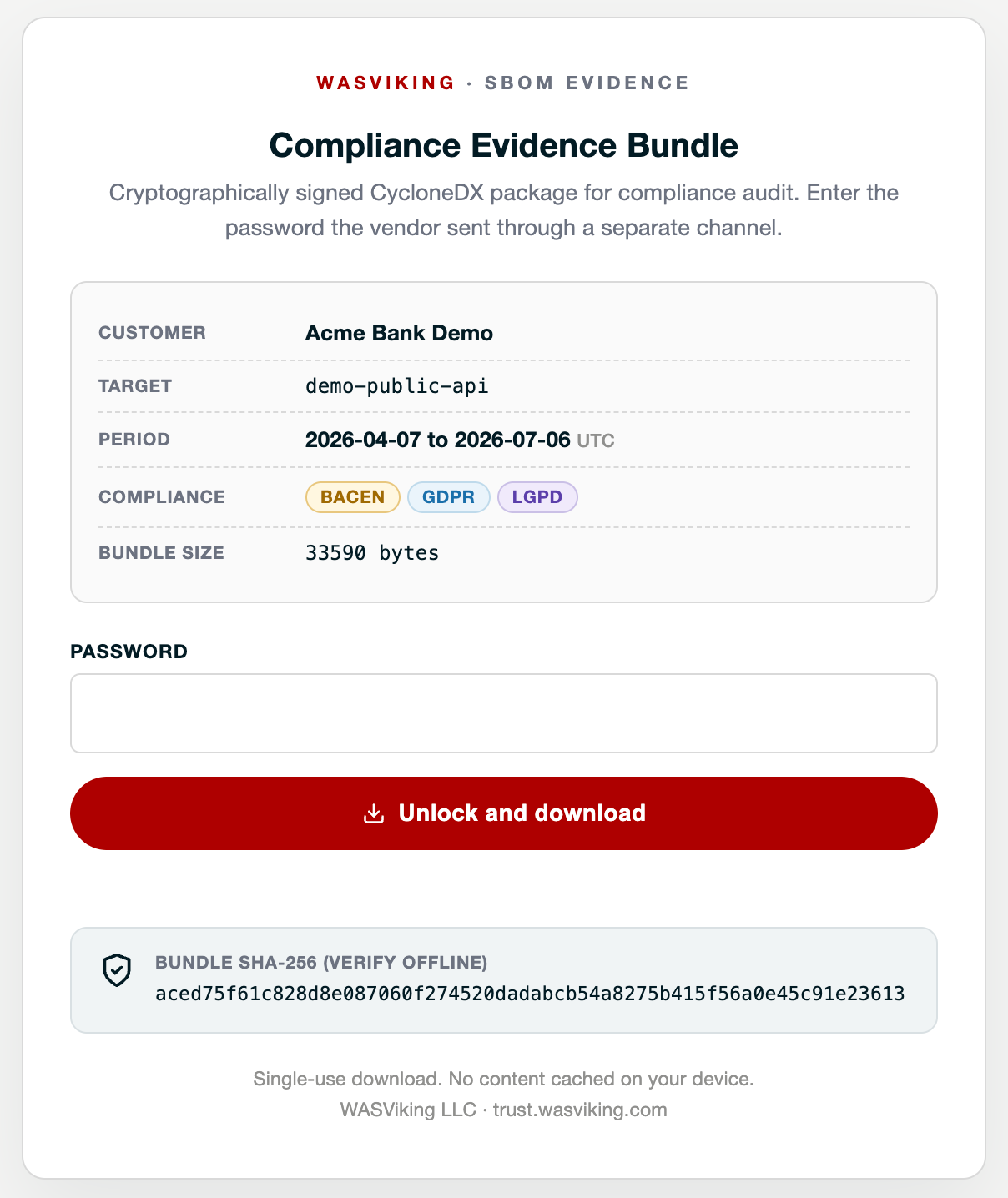 What your customer sees: the unlock page with the offline verification hash.
The page also shows the bundle's SHA-256 so the recipient can verify the file offline after downloading. For audit teams that go further, the signature chain is verifiable with cosign; point them to SBOM Evidence Bundle for the exact command.
Step 4: Track, expire, revoke
Back on Inventory → SBOM → Evidence Bundles, the table is your disclosure record:
- Status tracks the bundle through its life: building, ready to share, delivered, expired or revoked.
- Downloads counts recipient access, and the Delivered counter tells you at a glance which customers actually collected their evidence.
- The link dies on its own when the share lifetime runs out. If a request is withdrawn or a link was sent to the wrong contact, revoke the bundle; access stops immediately.
- Expired and revoked bundles keep their audit trail. When your own auditor asks what was disclosed last year, the answer is on this page.
If the same customer asks again next quarter, generate a new bundle with the new period. Each request gets its own artifact, its own password, and its own trail.
Automating it
Everything above is also available over the REST API
(POST /v1/sca/bundles to issue, plus list, revoke, and audit
endpoints), which is the path for teams that answer recurring audit
requests on a schedule. The endpoints and payloads are documented in
SBOM Evidence Bundle, and the
bundle.created, bundle.accessed, and bundle.revoked
webhook events let your own systems
react when a customer downloads their evidence.
Where next
- No submissions yet for the period? Start with
wasviking-sentinel sbomor wire the CI/CD SCA and SBOM pipeline. - Sharing posture instead of components: a Posture Share gives the same password-protected model over your dashboard and findings summary.
- The framework tags on the cover come from the compliance mapping.