
Posture Shares
Share a read-only, password-protected view of your security posture with an auditor, a customer, or an investor. Create the link, choose how much detail the recipient sees, and keep the access log.
A customer security review, an investor's due diligence, an auditor who wants to see your posture rather than receive another PDF. These requests all end the same way: someone outside your company needs to look at your security numbers, and giving them portal access is out of the question.
A Posture Share solves this with a password-protected, read-only link to your aggregated posture: risk score, compliance summary, and asset coverage, rendered in the recipient's language. Each link is independent, with its own purpose, recipients, expiration, and access log. The recipient sees a curated report; they never touch your portal, your raw findings, or your evidence.
The link is delivered by e-mail, one person at a time: every recipient
signs in at posture.wasviking.com with their e-mail, the first time with a
temporary password we send them, then with a password and a second factor of
their own. WASViking® stores passwords only as one-way hashes, so
nothing can be recovered, by you or by us. That is
a feature: a lost e-mail is answered with a new one, and the temporary
password in the old one dies automatically.
Where this helps in the day to day
- A customer's vendor questionnaire. Instead of filling the same spreadsheet every quarter, send a link that answers the recurring questions with live numbers.
- A sales conversation gets serious. When the prospect's security team enters the room, a scoped link with minimal detail shows maturity without exposing recon-sensitive data.
- Investor or M&A diligence. A time-limited, view-capped link gives the data room what it needs and expires when the process ends.
- The auditor handoff. Pair a Posture Share (the live view) with an SBOM Evidence Bundle (the signed artifact) and the audit request is answered end to end.
What the recipient sees and, just as important, what they never see (raw HTTP evidence, other targets, your audit log) is detailed in Posture Shares.
Pre-requisites
| Requirement | Detail |
|---|---|
| Posture data | Completed scans on the domain you intend to share, so the report has numbers to show. |
| Portal access | The Posture Shares permissions of your role. Admin and Manager can create and change links (manage) and declare remediation commitments (commit). Analyst and ReadOnly can read the links, their access log and the plan. A custom role can hold view, manage and commit separately. |
| The recipient's e-mail address | The work address of each person who will open the report. It is the only thing you deliver: there is no URL or password for you to pass on. |
Step 1: Open the Posture Shares page
In the portal, go to Posture & Compliance → Posture Shares
(/portal/posture/shares/).
The table lists every link with its purpose, who created it, when it expires, how many views it served, failed password attempts, and its status. You can search by purpose and filter by status, which matters once different teams start issuing links for different audiences.
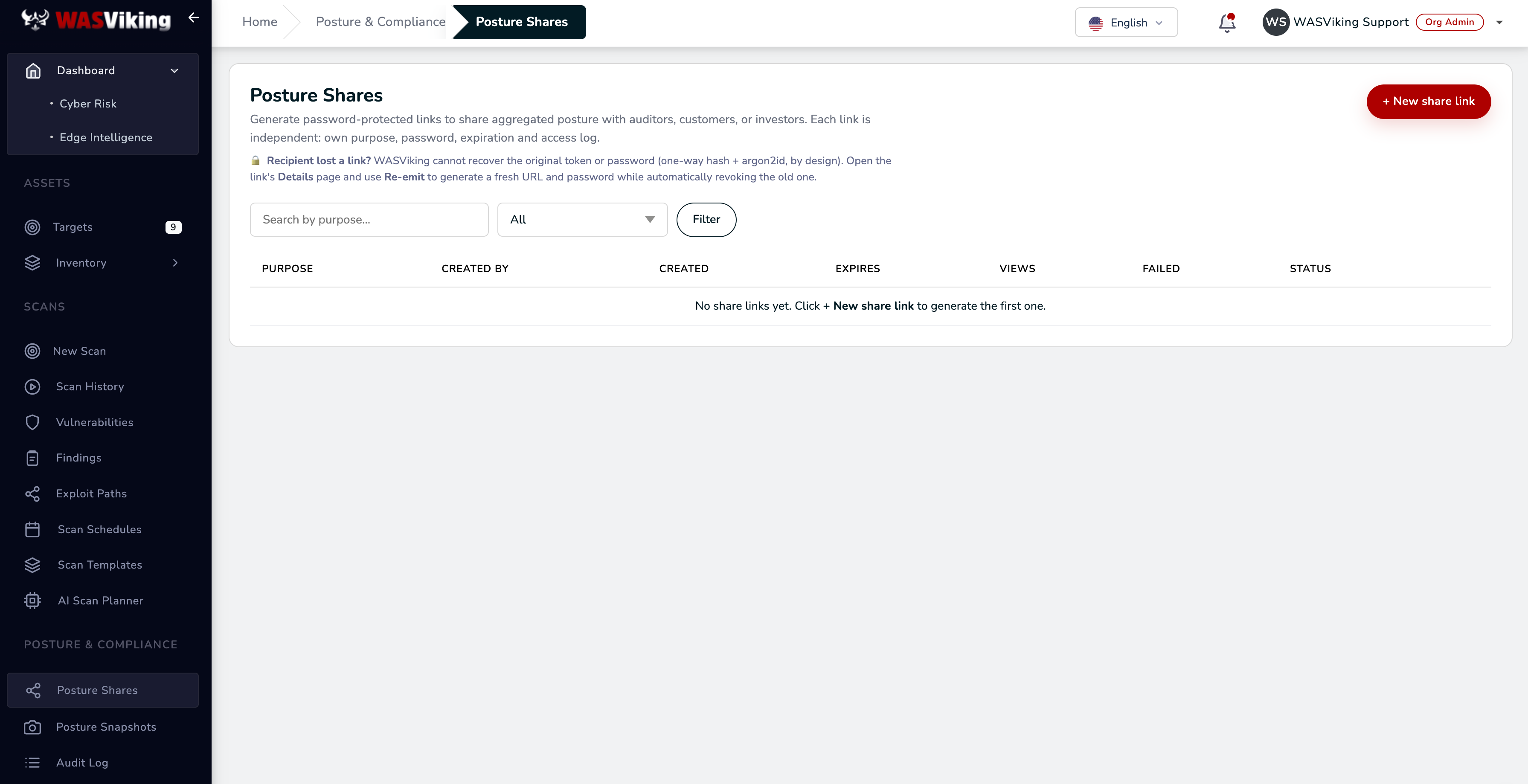 Posture & Compliance → Posture Shares.
One rule to know before you start: nothing is ever "recovered". A recipient who lost the e-mail before the first sign in gets a new temporary password when you use Resend next to their address, on the link's Details page, and the previous one stops working. A recipient who already signed in owns their password and recovers it by themselves, on the sign in page.
Step 2: Create the share link
Click + New share link and fill the form:
| Field | What to enter |
|---|---|
| Domain scope | Whole organization (all domains) for a company-level view, or a specific domain to scope the report to one product. The report is restricted to that domain and its subdomains. More domains can be added to the same link later, each one as its own report. |
| Purpose | An internal description, for example Enterprise customer vendor questionnaire, Q2 2026. Never shown to recipients; it is how you will find this link in the table a year from now. |
| Recipients | One e-mail address or several (up to 20), separated by commas or line breaks. Your customer gave you its Assessor ID (AO-XXXX-XXXX-XXXX-XXXX)? Type it instead of an e-mail: the invitation goes to that organization and there is no address to get wrong. Before the link is created you read what WASViking knows about each recipient (a domain proven by DNS by an assessor organization, a personal mailbox, or nothing) and confirm that they are your customers; nothing is created or sent before that. Each person gets a branded message with the address of the assessor portal and a temporary password valid for 7 days. On the first sign in they create a free account, their own password and two factor authentication, before anything of yours is shown. There is no URL or password for you to choose. More people can be invited, or removed, on the link's Details page. |
| Expiration | How long the link lives. 7 days is the recommended default; match it to the engagement, not longer. |
| Maximum views (optional) | A hard cap on total accesses. The link auto-revokes when reached. Useful for diligence processes with a known audience size. |
| Report language | Renders the share page and PDF in this language, and words the invitation e-mail. Pick the recipient's language, not your own. It is where the recipient starts: once signed in, the recipient can switch the portal, your shared space and its downloads between English and Brazilian Portuguese. |
| Auto-update with new snapshots (live mode) | Checked, the link always serves the latest published snapshot, so an ongoing customer or auditor relationship never needs a reissue. Unchecked, the link is pinned to the current snapshot version, which is what you want for time-stamped audit evidence. |
Then choose the exposure level, which controls how much detail the recipient sees:
| Level | Shows | Right for |
|---|---|---|
| Minimal | Score, compliance, and asset coverage only. | Cold prospects, when you do not want to expose severity counts. |
| Standard (recommended) | Adds severity counts and issue categories with open/closed counts and oldest open age. | Vendor security questionnaires, audit evidence, mid-relationship clients. Equivalent to mature SaaS Trust Center disclosures. |
| Detailed | Adds remediation performance over the last 90 days: median time to remediate and SLA percentages. Figures appear once findings have been remediated in the window. | Ongoing customer relationships and post-incident communication. |
Next, pick the sections to include. They sit on top of the classic report and follow the exposure level you chose. Like the domains a link shares, the exposure level and the sections can be changed later on the link's Details page, keeping the same URL and password:
| Section | Shows | Available when |
|---|---|---|
| Security domains | Application Security and External Exposure, each with its own index on the same 0 to 100 scale, so the recipient reads where the posture comes from: web and API, repository review, software supply chain, mobile, leaks and brand abuse. | Always. |
| Infrastructure | A fleet index with open vulnerability instances by severity, patch currency, and configuration hardening. Fleet-level percentages only: no host, operating system, package, or CVE is disclosed, and the number of hosts is never stated. | Your plan includes Infrastructure Defense and the scope is the whole organization. |
| Cloud Security | A cloud posture index with open findings by severity, the coverage confidence of the connected roles and the number of active attack paths. Estate-level figures only: no account identifier, name, region, resource or configuration is disclosed, and the number of accounts is never stated. | Your plan includes Cloud Security, at least one account is connected and the scope is the whole organization. |
| Active security controls | Which protective controls you operate, such as recurring assessments, edge monitoring, or a patch approval workflow. State only, never volumes. | The scope is the whole organization. Only controls the platform can see running are listed. |
| Findings register | The findings one by one: type, severity, status, first seen, last change, age, SLA state and whether a declared deadline covers it. Never the asset, an address, a URL, a package, a CVE identifier or evidence. | Always available, never on by default, and shown only at the Standard level or above. Turn it on for a reviewer who has to follow each item, such as a third-party risk team. |
A domain that was never assessed reads "Not assessed" on the report; it is never shown as clean. Links created before sections existed keep rendering the classic report, so nothing new appears on a link that is already in someone's hands.
The optional alerts keep you informed without watching the table: notify on first view, on access from outside your country, on more than 10 accesses in 24 hours, and if repeated wrong passwords end a recipient's access (this last one comes enabled).
Click Generate link. The next screen lists who the message went to. It shows no URL and no password, because nobody but each recipient ever holds one.
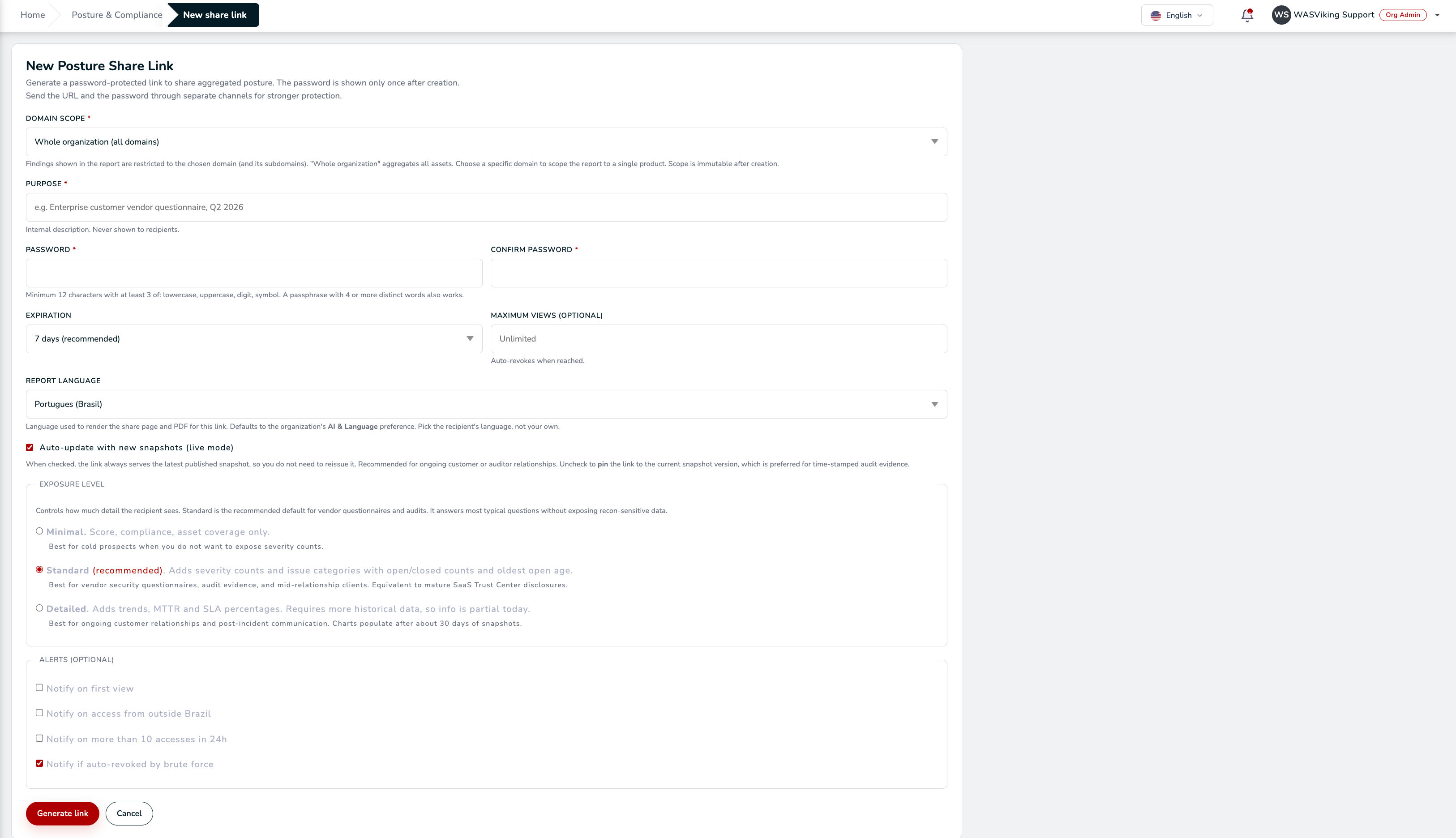 One address or several: each person signs in with an account of their own.
Step 3: WASViking delivers, you follow who got in
There is nothing for you to send. Each recipient gets their message right away, and you can tell your contact to expect an e-mail from WASViking that names your organization.
On the link's Details page, Invited assessors shows where each person stands: Sent, not opened yet, Temporary password expired (use Resend), or the First access mark, which carries the date, the time and the IP address of the first time that person opened your shared space. Typed an address wrong? Wrong address? Change the e-mail moves the invitation in one step, and the temporary password sent to the wrong address stops working at once.
The recipient signs in at posture.wasviking.com. The temporary password
shows nothing of yours: it leads to the account, a password of their own and
the mandatory second factor. My vendors then lists you, and one click
opens a read-only space in the language
you chose, with a menu instead of one long report: Overview,
Findings & remediation, Assessments & evidence,
Reports & history, Your access and Methodology. They can
come back during the life of the link to follow the remediation, see
what changed since their last visit, and download the signed PDF or
the one page assessment statement made to be attached to a vendor
assessment.
Nothing is cached on their device, and moving between areas does not
count as another view of the link.
The message links to the Assessor guide. It is written for the recipient: how to open the share, where each question of a vendor assessment is answered, how to verify a signed version and what to file.
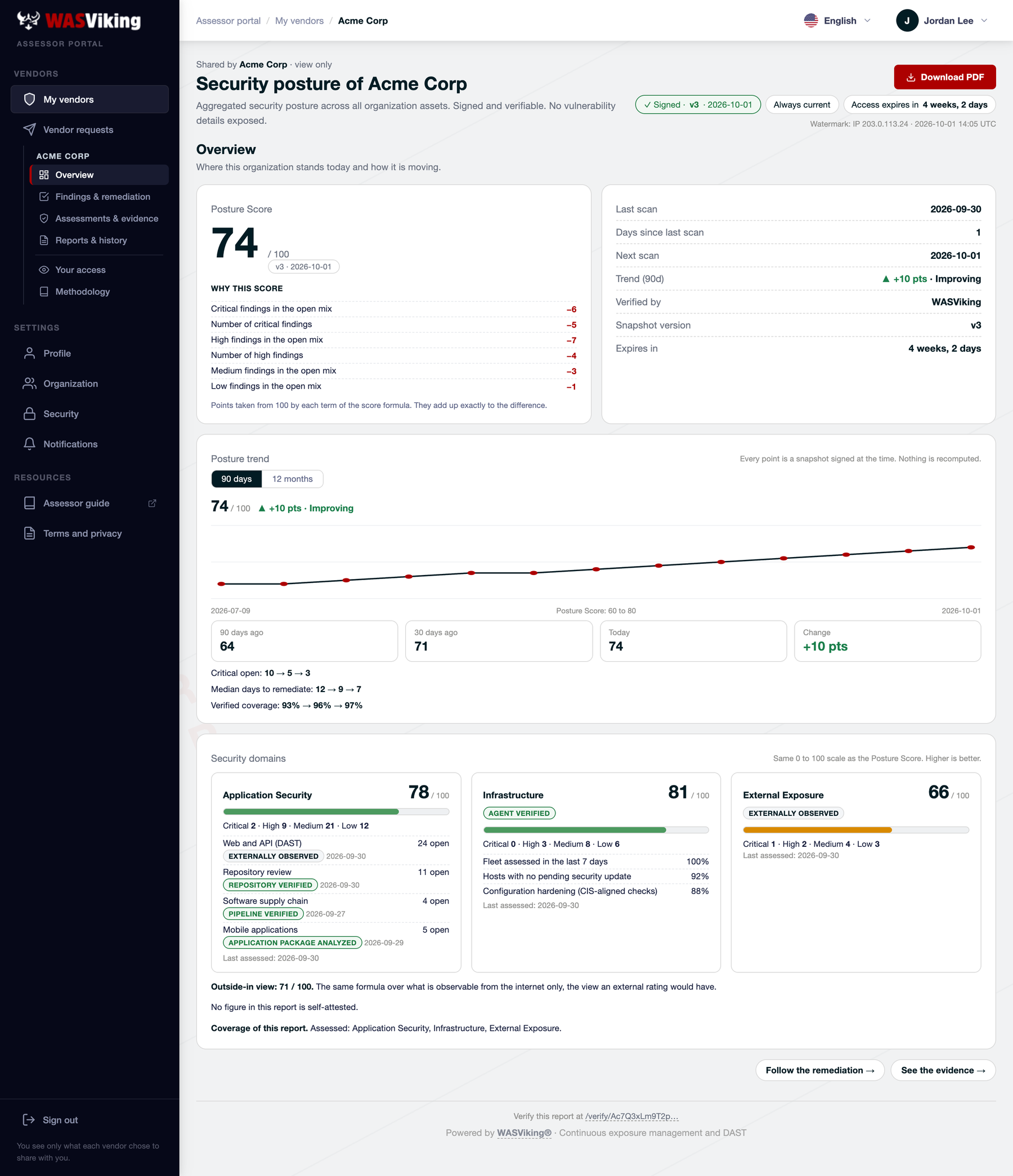 What your recipient sees after signing in: a signed, read-only view of your posture. Fictional data.
Step 4: Track, re-emit, revoke
Back on the table, each link tells its own story:
- Views counts successful accesses; Failed counts wrong temporary password attempts. Wrong guesses are counted per invitation: they lock it for a while and, if they go on, end it until you use Resend, and you are told by e-mail. The other recipients are not affected.
- Expires and the optional view cap end the link without any action from you.
- Resend (next to each address, on the link's Details page) answers the "the auditor lost the email" case: a new temporary password while that person never signed in, a reminder afterwards. It never resets the password of an account.
- Re-emit rotates everything at once, for example after a suspected leak: the link is revoked, a new one takes its configuration, and every recipient who is still invited is invited again on the new link.
- Recipient asked for more or less detail? On the same Details page, change the exposure level or the sections of a live link. Every recipient keeps their account, and only reloads the page. Everyone who holds the link sees the new level from the next visit on, and the change is kept in the lifecycle audit with the previous and the new setting. The recipient can also ask from their side: a form in the shared space sends you an email, and the panel shows the request as pending until you save a new disclosure.
- Recipient follows several vendors? Nothing to do: the account they created serves every vendor that invites their e-mail, and they see you next to the others under My vendors. Their visits show in your access timeline with their e-mail, and removing the invitation ends that access at once.
- Recipient asked for a deadline? At the Standard level or above the recipient can ask for a remediation deadline from the shared space, by severity, from a fixed list. You get an email and the Remediation plan page shows the request as pending. Declaring a commitment for that scope and severity answers it; nothing is sent back if you do not.
- Recipient asks what the plan is? Open Remediation plan from the Posture Shares page and declare a commitment: a scope, a target and a due date. It shows on every share of that scope at the Standard level or above, and the platform measures the delivery. It cannot be edited, only withdrawn, and a withdrawn commitment stays visible for 90 days.
- Recipient wants to change their password? It is their account: they change it on its Account page, with the current password and a code of the authenticator app. On a link created before the portal, which still has a single shared password, the Details page keeps the switch that allows or forbids a personal password.
- Recipient needs another domain? In Shared scope, on the same Details page, add or remove domains of your own targets, up to 10 per link, without issuing a new URL. Every domain stays its own report, with its own score, signed snapshot, 90-day and 12-month trend, coverage and verification: figures are never combined across domains. With two or more domains the recipient gets a domain selector and a summary at the top of the page, one PDF per domain, and a consolidated PDF that binds those same reports behind a summary cover, each one still with its own signed snapshot and verification link. A subdomain shared next to its root domain is a separate report, and both say so. Whole organization never mixes with domain scopes.
- Pinned links keep their evidence. On a live link the change applies from the next visit on, and a removed domain stops being served at once. A pinned link is never edited in place: the change opens a new revision, domains that stay keep the exact snapshot they were pinned to, and every earlier revision remains listed on the Details page.
- Every access is logged on both sides, so when your own audit asks who saw your posture last year, the answer is in the table and in the audit log.
Treat one link per audience as the habit, and one address per person: the purpose field and the access log stay meaningful when a link maps to one relationship and every visit carries a name.
Automating it
Posture Shares are created and managed in the portal; there is no public API for them today. What runs on its own is the follow-up: each link can notify you by email on the first view, on an unusual volume of accesses, and when repeated wrong passwords end a recipient's access, so nobody has to watch the table.
Where next
- The signed counterpart for component-level evidence: SBOM Evidence Bundles.
- What feeds the compliance summary on the report: Framework mapping.
- The full recipient-visibility contract and operator controls: Posture Shares.