
Account closure and data erasure
How an organization administrator closes a WASViking account, what happens during the 60-day reversible window, what is erased, what is kept and why, and how the erasure is evidenced.
WASViking® lets the organization close its own account from the portal, without a support ticket, and erases the organization's data from our active systems at the end of a reversible window. This page describes the procedure as it runs in production, the records that survive it because the law requires them, and the evidence you receive when it completes. It applies to organizations that contract WASViking directly. If your account is provisioned and managed by a WASViking partner, the closure is handled through your provider.
Who can close the account
Closing the account is a protected operation. It is enabled by an organization administrator who also holds billing authority and has a verified e-mail address. That person enables the closure authority for the organization with a code from an authenticator app, and only then does the option to start the closure appear. Members without those roles see an explanation of who can enable it and can ask [email protected] from the owner's address if they need help.
Before you start
Export what you need. During the reversible window the portal remains readable and exportable (reports, CSV downloads), and you can ask our team for a full export, but after the window closes the data is gone.
How to close the account
The whole procedure runs from one page of the portal, User > Privacy & Data. The top of the page restates what we hold about your organization and how to exercise your privacy rights; the Close organization account card at the bottom is where you enable and start the closure, and where the cancel action lives during the reversible window.
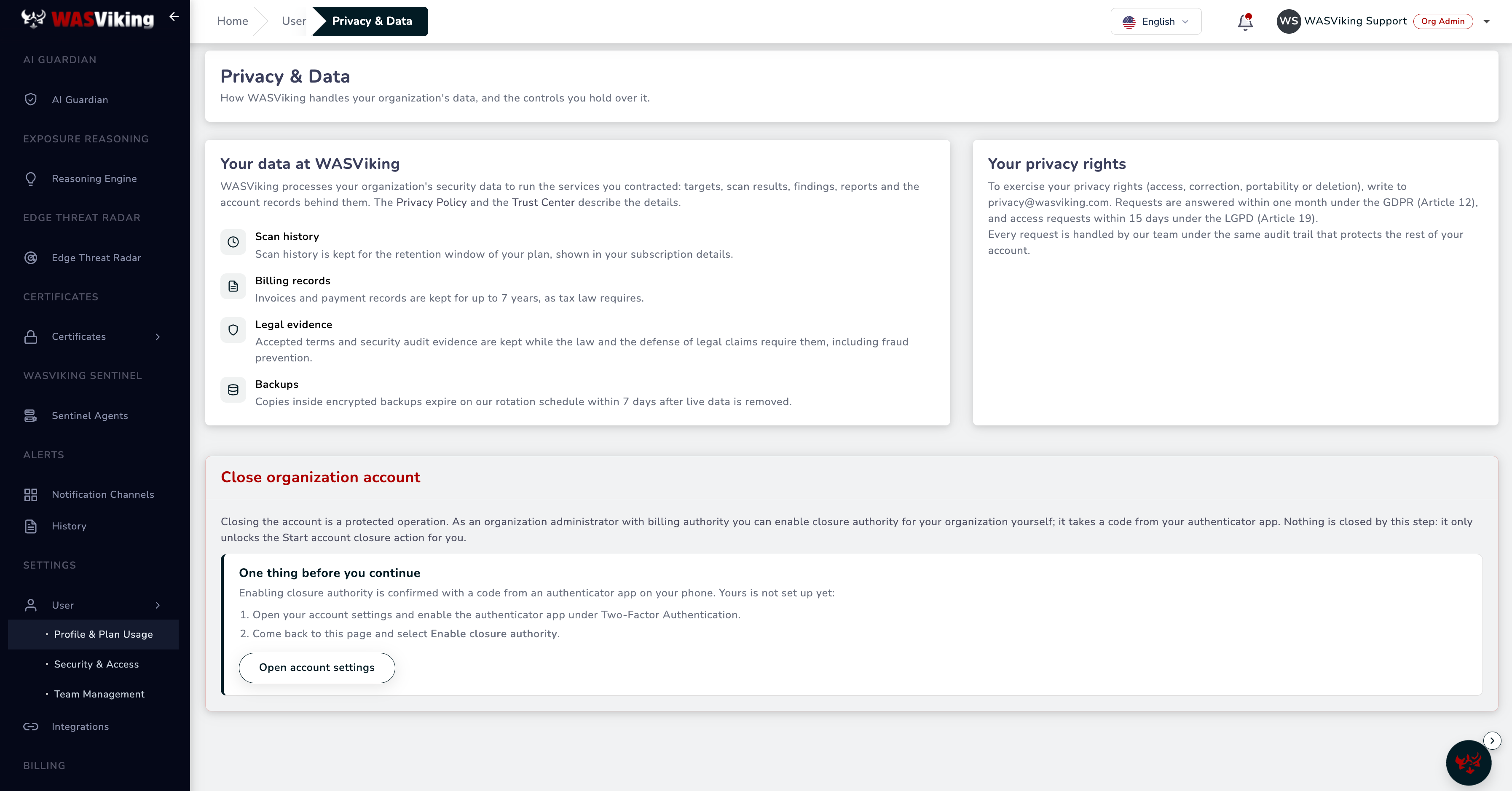 User > Privacy & Data. This administrator has not set up an authenticator app yet, so the card points to account settings first; once it is set up, the same card shows Enable closure authority.
- Sign in and open User > Privacy & Data.
- Under Close organization account, select Enable closure authority and confirm with the code from your authenticator app. Nothing is closed by this step; it only makes the next one available. If your authenticator app is not set up yet, the page sends you to your account settings first.
- Select Start account closure, then Verify my identity and enter the code from your authenticator app.
- Enter the 8-digit confirmation code we e-mail you (it expires in 10 minutes and works once) and select Confirm account closure.
The page shows a closure reference. Keep it: every message about this closure quotes it, and support uses it to find the record.
What happens right away
As soon as the closure is confirmed the organization is suspended:
- every open session is signed out;
- API keys and Sentinel agents are disabled;
- the subscription stops renewing (no further renewal is charged);
- every write in the portal is blocked. Reading and exporting remain available, and the Privacy & Data page keeps the cancel action.
You receive a confirmation e-mail with the date after which erasure begins.
The 60-day reversible window
You have 60 days from the confirmation to change your mind. Three days before the window ends we send a final reminder. To keep the account, open Privacy & Data and select Cancel this closure; cancelling requires the same verification used to make the request (authenticator code and e-mail code). When a closure is cancelled the organization is unsuspended, the subscription renewal is restored and you receive an acknowledgement e-mail. Nothing was deleted during the window, so the account resumes with all its data.
If nobody with closure authority can sign in during the window (lost password, lost authenticator), the usual account recovery applies: password reset from the sign-in page and authenticator backup codes. Beyond that, write to [email protected] from the owner's address.
What is erased
When the window ends the erasure runs automatically. It removes the organization's data from all of our active systems: relational and document databases, object storage and the files generated on our scanning hosts. In practice that means targets, scans, findings, reports, screenshots, evidence files, uploaded mobile binaries, Sentinel agent certificates, integrations, API keys, notification settings and the rest of the organization's working data. The user accounts of the organization are closed at the same time: sign-in credentials, authenticator secrets, sessions and login history are removed and the accounts can no longer be used.
Copies held in encrypted backups expire on our rotation schedule within 7 days after the live data is removed and are never restored into production.
What is kept, and why
Records we are legally required to keep survive the erasure. Each is kept only for its mandated period, is access-restricted, and holds no more than the identifiers the obligation needs.
| Record | Why it is kept | How long |
|---|---|---|
| Invoices, payment records and the subscription record | Tax and accounting law | 7 years |
| Accepted terms and the audit evidence tied to consent, authorization to scan, and the closure itself | Establishment, exercise or defense of legal claims; fraud prevention (GDPR Art. 17(3), LGPD Art. 16) | 5 years |
| The closure request, the deletion manifest and the erasure certificate | Proof that the erasure was requested, verified and completed | 5 years |
| A minimal organization identifier record | Anchor for the records above; permanently frozen, never reusable | While the records above exist |
Nothing else is retained.
The completion record
When the erasure completes, the person who requested the closure receives a completion e-mail with the closure reference, the time of completion (UTC) and the number of records removed across our active systems. Behind that message WASViking keeps a signed erasure certificate: a deterministic record of what was deleted per store, what was retained and on which legal basis, sealed with hashes so it can be verified later. If you need the certificate for an audit, or the completion record sent again to a verified address, write to [email protected] quoting the closure reference.
Coming back later
During the window, cancel the closure and continue as before. After the erasure there is no reactivation of the same organization: its data no longer exists and the record of its erasure is final. A company that wants to use WASViking again signs up as a new customer, with a new organization and new consents. The e-mail addresses of former users are free to be used again.
Other privacy requests
Access, correction, portability and deletion requests that are not an account closure are handled by our privacy team. Write to [email protected] from the address on file. Requests are answered within one month under the GDPR (Article 12) and access requests within 15 days under the LGPD (Article 19). The commitments behind this page are stated in the Privacy Policy and the Data Processing Agreement on the Trust Center.