
Protect Claude Code on Claude seats
Send Claude Code used with your company's Claude Team or Enterprise seats through the WASViking AI Gateway, without an API key. Each developer keeps their own Claude sign-in and seat; your policies, the masking of secrets and the request log apply to every request.
Developers who use Claude Code with your company's Claude Team or Enterprise seats can work through the WASViking® AI Gateway without an API key. Each developer keeps their own Claude sign-in and seat, and the gateway passes that sign-in to Anthropic. On the way, your policies apply to what the developer sends, secrets in files Claude Code reads are masked, and each request is recorded with the person who made it.
The gateway never stores the developer's Claude sign-in, never records it and never shows it.
To try it on one computer before you roll it out, do Steps 1 to 3 below and then follow Test Claude Code on Claude seats in VS Code.
How it works
- Each developer signs in to Claude Code with their company Claude account, as today. The gateway passes that sign-in to Anthropic, so every request uses the developer's own seat.
- The managed settings file you distribute points Claude Code at the gateway and carries one organization key. The key tells the gateway which workload applies; it is not a credential for Anthropic.
- Claude Code's own telemetry tells the gateway who is behind each session and which Claude organization they signed in to. Sessions of any other Claude organization are refused.
Before you start
- A Claude Team or Enterprise organization, and its organization ID.
- Device management (MDM) or another way to place a file on the developers' computers. Settings delivered from the Claude admin console do not reach sessions that go through a gateway, so this mode uses a managed settings file.
- The AI Gateway turned on, as in Protect model API calls.
- Claude Code 2.1.273 or later on the developers' computers, in VS Code or in the terminal.
Step 1: create the gateway
In AI Guard, Protection, AI Gateway, open Workloads and select New gateway. Fill in the form as below; the example column matches the picture.
| Field | What to set | Example |
|---|---|---|
| Name | A name your team recognizes. | Claude Code Engineering |
| Identifier | Short name used in policy conditions and in the request log. | claude-code-engineering |
| Environment | Where the developers work. | Production |
| Owner | The person responsible for the gateway. | Me |
| Input inspection | Inspect and apply policy, so your policies decide. Inspect and record only records what they would do, which suits a first week of observation. | Inspect and apply policy |
| Answer inspection | Stream and monitor. Claude Code reads answers as they stream; this mode sets it for you. | Stream and monitor |
| When policy cannot be evaluated | Deny when policy cannot be evaluated never lets an unchecked request through. Allow and record as degraded keeps developers working during an incident and marks those requests. | Deny when policy cannot be evaluated |
| Authentication | Claude subscription sign-in (Claude Code on Team or Enterprise seats). | Same |
| Claude organization IDs | Your Claude organization ID. Add more than one if your company has several. | 7c1e9a42-5b3d-4f8e-a6c2-0d9b4e17f3a5 |
| Coding assistant (Claude Code and similar) | Ticked and locked by this authentication. | Ticked |
| Requests per minute per key | Counts per Claude Code session in this mode. Leave empty for no limit, or set a ceiling. | 60 |
| Request size limit (KB) | 4096. Claude Code sends long conversations, and a lower limit refuses them. |
4096 |
| Daily budget (USD), Monthly budget (USD) | Leave empty. Usage is billed by seat, so budgets in dollars do not apply. | Empty |
| Allowed models | claude-* |
claude-* |
| Denied models | Models you do not want used, for example claude-opus-* to keep the team on Sonnet. It always wins over the allowed list. |
Empty |
| Description | Optional. | Claude Code on the engineering team's Claude Enterprise seats |
Select Save gateway.
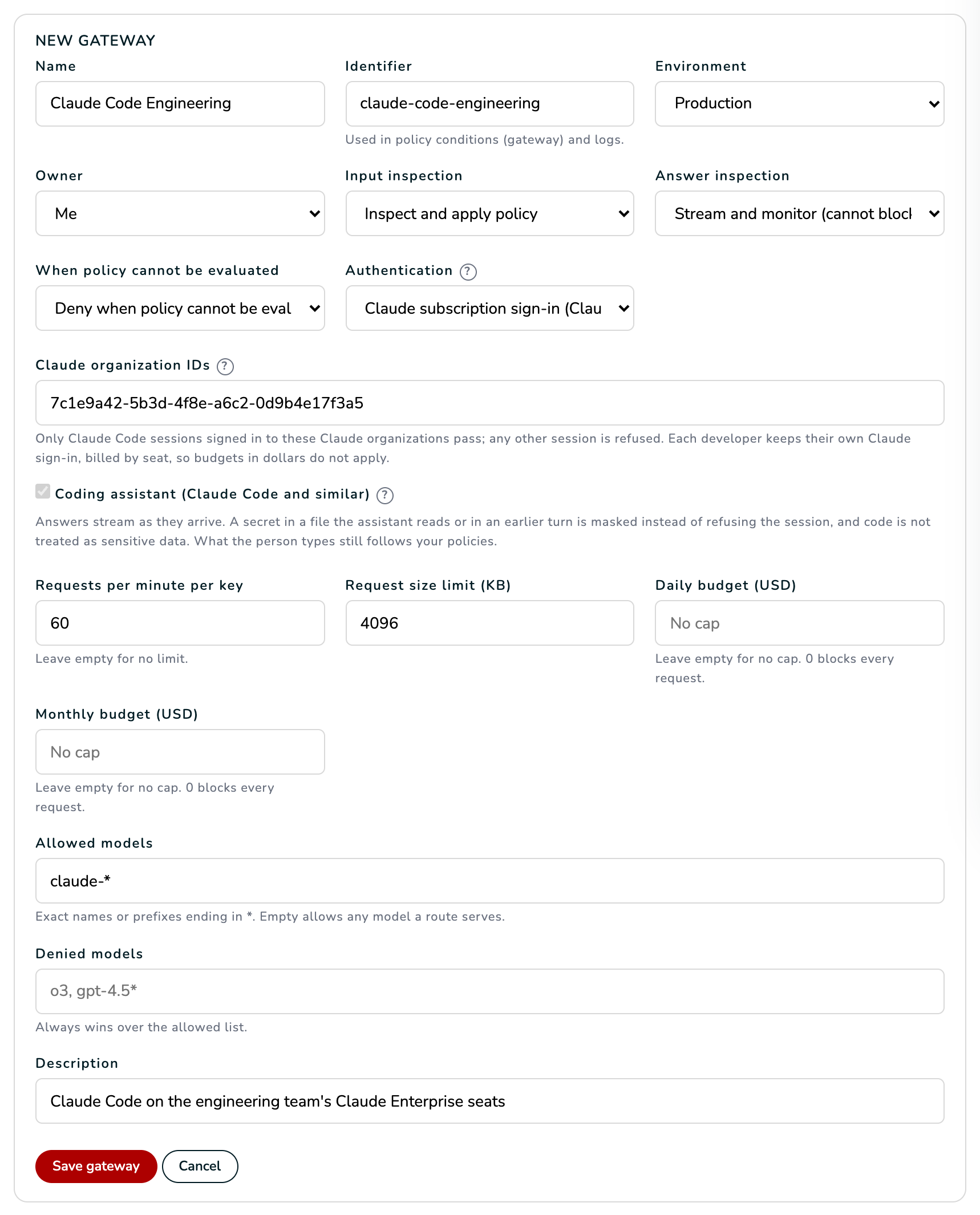 AI Gateway, Workloads, New gateway, filled in for Claude Code on Claude seats.
Where to find the organization ID. In a Claude Team or Enterprise
organization, an owner or admin finds it on claude.ai under Admin settings,
Organization (https://claude.ai/admin-settings/organization).
For a personal Claude account, or if you do not have the ID at hand, save the gateway with any ID and send one message from Claude Code through it: the row on Workloads lists the Claude organizations whose sessions arrived, marked accepted or refused. Edit the gateway and add yours. The ? next to each field of the form explains it too.
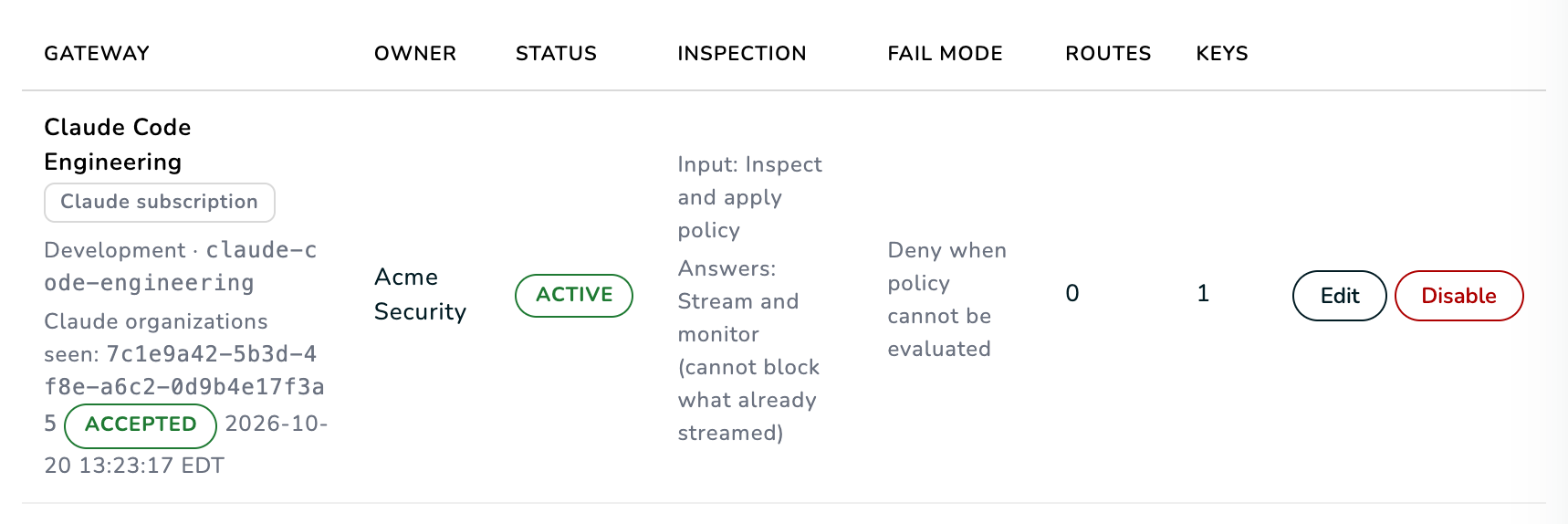 After the first session, the row shows the Claude organizations seen.
Step 2: choose the policies
The policies decide what happens to what developers send. On the AI Gateway page, select Policies, then Policy templates, and use the AI Gateway templates below. Use this template opens the editor already filled in, in Audit only. Switch it to Enforce once the matches look right and select Save policy. To limit a rule to this gateway, narrow it to the gateway in the editor.
| Template | What developers see | Recommendation |
|---|---|---|
| Block secrets in requests | A key or a password typed in a message is refused with API Error: 400 and the rule's message, "Do not send keys or passwords to the model." Secrets in files Claude Code reads, and in earlier messages, are masked by the gateway instead, so the session goes on. |
Enforce. |
| Redact personal data in requests | Personal data such as e-mail addresses and tax ids reach Anthropic as markers such as [REDACTED:CPF]. Claude Code sends the developer's own e-mail address with every request, so with this rule every request is rewritten. |
Enforce to mask personal data, or Audit only to record it without changing requests. |
| Block prompt injection | Attempts to override the model's instructions are refused. | Enforce. |
| Withhold answers with secrets, Redact personal data in answers | Answers stream to Claude Code, so these rules record what they find without holding the answer back. | Optional, for the record. |
Source code does not count as sensitive data on this gateway, so no rule is needed for it.
Step 3: generate the managed settings file
On Integrations, under Claude Code on Claude Team or Enterprise seats, select Generate the managed settings file next to the gateway. The file is shown once: it carries a new organization key for this gateway. Select Copy and keep it like a password until it is in place.
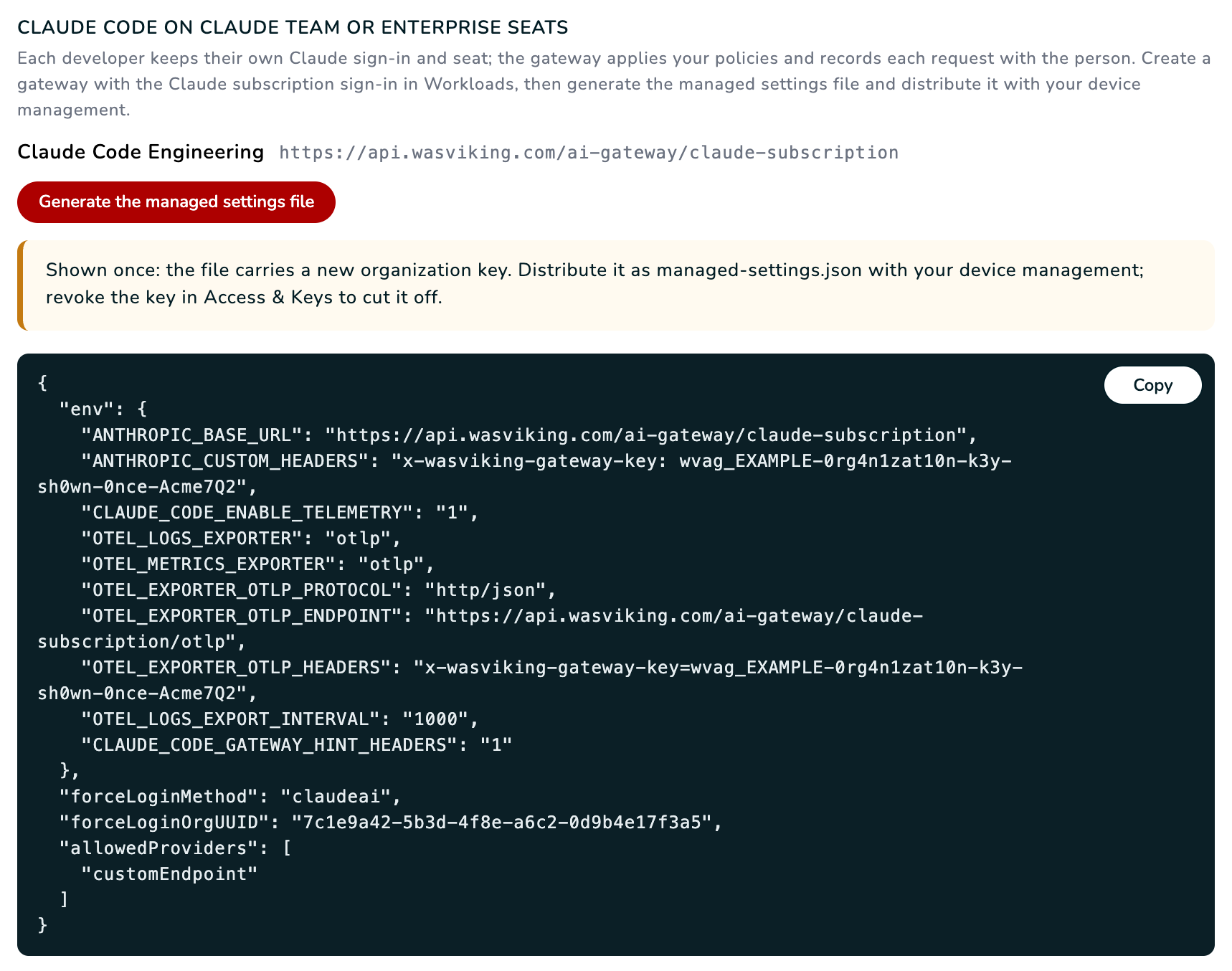 The file is shown once. The key in the picture is an example.
What each entry does:
| Entry | What it does |
|---|---|
ANTHROPIC_BASE_URL |
Sends Claude Code's requests to the gateway. |
ANTHROPIC_CUSTOM_HEADERS |
Carries the organization key in the x-wasviking-gateway-key header. |
CLAUDE_CODE_ENABLE_TELEMETRY and the OTEL_ entries |
Send Claude Code's telemetry to the gateway, which tells it who is behind each session. |
CLAUDE_CODE_GATEWAY_HINT_HEADERS |
Makes Claude Code say which requests carry what the developer typed. In Claude Code's own requests, such as the auto mode safety checks and conversation titles, a secret is masked instead of refused. |
forceLoginMethod, forceLoginOrgUUID |
Claude Code only accepts a sign-in to your Claude organization. |
allowedProviders |
Set to ["customEndpoint"], so Claude Code only works through the gateway. |
On Access & Keys, the key shows the label claude-code- followed by the
gateway identifier, and belongs to Claude Code (organization). To cut a
file off, revoke its key there and generate a new file.
The same result shows the block To test in VS Code on one computer, used by Test Claude Code on Claude seats in VS Code.
Step 4: distribute the file
Save the file as managed-settings.json in the system directory of each
developer's computer, with your device management:
| System | Location |
|---|---|
| macOS | /Library/Application Support/ClaudeCode/managed-settings.json |
| Linux and WSL | /etc/claude-code/managed-settings.json |
| Windows | C:\Program Files\ClaudeCode\managed-settings.json |
If you already deliver another managed settings file, place this one as a
separate file in the managed-settings.d directory next to it.
Developers sign in to Claude Code with their company Claude account as they do today. Nothing else changes for them.
Step 5: check
- A developer sends a message in Claude Code. In the terminal,
/statusshows the gateway address on the Anthropic base URL line. - On Workloads, the gateway row lists your Claude organization as accepted.
- On Traffic, the request shows the developer's e-mail, the stream and subscription chips, and by seat in the cost column. Select a row to see the decision, the rule and what was found.
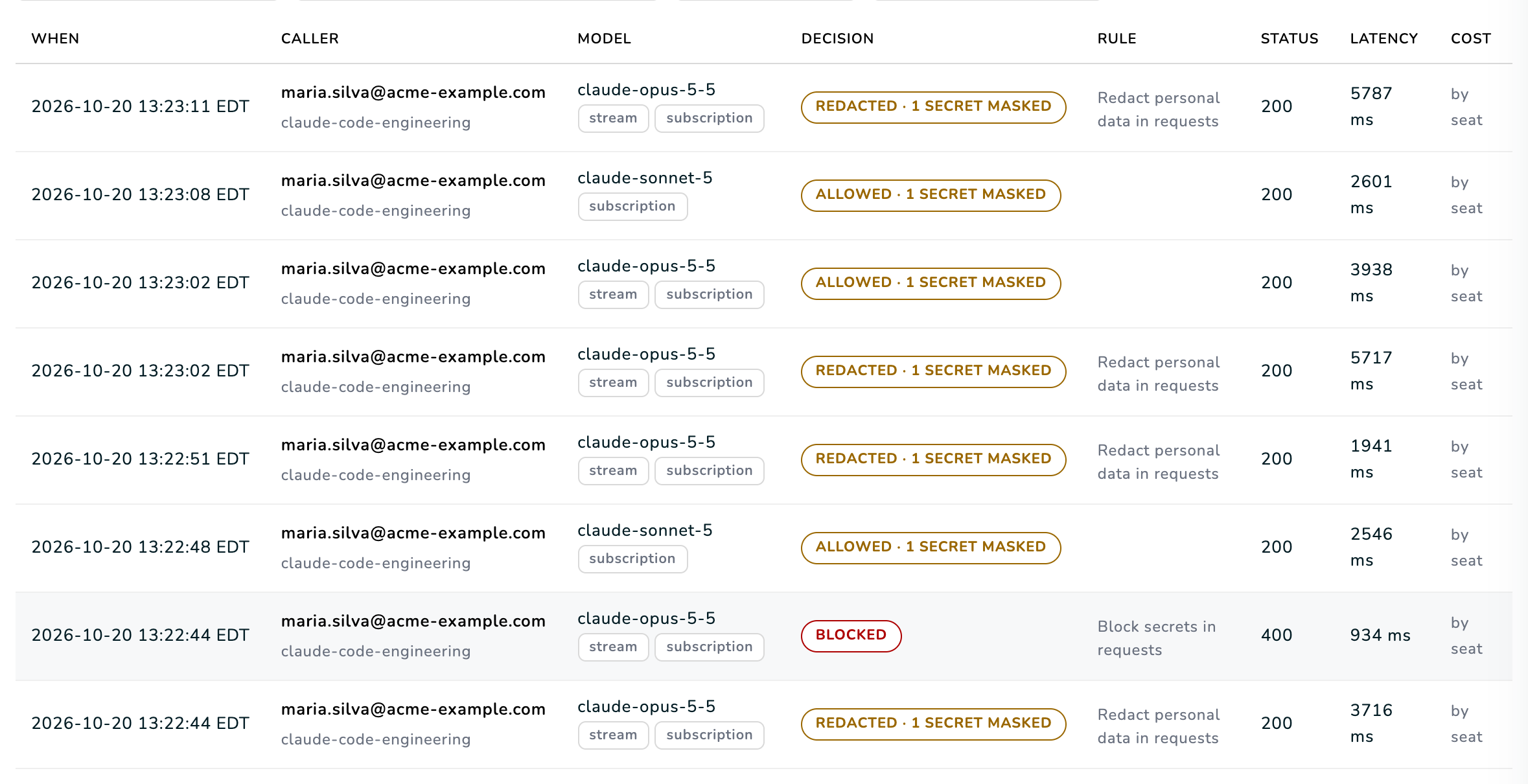 Traffic of the gateway. The blocked row is a message with a key; the rows after it went on with the key masked.
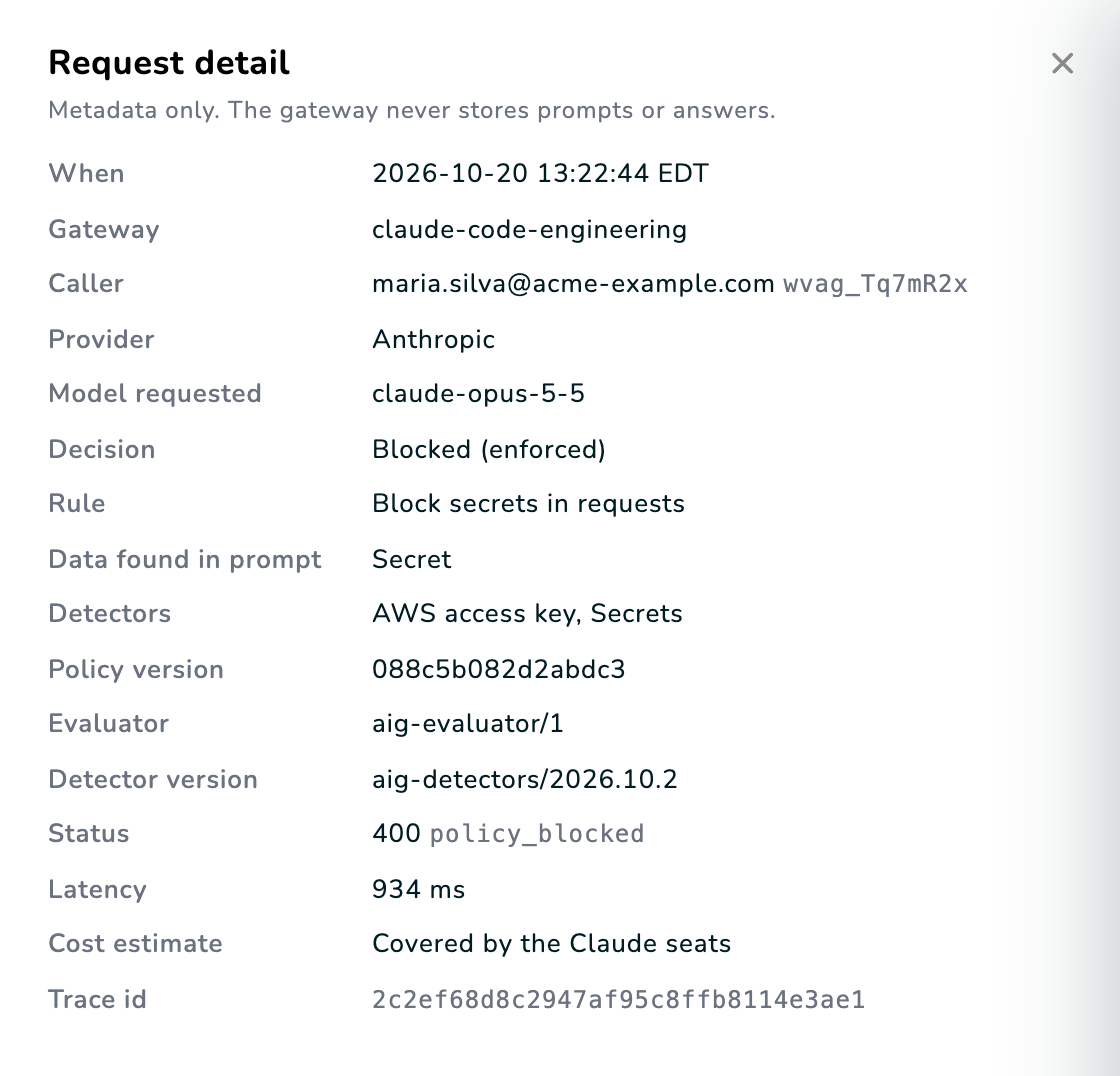 Request detail. The gateway keeps metadata only, never prompts or answers.
What developers see
| Situation | In Claude Code | On Traffic |
|---|---|---|
| A message with a key or a password | API Error: 400 with the rule's message. Nothing reaches Anthropic. The developer removes it and sends again. |
Blocked, status 400. |
| A file with a secret that Claude Code reads | The answer shows a marker such as [REDACTED:AWS_KEYS]. The session goes on. |
1 secret masked. |
| The message right after a refusal | Claude Code sends the refused message again with the new one, so Claude may comment on it as well. It only sees the marker. | Secrets masked. |
| Personal data, with the redact rule on Enforce | A marker such as [REDACTED:CPF]. A number whose check digits are not valid is not a CPF and passes as typed. |
Redacted. |
| Auto mode | Commands keep running after a refusal. | Claude Code's own safety checks, when it makes them, appear as separate rows without the stream chip. |
| The first message of a conversation | Nothing different. | Two rows: the second one names the conversation. |
Limits to know
- The Claude desktop app, Remote Control and Claude Code sessions in the cloud or in Slack do not go through the gateway.
- A session whose Claude organization is not on the gateway, or that cannot be identified a few seconds after it starts, is refused.
- To also decide each action Claude Code takes (commands, file reads, tools), add Assistant Guard.
Troubleshooting
| What you see | Why | What to do |
|---|---|---|
| "This Claude Code session is not identified as your organization's Claude account" | The session's Claude organization is not on the gateway, or its telemetry did not reach WASViking. | Check the Claude organizations seen on Workloads; add your organization ID; allow the gateway address in your network. |
| Refused as not identified, although the organization is on the gateway | The settings were placed in the project's .claude folder, where Claude Code does not take the telemetry. |
Use the managed settings file or, on one computer, the VS Code block from Integrations. |
| "Sign in to Claude Code with your company Claude account" | Claude Code has no Claude sign-in, or uses a key. | Run /login with the company Claude account and remove ANTHROPIC_API_KEY or ANTHROPIC_AUTH_TOKEN. |
| "This gateway is not set up for Claude subscription sign-in" | The file carries the key of a gateway that uses gateway keys. | Generate the file from a gateway with the Claude subscription sign-in. |
/status does not show the gateway address |
The file is not in the system directory, or Claude Code started before it arrived. | Check the location in Step 4 and start Claude Code again. |
| "The model ... is not allowed on this gateway" | The model is not in Allowed models, or it is in Denied models. | Add claude-* to Allowed models. |
| "The request exceeds the gateway size limit" | The conversation passed the size limit. | Raise Request size limit (KB) to 4096, or run /compact in Claude Code. |
| In auto mode a command is not run: "temporarily unavailable, so auto mode cannot determine the safety" | A secret typed earlier in the conversation reaches the gateway again in auto mode's safety check, and the settings were generated before CLAUDE_CODE_GATEWAY_HINT_HEADERS was added. |
Generate the file again, or add CLAUDE_CODE_GATEWAY_HINT_HEADERS set to 1; or start a new conversation. |
API Error: 400 with your policy's message |
The developer typed something your policy blocks, such as a secret. | Remove it from the message and send it again. |